

Upflow → Blog → AR collections
How to Build a Multi-Channel Collections Strategy
Quentin Gaudinat
|
November 27, 2026
Generate AI summary


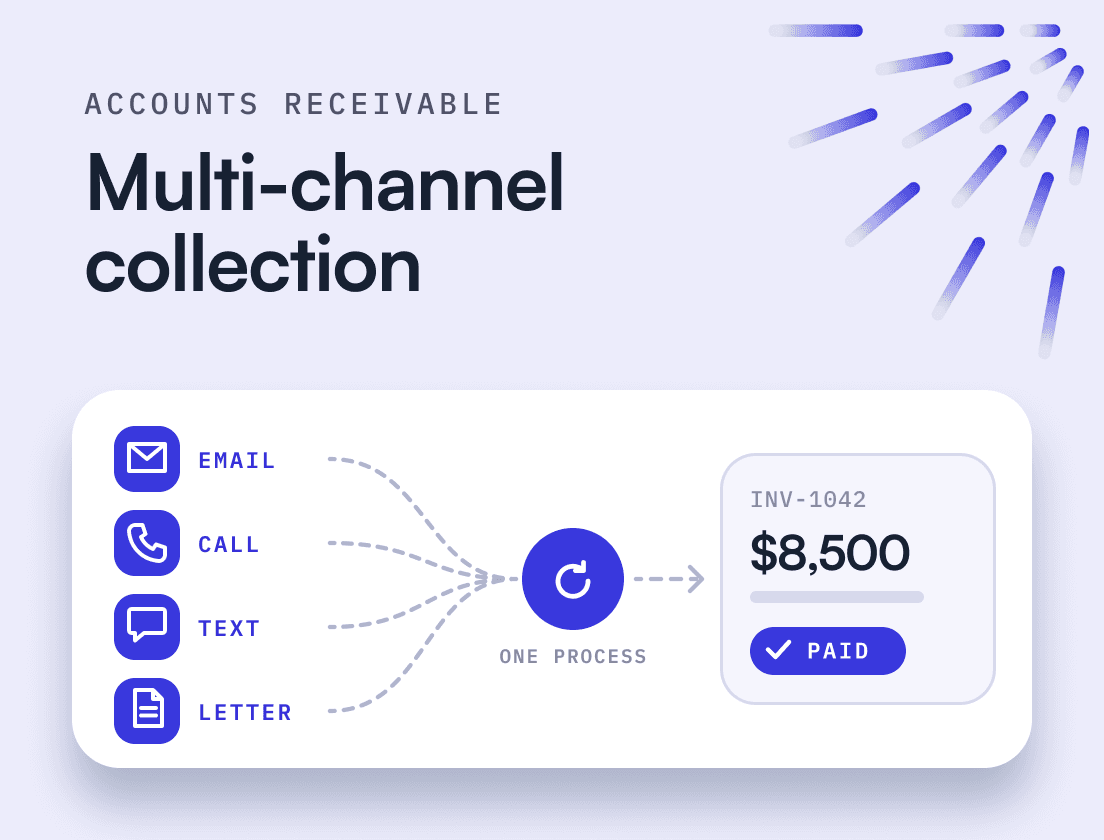
Cash collection looks different in every industry. Some customers will only pay through an AP portal with a purchase order attached, and in some markets a text message is simply how business gets done. Across those differences, finance teams have reached the same conclusion: no single channel reaches every customer, so collection has to run across several. Research on collections supports this. McKinsey found that most customers prefer to be contacted and act through digital channels, while a smaller segment remains more responsive to traditional contact methods.
Where most teams fall short is the design that connects those channels. Channels usually get added one at a time, each in response to an account that would not pay, and the reasoning behind them rarely gets written down. The rules for when an account moves from email to a call, and for who in sales or customer success steps in after that, stay with the people doing the work. PYMNTS Intelligence data shows how much of collection still depends on those people, with more than 75% of SMBs still manually chase collections or handle disputes via email.
That arrangement works while the same people run collection every day, and it stops working once an AI agent takes on part of the job. This shift is already underway, with Gartner publishing its AI Implementation Guide: Accounts Receivable Agents in February 2026 for CFOs assessing, piloting, and operationalizing AR agents. An agent applies whatever design it is given to every account in every cycle. With clear rules for each channel, it reaches far more customers than your team could on its own. Without them, it falls back on generic sequences, and a customer who has paid on time for two years gets the same message as one drifting toward default.
Building a multi-channel collection engine today means designing each channel so an agent can run it. This guide covers that one channel at a time, starting with what each channel does best and what needs to be in place before an agent takes it over.
Decide who to contact and when
Before you set up your channels, you need to decide how your collection process will work. This comes down to two things: which accounts get personal attention, and when you contact customers about their invoices. The sections below cover both, and the channel sections later in this guide refer back to them.
Segment your accounts
If you look at all your receivables in one view, you will usually find that a small number of customers owe you most of the money, while a much larger number of accounts each owe very little. This means your team does not need to spend the same effort on every account. Your largest accounts should have someone on the team who knows them well, and your smaller accounts can run on a standard sequence from the day they are set up.
Most teams build their first segments on two factors:
- Value. The size of a balance shows how much is at stake if the account goes unpaid, which makes it the natural place to start.
- Payment behavior. A customer who starts paying later than usual is often showing the first sign of a problem, usually before it misses a payment.
Your segments should also change as your customers do. When an account starts paying late, it should move into a segment that gets more attention, and when it returns to paying on time, it can move back. Tracking those changes by hand gets difficult as your number of accounts grows, so this is one of the first tasks you can hand to an agent. It can watch the thresholds you set and move accounts as their payment behavior changes.
Set your collection stages
Once you know which accounts need which level of attention, the next decision is when to contact them. It is easier to plan this in stages than in fixed numbers of days, because the right timing depends on the customer. Enterprise customers usually need more time, since their approval process adds days that more frequent reminders will not remove. Smaller customers can be contacted sooner because they have fewer steps between receiving an invoice and paying it. The dates differ between the two, but the stages stay the same.
- Confirmation happens before the due date. If anything about the invoice or the payment terms is unclear, this gives you time to fix it before it causes a delay.
- Reminder comes just before the due date. It gives the customer a short nudge, along with an easy way to tell you if something is wrong.
- Resolution starts when an invoice is stuck for a specific reason, such as missing information or a disputed line. Your team finds that blocker and deals with it directly, since more reminders will not move the invoice.
- Escalation brings in the heads of finance along with the sales and customer success teams who own the relationship. Everyone involved needs to give the customer the same message.
- Enforcement is the final stage, which in software usually means suspending access to the product. Because suspension is a serious step, the customer should always be warned before it happens.
How these decisions shape your channels
Your segments and stages decide which channel you use for each message. Most messages in the early stages go out by email, because email can reach every account at low cost. Calls and letters are usually saved for the later stages and for your most important accounts, where a more personal or more formal message is worth the extra effort. The sections that follow cover each channel in turn, starting with email. If you are building segments and stages for the first time, From Zero to Collected covers both in more detail.
Email is the channel you will use most. It reaches every account at low cost, and it works well for routine messages in the early stages, which is where most invoices get paid. Because so much of your collection work runs through email, small problems in how it is set up get repeated across every account. The sections below cover what to set up so that your emails reach the right person and are easy to act on.
Deliver the invoice correctly
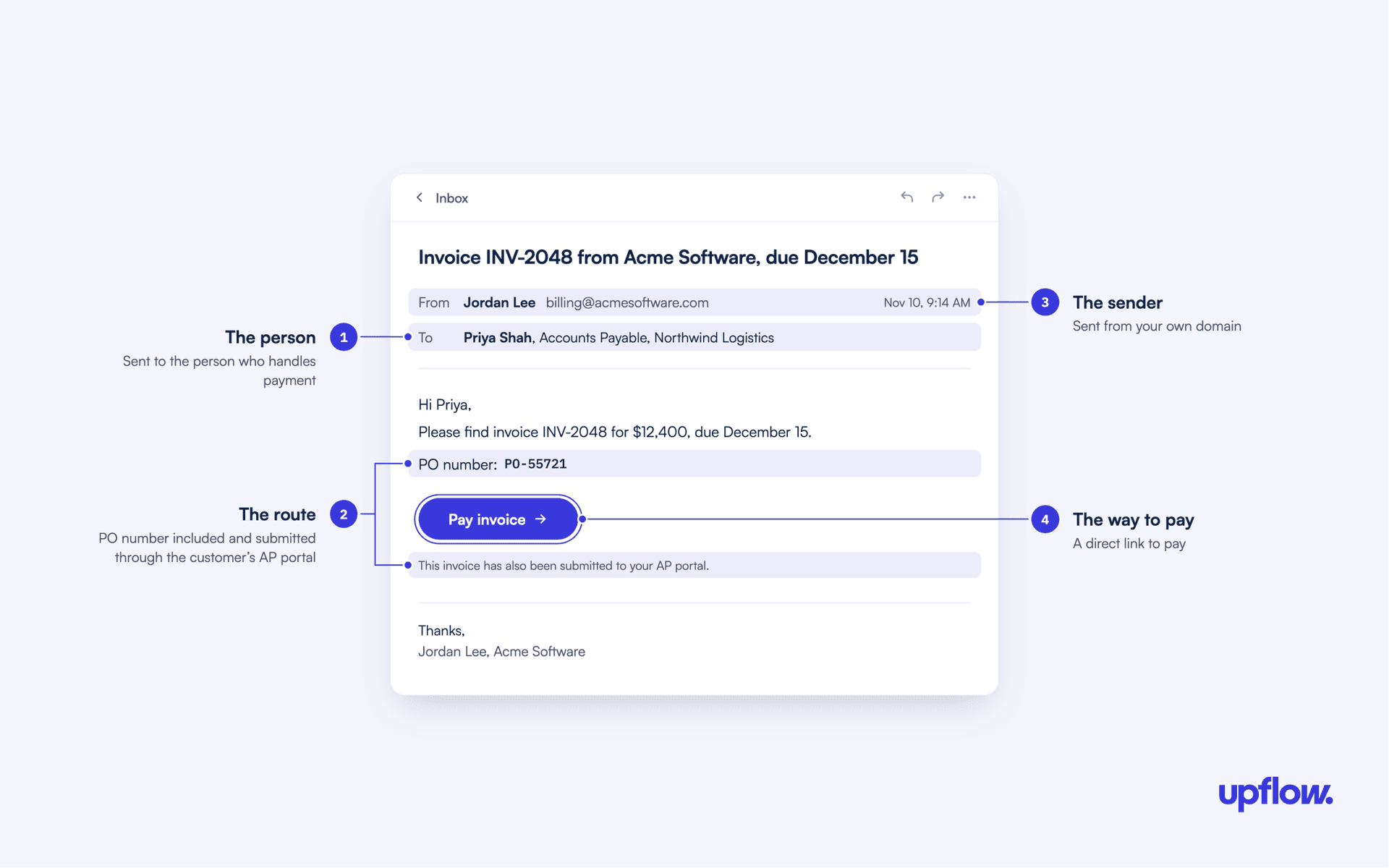
The first collection email is the invoice itself. Many invoices go overdue because they were never properly delivered, even when nothing on the invoice is wrong. Before you plan any reminders, check that each invoice gets these four things right:
- The person. Send the invoice to whoever handles payment at the customer. This is rarely the person who signed the deal.
- The route. Larger customers often require invoices to be submitted through an AP portal, and many will not process an invoice without a purchase order number on it.
- The sender. Send from your own domain rather than your billing system’s, so the customer recognizes who is billing them.
- The way to pay. Include a link to a payment page, so the customer can pay while the invoice is in front of them.
If any of these is wrong, your team ends up chasing an invoice the customer either never saw or could not submit for payment.
Send from your own domain
Emails from your own domain, such as [email protected], are more likely to be opened because the customer recognizes the sender. To send from your domain, you need to set up the DNS records that prove your emails are authorized, known as SPF, DKIM, and DMARC. The major email providers now expect them. Google’s sender guidelines require all senders to set up SPF or DKIM, and bulk senders to set up SPF, DKIM, and DMARC. Microsoft introduced similar rules for Outlook.com in 2025, under which messages that don’t comply are first routed to Junk, and may eventually be rejected if the issues remain unresolved.
Sending from your own domain also lets you track what happens after each email goes out. You can see whether it was opened, whether it bounced, and whether it is landing in spam.
Include the right people
On your side, collection emails usually start with whoever owns the account day to day. As an account moves into later stages, more people join, including the heads of finance and the sales and customer success teams who own the relationship. On the customer’s side, the emails should reach the person who handles payment, along with anyone else who needs to approve it. However many people are involved, the customer should receive one consistent message rather than separate threads from different people.
Link every email to a payment portal
Every collection email should link directly to a payment portal. The fewer steps between the email and the payment, the more invoices get paid without anyone having to follow up. The portal should let customers handle common tasks on their own:
- See their balance and pay it
- Raise a dispute or send a promise to pay
- Download documents they need, such as a W-9
- Save a payment method or set up autopay
Each of these also turns a customer reply into a clear action that your team or an agent can record and follow up on.
Write a template for each stage
Templates let you send consistent emails at scale without writing each one from scratch. Write one for each stage in your timeline, and adjust them by segment so that a long-standing customer who misses one payment does not receive the same message as a habitual late payer. With templates in place, your team can spend its time personalizing emails for your largest accounts.
What an agent can handle on email
Once these foundations are in place, an agent can run most of your email work. It can:
- Send each email at the stage you defined, to the right contact, using the template for that segment
- Follow up when a customer does not respond
- Read replies and tell a question apart from a promise to pay
- Answer routine questions, such as requests for an invoice copy
- Log disputes against the right invoice and send them to the person responsible
Your team still decides how the templates are written and how the stages are timed. It also handles the replies that need judgment, such as a request for a payment plan or a complaint about the product.
Calls
Most finance teams agree that a phone call is one of the most effective ways to collect. On a call, you can ask questions, hear the customer’s side, and agree on next steps in a way that is hard to do over email. The reason teams make so few calls is the time each one takes. Someone has to look up the account, dial, wait, talk, and then write down what was agreed. Because of that effort, most teams save calls for their largest accounts, and most customers only ever hear from finance by email.
Call agents change that. An agent can make routine collection calls on your behalf, which means more of your customers can get a conversation instead of another reminder. The sections below cover how to decide which calls go to an agent, how to set the agent up so the calls strengthen the relationship, and what stays with your team.
Decide which calls go to an agent
Start by writing down when a call is needed at all. Most teams decide this on instinct, which means it depends on who is working the account that week. Written triggers make the decision consistent, and they tell an agent when to call. The common triggers are:
- The invoice is close to its due date or just past it. A short call to confirm the invoice was received and check for problems often works better than a second email.
- The customer has stopped responding to emails. A call is the most direct way to find out why.
- A dispute is taking too long to resolve over email. A conversation can often settle in minutes what has gone back and forth for weeks.
- A large renewal is at risk. When an unpaid balance could affect a renewal, a call lets you raise it early.
- The customer cannot pay. A customer facing financial trouble needs a conversation about options.
The first two triggers are usually routine and suit an agent well. The last three depend on judgment and the relationship, so they should go to a person. Your segments help here too. A call to one of your largest accounts can still go to someone who knows the customer, while calls across the rest of your accounts can go to the agent.
What a call agent can do
On a routine call, an agent can:
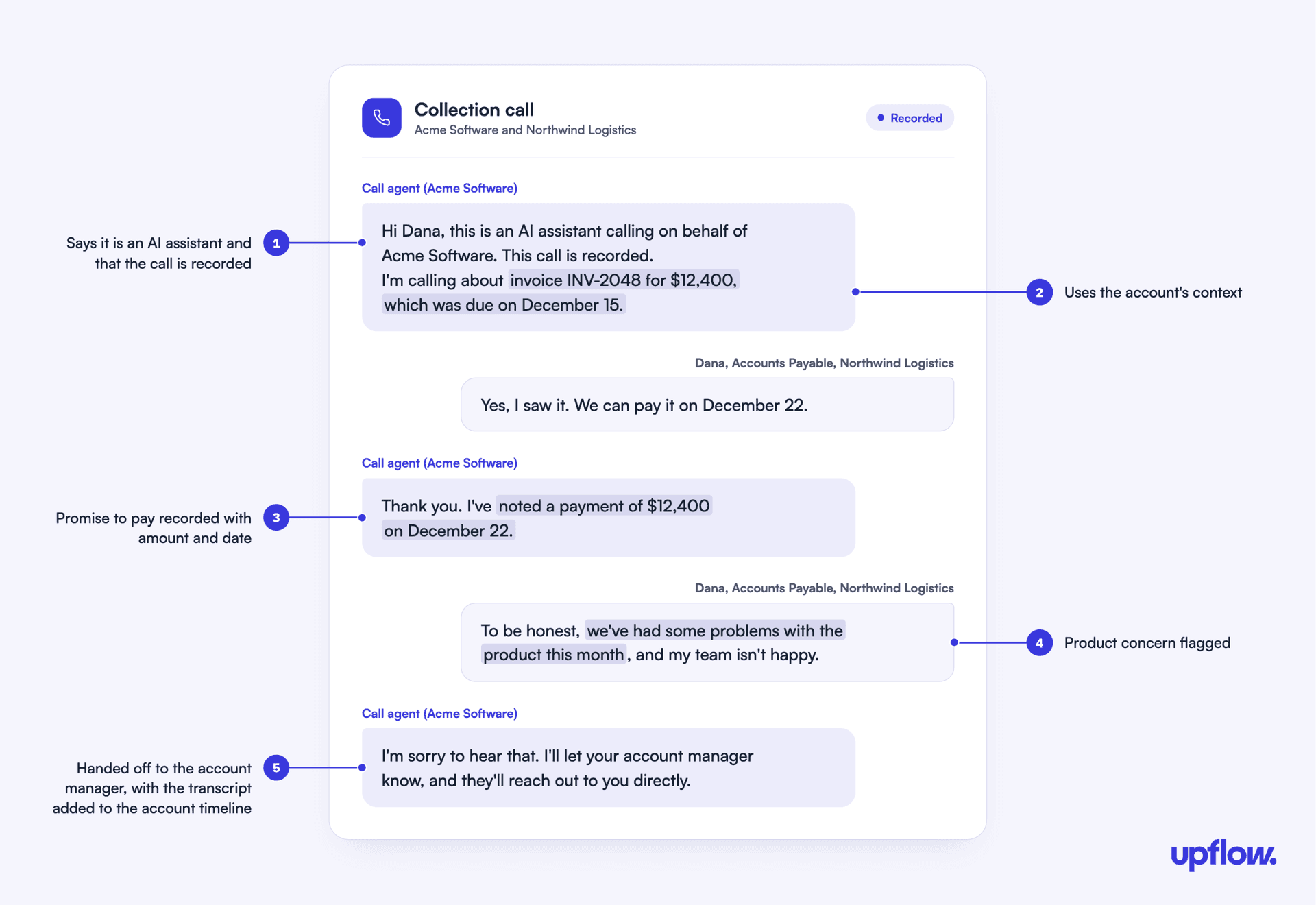
- Reference the specific invoices that are due or overdue, with amounts and dates
- Answer basic questions, such as where to pay or how to get a copy of an invoice
- Record a promise to pay, including the amount and the date
- Speak with the customer in their own language
- Alert the right person on your team when something on the call needs attention, such as a dispute or a mention of cancelling
After the call, the full transcript goes on the account’s timeline. Anyone in finance, sales, or customer success can read what was said, so the context no longer stays with whoever made the call.
Keep the call about the relationship
A call agent can make collection feel more transactional if it is used only to increase the number of calls. The customer notices when a call is just pressure. Set up well, the same agent can do the opposite, because it lets you have a conversation with customers who would otherwise only receive automated emails. A few choices make the difference:
- Use the account’s context. The agent should know the customer’s payment history, open disputes, and any recent conversations, so the customer never has to repeat themselves.
- Hand off when the conversation needs a person. If the customer says they cannot pay, raises a complaint about the product, or mentions their renewal, the agent should stop and bring in the right person instead of pushing for payment.
- Match the tone to the customer. A customer who has paid on time for years and missed once should hear a check-in, not a demand. Your segments and stages decide which approach each customer gets.
- Share what you learn. When transcripts sit on the account’s timeline, the whole company learns how the customer is doing, which helps sales and customer success as much as it helps finance.
Set up calls correctly
Calls come with legal requirements, and they apply whether a person or an agent makes the call:
- Recording consent. In the US, federal law allows recording with the consent of one person on the call, but according to the Reporters Committee for Freedom of the Press, about 11 states primarily have all-party consent requirements for recording. The simplest approach is to tell everyone at the start of the call that it is being recorded.
- AI voice rules. In 2024, the FCC ruled that calls made with AI-generated voices are “artificial” under the Telephone Consumer Protection Act, which means callers must obtain prior express consent from the called party before making such a call. The ruling also reminds callers that these messages must include disclosures, such as the name and contact information of the entity responsible for the call. Check what applies to your customers before an agent starts calling, especially for mobile numbers.
- The right contact. The agent needs a current phone number for the person who handles payment, along with a record of whether that person has agreed to be called.
- Logged outcomes. Every call, whether made by a person or an agent, should end with the outcome recorded on the account, so the next step happens on time.
What stays with your team
Your team still makes the calls that depend on judgment, such as talking with a customer who cannot pay or a large account whose renewal is at risk. It also decides what the agent is allowed to agree to on a call, and it reviews the transcripts the agent flags. Over time, as the agent handles more calls well, your team can decide which kinds of calls to hand over next.
Texts
A text reaches the customer on their phone, where it tends to be read much sooner than an email. That makes texts useful when you need a customer’s attention quickly. The limit is length. A text has room for a short nudge and a link, and it is the wrong place to explain anything. Texts are also more intrusive than email, because they reach the customer on a personal device. The more often you send them, the more likely a customer is to react badly, so texts work best when you use them rarely.
Decide when to send a text
Because texts lose their effect when overused, it helps to write down the situations where they are allowed. The common ones are:
- The customer is not responding to email. A text is a lighter step than a phone call and often gets a reply when emails have not.
- A payment is due today. A short reminder makes sure the customer sees it in time.
- Texting is the norm for the customer. In some regions and industries, texts are simply how business gets done.
- An account has moved to a later stage. After several emails, a text can make clear that the matter has become more serious.
- The customer responds better to texts. Some customers reply to texts much faster than to email, and their history will show it.
Set up texts correctly
Texting customers is regulated, so the foundation for this channel is mostly about consent. Set up the following before your team or an agent sends a text:
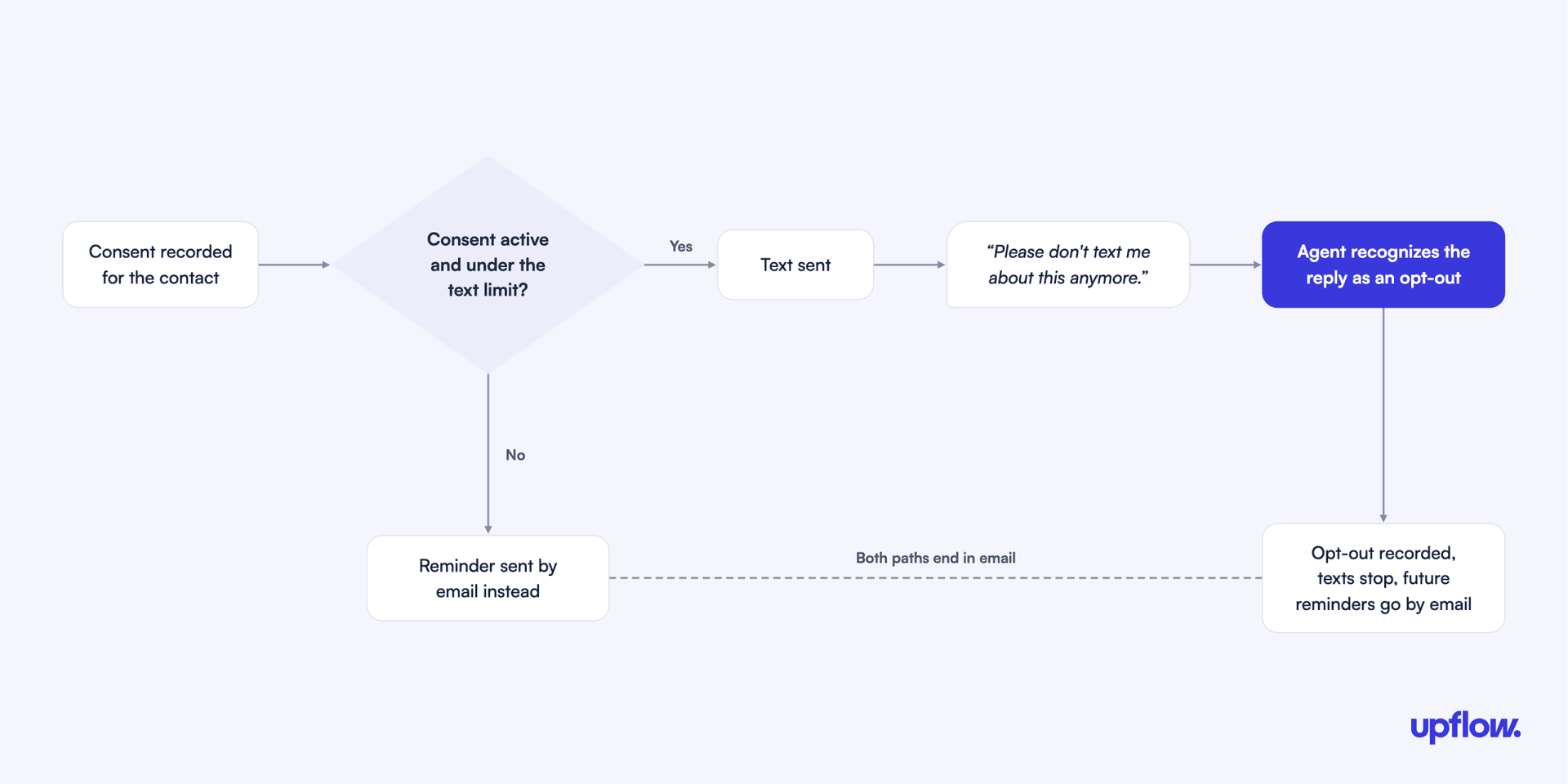
- Get consent first. In the US, the Telephone Consumer Protection Act generally requires consent before you text a mobile number. In the UK and EU, GDPR and PECR set similar rules. The details vary by region, so check what applies to your customers.
- Make opting out easy, and act on it quickly. Under FCC rules, customers can revoke consent through any reasonable means, and businesses may not designate an exclusive means to request revocation of consent. All reasonable opt-out requests must be honored within a reasonable time not to exceed ten business days from receipt of such request. (Kelley Drye summary of the FCC rules)
- Store consent with the contact. Keep a record of who agreed to receive texts, when they agreed, and whether they have since opted out. Without this record, neither your team nor an agent can tell whether a text is allowed.
- Set a limit on how often you text. Decide the maximum number of texts a customer can receive in a given period, so texts stay rare enough to be noticed.
- Keep each text clear. Say who is sending it, which invoice it is about, and include a link to pay.
What an agent can handle on texts
With consent records and limits in place, an agent can run most of your texting. It can:
- Send texts only to contacts who have agreed to receive them, and only within your limits
- Read replies, record a promise to pay, and answer simple questions
- Recognize an opt-out request in a reply, even when the customer does not use a standard word like “stop,” and stop all texts to that contact right away
- Switch to email or flag the account for a call when a text is not the right channel
Your team decides when texts are allowed, how they are worded, and how often they can be sent. It also handles any reply that needs judgment, such as a customer asking for more time to pay.
Letters and registered letters
A letter is the most formal message you can send a customer. It takes longer to arrive than an email and costs more to send, so most teams use letters only in the escalation and enforcement stages. At that point, the formality is the reason to send one. A letter tells the customer that the matter has become serious, and a registered letter adds a record that the customer received it. That record matters if the account later goes to a collection agency or to court.
Decide when to send a letter
Because a letter signals that the relationship is under strain, it should never be the first time a customer hears about a problem. Before a letter goes out, the customer should already have received your emails, and for important accounts, a call. The common reasons to send one are:
- You are about to suspend access or take another enforcement step. A letter gives the customer formal notice of what will happen and when.
- You are about to hand the account to a collection agency or legal counsel. A final demand letter gives the customer one last chance to pay before that step.
- Your contract requires written notice. Some agreements require notice in writing before you can act on a late payment.
- The customer may later claim they were never told. A registered letter creates a record that settles that question.
Set up letters correctly
A letter carries more weight than an email, so mistakes in a letter are harder to take back. Set up the following before your team or an agent prepares one:
- A standard structure. Each letter should list the unpaid invoices and amounts, summarize the contact you have already made, state what happens next and by what date, and explain how to pay.
- The right legal entity and address. Send the letter to the legal entity and address in your contract, which may differ from the contact your team emails.
- An approval step. Every letter should be reviewed and approved by a person before it goes out, because it often marks a turning point in the relationship.
- Proof of delivery stored on the account. Send registered letters through a tracked service, such as USPS Certified Mail in the US, and save the delivery record to the account.
What an agent can handle on letters
An agent can do most of the preparation for a letter, which saves your team time at the stage where accounts need the most attention. It can:
- Flag accounts that have reached the stage where a letter is due
- Draft the letter from your template and the account’s history
- Gather the supporting documents, such as invoice copies and a log of past contact
- Track delivery, save the proof to the account, and set a reminder for the deadline in the letter
Your team approves and signs every letter. It also decides whether an account should move to enforcement at all, and it handles the customer’s response. For a customer with a long history of paying on time, a person may decide that a call is the better next step, even when the account has technically reached the letter stage.
Other channels
In some regions, WhatsApp is the main way businesses talk to each other, and a customer may reply there much faster than to an email. It works much like texting, with short messages and a link to pay, but its rules are stricter. According to Meta’s developer documentation, businesses are required to obtain opt-in before sending proactive business-initiated messages to customers outside the 24-hour window. The WhatsApp Business Messaging Policy also states that outside the 24-hour customer service window, you may only send messages via approved Message Templates. In practice, this means your reminders need to be written and approved in advance, and you need a record of which contacts have agreed to hear from you there.
The same policy matters if an agent handles WhatsApp replies. Businesses may use automation when responding during the 24-hour window, but must also have available prompt, clear, and direct escalation paths, such as transferring the chat to a person or offering a phone number or email. This matches how the agent should work on every other channel, with a clear way to bring in your team when a conversation needs it.
In-app reminders
If you sell software, your product is a channel your customers already use every day. A notice inside the product can reach a customer who has stopped opening your emails, and it often works well in the later stages, when access to the product may be at risk. A few rules keep in-app reminders useful:
- Show them only to the right people. The notice should appear for admins or the people who handle billing, not for every user at the customer.
- Link to the payment portal. The customer should be able to pay or raise a problem in a click.
- Use them in line with your stages. An in-app notice before suspension gives the customer a clear warning in the place where they will feel the impact.
Make your channels work together
Each channel now has its own setup, but customers do not experience your channels separately. A customer who gets an email from finance, a call from an agent, and a renewal conversation with customer success will compare what each one said. If the messages do not match, the customer stops trusting all of them. This section covers what connects your channels into one process, so that every message builds on the last one.
Keep one record of every message
Every message and reply, from any channel, should be logged on the same account timeline. This includes emails, call transcripts, texts, letters, and any changes in consent. With one record, your team can see the full history of an account before contacting the customer, and the customer never has to explain something twice. An agent depends on this record even more than your team does. Before it sends a message, it checks what the customer has already heard, whether they have promised to pay, and whether a dispute is open. Without that history, it would send the next step in the sequence even when the customer has already replied.
Write down which channel to use at each stage
Earlier sections covered when each channel works best. The next step is to put those decisions together in one set of rules your team and the agent both follow. For each stage, decide which channel leads and which ones can follow, and adjust the rules by segment. For example, a smaller account might move from email to a text before anyone calls, while one of your largest accounts gets a call from its account owner before any text goes out.
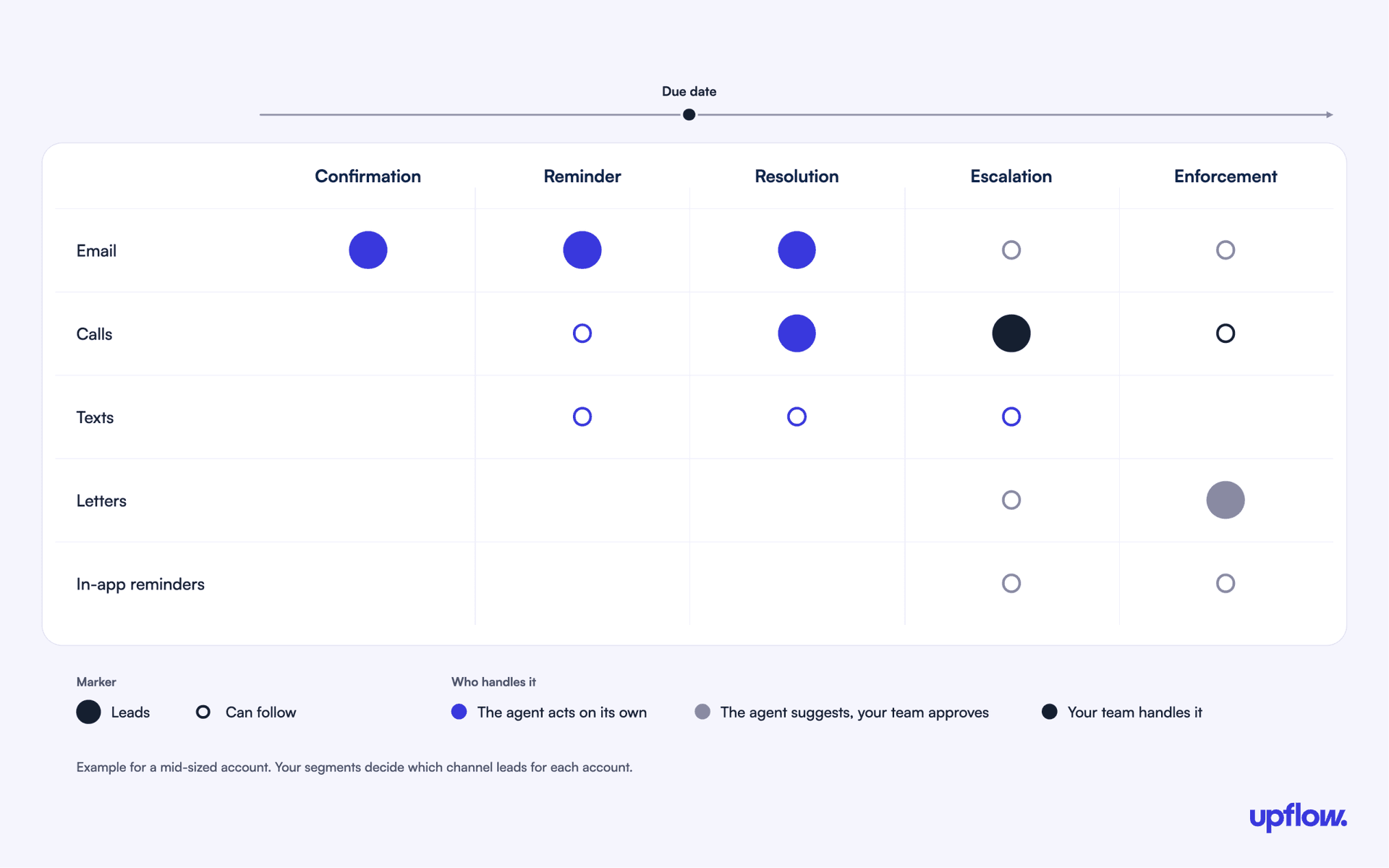
When the rules are written down, two people working on similar accounts will contact them in the same way, and the agent will follow the same path your team would. When the rules change, you update them in one place.
Decide when sales and customer success step in
Finance owns collection, but sales and customer success own the relationship. Collection works best when all three teams agree on when the others get involved. Set clear points for this, such as:
- When an account reaches escalation. The account owner in sales or customer success should know before the customer hears about it from finance.
- When a renewal is coming up. An unpaid balance should be raised early, so it does not surprise anyone during the renewal conversation.
- When a customer raises a product problem. Product complaints that come up during collection should go to customer success, since finance cannot resolve them.
Make the collection status of each account visible to these teams as well. An account owner who can see that an invoice is overdue can raise it naturally with the customer, without waiting for finance to ask.
Decide what the agent does on its own
For every action across your channels, decide which of three levels applies:
- The agent acts on its own. Routine work, such as sending a reminder email at the right stage or recording a promise to pay.
- The agent suggests and your team approves. Steps with more weight, such as sending a letter or moving an account into escalation.
- Your team handles it. Decisions that depend on judgment and the relationship, such as agreeing to a payment plan or talking with a customer who cannot pay.
Start with a small set of actions at the first level, and review how the agent handles them. As it proves reliable on one type of action, you can move more actions to that level. This keeps your team in control of the decisions that affect the relationship, while the agent takes on more of the routine work over time.
Where to start
You do not need every channel in place before you begin. Most teams build their collection process in steps, and each step makes the next one easier. A good order is:
- Set your segments and stages. Decide which accounts get personal attention and what happens at each stage of an invoice. Everything else depends on these decisions, so they come first, even if the first version is simple.
- Get email right. Make sure invoices reach the person who handles payment, send from your own domain, link every email to a payment portal, and write a template for each stage. Since most invoices get paid during the early stages, this step alone will cover most of your accounts.
- Add calls for the accounts that need them. Write down your call triggers and start logging every call on the account. Begin with your largest accounts and the customers who have stopped responding.
- Add texts, letters, and other channels as you need them. Bring in each one when your volume or the value of your accounts calls for it, and set up consent and proof of delivery before you send the first message.
- Connect the channels. Keep one record of every message, write down which channel leads at each stage, and agree on when sales and customer success step in.
The agent can follow the same path. Start it on a few routine actions, such as sending reminder emails and recording promises to pay, and review how it handles them. As it proves reliable, give it more of the work on each channel, while your team keeps the decisions that depend on the relationship.
The goal is a process where every customer hears the right message, through the right channel, at the right time, whether your team sends it or an agent does. From Zero to Collected covers each part of this process in more detail, from setting credit terms to running collection with agents.


Quentin Gaudinat
Global Sales Director at Upflow
About the Author
Quentin is the Global Sales Director at Upflow, where he helps SaaS companies transform their revenue operations and improve cash flow performance. With hands-on experience advising hundreds of B2B finance teams, Quentin understands what it takes to build scalable financial processes in high-growth environments.
At Upflow, Quentin bridges the gap between sales and finance by enabling businesses to adopt smarter AR practices that accelerate collections and reduce friction in customer relationships. His work centers on helping SaaS leaders leverage automation and data for better financial outcomes.
On the Upflow blog, Quentin shares actionable insights for SaaS operators navigating the evolving finance and tech landscape. He writes about tools, trends, and strategies that help companies choose the right systems, streamline operations, and scale sustainably.
Summary

Shared
Frequently Asked Questions
Can’t find what you’re looking for?
Ask AI
A multi-channel collection strategy uses more than one way to contact customers about unpaid invoices, such as email, phone calls, texts, and letters. Each channel is assigned to specific stages of the collection process and to specific groups of accounts. For example, email usually handles the early reminders for most accounts, while calls and letters are saved for later stages and larger balances.
A call is the better choice when a reminder email is unlikely to solve the problem. The common situations are a customer who has stopped responding to emails, a dispute that has gone back and forth for too long, a large account whose renewal is at risk, and a customer who cannot pay and needs to discuss options. For routine reminders, email is usually enough.
In most cases, you need the customer’s consent before texting them. In the US, the Telephone Consumer Protection Act generally requires consent before you text a mobile number, and in the UK and EU, GDPR and PECR set similar rules. You also need to make opting out easy. Under FCC rules, businesses may not designate an exclusive means to request revocation of consent, and all reasonable opt-out requests must be honored within a reasonable time not to exceed ten business days from receipt of such request. The rules vary by region, so check what applies to your customers.
It depends on where the customer is. US federal law allows recording with the consent of one person on the call, but according to the Reporters Committee for Freedom of the Press, about 11 states primarily have all-party consent requirements for recording. The simplest approach is to tell everyone at the start of every call that it is being recorded.
Yes, but the same rules that apply to automated calls apply to AI calls. In 2024, the FCC ruled that calls made with AI-generated voices are “artificial” under the Telephone Consumer Protection Act, which means callers must obtain prior express consent from the called party before making such a call. A well-run call agent also says at the start that it is an AI calling on your company’s behalf, and hands the conversation to a person when the customer raises a complaint, cannot pay, or needs a decision only your team can make.
Send from your own domain and set up the DNS records that prove your emails are authorized, known as SPF, DKIM, and DMARC. Google’s sender guidelines require all senders to set up SPF or DKIM, and bulk senders to set up SPF, DKIM, and DMARC. Microsoft’s rules for Outlook.com are similar, and messages that don’t comply are first routed to Junk, and may eventually be rejected if the issues remain unresolved. Once these are in place, track bounces and spam placement so you know your reminders are arriving.
Send a letter when an account has reached escalation or enforcement and the customer has already received your emails and, for important accounts, a call. Common reasons include giving formal notice before suspending access, making a final demand before handing the account to a collection agency, and meeting a contract requirement for written notice. Send it as a registered letter when you need proof the customer received it.
Related articles