

Upflow → Blog → Accounting and Software
What Is a Credit Memo? A Guide for B2B Finance Teams
Alexandre Antoine
|
October 26, 2026
Generate AI summary


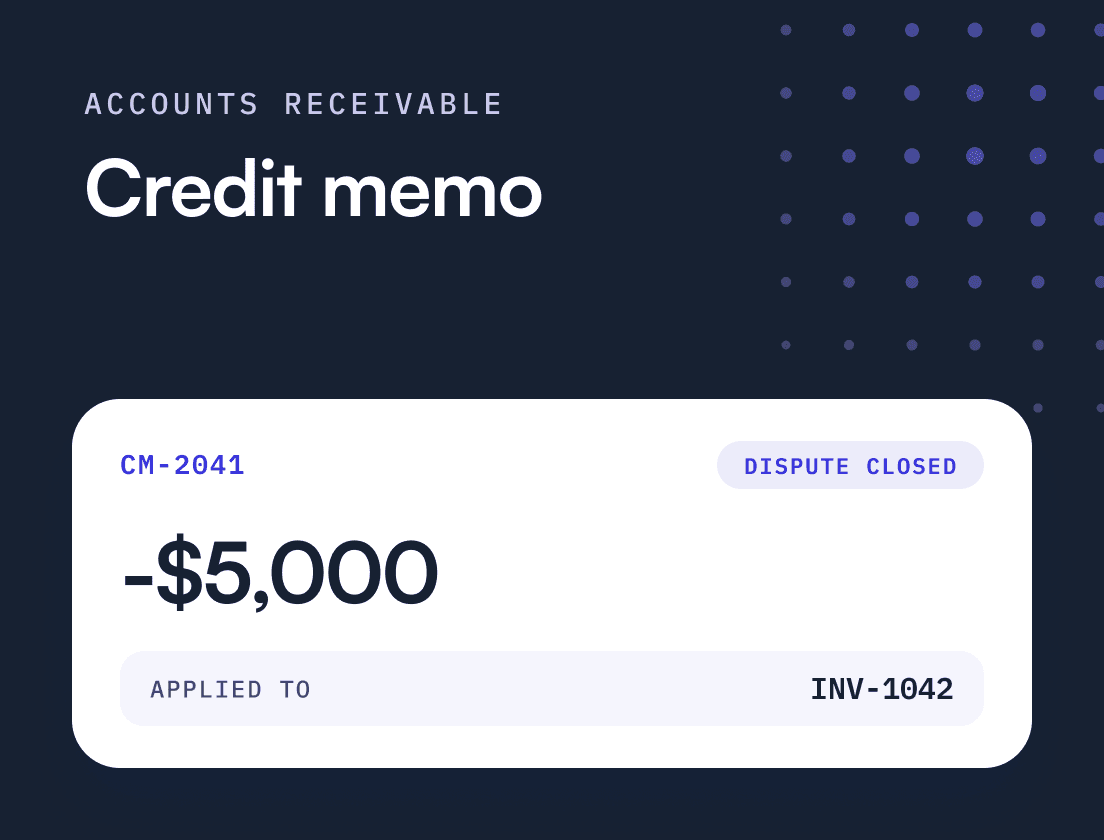
TL;DR: A credit memo is the document a seller issues to reduce what a customer owes on an invoice that has already gone out. For a finance leader, it matters as a control: issued late, applied to the wrong invoice or left unapplied, it keeps overdue balances on your aging report that will never become cash, and it hides the disputes that caused them.
A credit memo is a document a seller issues to a customer to reduce the amount owed on an invoice that has already been sent, without deleting or editing the original invoice. In the UK and across EMEA the same document is usually called a credit note; the two terms mean the same thing.
A credit memo is the last step of a dispute, and the step where the receivable either closes cleanly or turns into a second reconciliation problem. It is often handled as admin, a correction someone posts in the ERP when sales says a customer was overcharged. A credit issued six weeks after the customer raised the issue has spent those six weeks as an “overdue” invoice your team was chasing. A credit auto-applied to the wrong invoice leaves the disputed one open. And a credit with no reason attached tells you nothing about why it was needed.
What is a credit memo and what does it include?
A credit memo reduces a customer’s balance by a stated amount and points back to the invoice it corrects. The original invoice stays on the books, so the audit trail shows both what was billed and why it changed.
A usable credit memo template for B2B carries these fields:
- A unique credit memo number and an issue date
- The original invoice number and date it relates to
- Customer and seller legal details matching the original invoice
- The credited amount, with the tax reduction shown separately
- The reason for the credit, ideally as a reason code from a fixed list
- How the credit will be used: applied to a specific invoice, held on account, or refunded
The reason field is the one most teams leave blank or fill with “adjustment”. It is also the one that makes credits useful later, as you will see below.
One clarification: the “credit memo” on a bank statement is a banking term for money added to your account, unrelated to the AR document covered here.
When should you issue a credit memo instead of a corrected invoice?
Issue a credit memo when an invoice has already been sent and posted and the customer is owed a reduction. Rewriting an issued invoice in place destroys the record of what the customer originally received, which is why ERPs such as NetSuite and QuickBooks Online handle the reduction as a separate transaction.
In B2B tech the common triggers are:
- A pricing or contract mismatch, such as a discount agreed at signing that never reached billing, or a downgrade that the renewal invoice ignored
- A billing error, such as a mid-cycle upgrade prorated wrongly or a seat counted twice
- A service credit owed under an SLA
- A tax correction, such as VAT charged on a reverse-charge supply or sales tax charged to an exempt customer
- A cancellation or partial termination agreed after the invoice went out
From Zero to Collected, Upflow’s book on building a collection function, gives a simple rule for the dispute case: if the customer is right and has not paid, send a corrected invoice; if they have already paid, issue a credit note. Once the invoice is posted, that corrected invoice is usually a credit memo against the original plus a new invoice. In the EU, any document that amends and refers specifically and unambiguously to the initial invoice is itself treated as an invoice, which is why VAT corrections usually take the form of a credit note that references the original rather than an edit to the issued invoice. HMRC lists the conditions for a valid credit note: it must correct a genuine mistake or overcharge, or reflect an agreed reduction in the value of a supply, it must give value to the customer, and it cannot be issued for a bad debt. HMRC also expects it within 14 days of the decrease in consideration, which it treats as the date you refund the customer or offset the credit against what they owe.
That last condition matters. A customer who simply will not pay gets a write-off, not a credit memo, with a different approval path and accounting treatment.
What is the difference between a credit memo, a debit memo and a refund?
A credit memo lowers what the customer owes. A debit memo raises it. A refund sends cash back. Only the refund moves money.
| Document | What it does | Typical trigger | Effect on AR | Effect on cash |
|---|---|---|---|---|
| Credit memo | Reduces the amount owed | Overcharge, billing error, agreed concession | Down | None |
| Debit memo | Increases the amount owed | Undercharge, missed fee or usage | Up | None until paid |
| Refund | Returns money already paid | Customer paid and wants cash back instead of credit | Clears a credit balance | Cash out |
| Write-off | Removes an uncollectible balance | Customer cannot or will not pay | Down | None |
The credit memo and the write-off both reduce AR and bring in nothing, which is why they get confused. The difference is the reason. A credit memo says the customer was right. A write-off says you gave up. Mixing them up distorts both your dispute data and your bad debt numbers.
How does a credit memo affect revenue, receivables and cash?
A credit memo reduces revenue and receivables by the same amount and has no effect on cash. That last part is easy to forget when you are reading a collection curve: a cleared receivable is not a collected one.
On revenue, US GAAP is explicit. Under ASC 606, credits and price concessions are forms of variable consideration, and consideration is also variable when the customer has a valid expectation, based on your customary business practices, that you will accept less than the contract price. Put plainly: if your team routinely credits a certain kind of complaint, your auditors may expect you to estimate those credits when you recognize revenue, not when the memo is posted.
On tax, when the original invoice carried VAT, the credit memo also reduces output tax. EU VAT law requires the taxable amount to be reduced where the price is reduced after the supply takes place, under conditions each member state sets. Get the tax lines wrong on the credit and you create a second correction.
How do unmanaged credit memos distort DSO and the aging report?
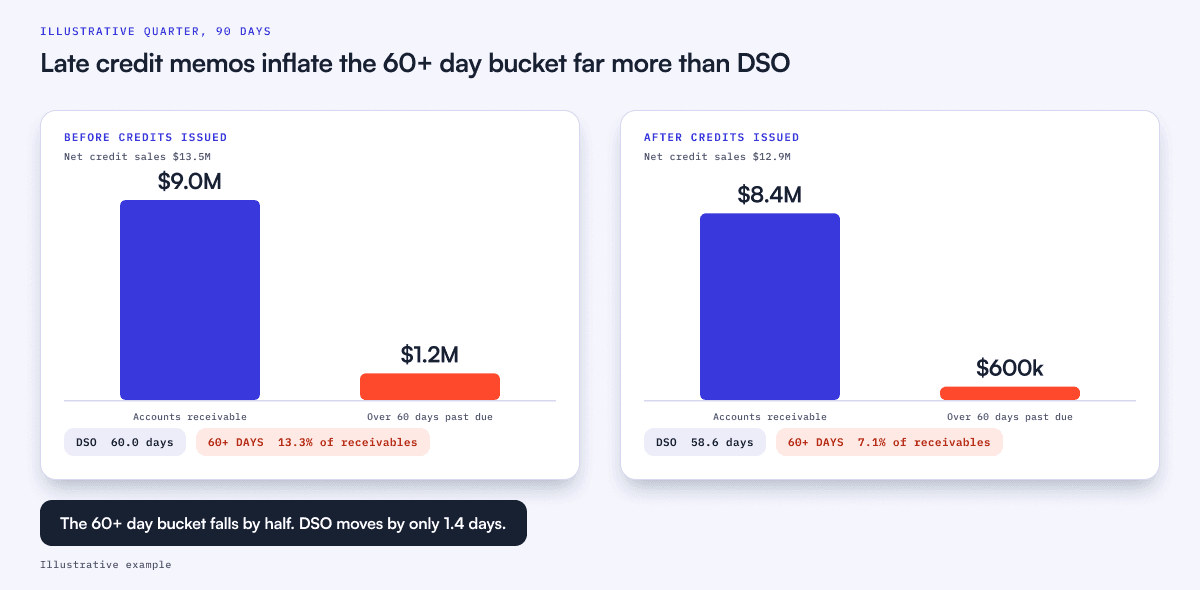
Late credits inflate both DSO and the overdue buckets of your aging report, because the disputed amount sits in receivables as if it were collectible. DSO barely notices. The aging report notices a lot.
Take a B2B tech company closing a quarter with these numbers:
- Accounts receivable: $9.0M
- Net credit sales for the quarter: $13.5M
- Balances more than 60 days past due: $1.2M
- Of those, $600k are disputed invoices where the customer is right and is owed a credit that has not been issued yet
Using the standard DSO formula, DSO = (accounts receivable ÷ net credit sales) × days in period = ($9.0M ÷ $13.5M) × 90 = 60.0 days.
Now issue the $600k of credits. Receivables fall to $8.4M and net credit sales fall to $12.9M, because a credit memo reduces both. DSO = ($8.4M ÷ $12.9M) × 90 = 58.6 days. A drop of 1.4 days, which no board member will ask about.
The aging report tells a different story. Before the credits, 13.3% of receivables ($1.2M of $9.0M) sat more than 60 days past due. After them, 7.1% does ($600k of $8.4M). Half of what looked like your most seriously overdue cash was never going to be collected. It was a credit nobody had written.
That gap has costs. Your collectors work a $1.2M list when only $600k of it can turn into cash. Any bad debt reserve built on aging percentages is set too high. And the customers in that bucket are being chased for money they have already told you they do not owe.
The book tells this story through Elisa Rodriguez, Accounting Manager at MasterPro Lighting. Deals were closed on net-45 and invoices went out on net-15, so customers looked overdue from day one. The harder part was everything else that never made it from the deal to the invoice, credits and mid-cycle cancellations among them. By the time her team found the cause, the customer had already been chased on an invoice that was wrong.
Where do credit memos go wrong in the ERP?
Most credit memo problems are application problems: the memo is created correctly and then lands on the wrong invoice, or on none.
Auto-apply picks the invoice for you. In NetSuite, checking Auto Apply on a credit memo applies the amount to the oldest invoices or cash sales due. QuickBooks Online has an “Automatically apply credits” setting that applies credits to open invoices for you. Both are sensible defaults for routine credits. Both are wrong for a dispute credit. Picture a customer with two open invoices: #1001 for $40,000, older and undisputed, and #1042 for $25,000, disputed because a seat was billed twice. You issue a $5,000 credit for #1042 and auto-apply sends it to #1001. Now #1001 shows $35,000, #1042 still shows the full $25,000 as overdue, and the customer, who will pay #1001 in full from their own records, ends up with a $5,000 overpayment while being chased on #1042.
Unapplied credits pile up. A credit issued against an invoice the customer already paid sits on the account as a balance you owe them. Left alone it confuses statements, and in the US it can also become a compliance issue: BDO lists accounts receivable credits among the property types companies commonly fail to report under state unclaimed property laws. Rules vary by state, so check with your advisors. Our guide to unapplied credits covers the clean-up.
Credits are issued with no dispute behind them. When a sales rep can request a credit by Slack message and finance posts it, the credit closes something that was never logged as a dispute. The ledger is correct. The information about what went wrong is gone.
What does a good credit memo process look like?
A good process ties every credit to a logged dispute, a named approver and a specific invoice, and then feeds the reasons back to whoever caused them. Six steps cover it.
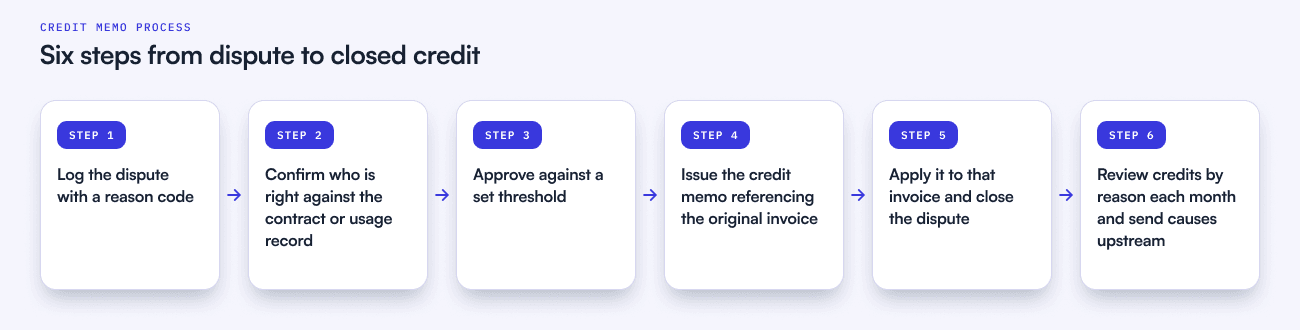
- Log the dispute first. No credit without a dispute record that states the invoice, the amount in question and a reason code. Use the same reason list for disputes and credits: pricing or contract, billing error, service, tax.
- Confirm who is right. Check the claim against the contract, the order form or the usage data. The person who owns the disputed item answers the question; finance owns the dispute until it closes.
- Approve against a threshold. Settle in advance who can credit how much. Small credits stay with whoever is handling the case. Larger ones need a second signer.
- Issue the memo against the original invoice. Same customer account, same currency, reason code filled in, tax lines matching the original.
- Apply it to that invoice and close the dispute. Apply dispute credits manually to the disputed invoice rather than letting auto-apply pick. Then tell the customer what changed and what they now owe.
- Review the credits every month. Look at credit memos as a share of invoiced revenue, credits by reason code, days from dispute to credit, and the age of unapplied credit balances.
Steps one and five are where a shared AR tool earns its keep, because the dispute and the credit need to be visible to the same people. In Upflow, a disputed invoice is paused from collection workflows while staying visible in analytics and the customer portal, and credit notes synced from your billing system show which invoice each one is applied to and how much is still unapplied, so an orphaned credit is easy to find.
Step six is the one most teams skip, and it is the one that pays. A run of pricing credits points to the handoff between sales and billing. A run of billing errors points to invoice review. Each fix removes a whole class of future credits, which no amount of faster posting will do.
Why should finance leaders read credit memos as a signal?
A credit memo is the customer telling you, in writing, which part of your order-to-cash process failed. Read in aggregate, your credits are the most honest map you have of where invoices go wrong.
That is the view behind Financial Relationship Management (FRM), the discipline of managing the financial relationship with a customer from the moment payment terms are agreed until cash is collected and reconciled. In FRM terms, a credit memo sits on the prevention side as much as on collection: every credit is a customer who was willing to pay the right invoice.
So the practical test for your team is simple. Pick last quarter’s credit memos and ask two things of each one: which dispute did it close, and what would have prevented it. If you cannot answer the first, your credits are not under control. If you never ask the second, you will issue the same credits next quarter.
From Zero to Collected covers dispute capture, routing and resolution in full, including a routing matrix you can adapt to your own teams. Get your free copy of From Zero to Collected.

Alexandre Antoine
Finance Director at Upflow
Alexandre is the Finance Director at Upflow, where he leads the company’s internal finance and accounting operations. With a background in both strategic finance and financial reporting, Alexandre brings a practical, detail-oriented approach to the complexities of B2B finance.
At Upflow, Alexandre ensures that internal processes from cash management to KPI reporting are optimized for transparency, accuracy, and growth-readiness. He helps build scalable finance systems that support Upflow’s mission to empower other finance teams through better collections and cash flow insights.
Alexandre regularly contributes to Upflow’s blog with in-depth articles on accounting metrics, financial ratios, reporting best practices, and operational benchmarks. His writing provides actionable advice for controllers, FP&A teams, and finance leaders navigating complex financial processes.

Summary

Shared
Frequently Asked Questions
Can’t find what you’re looking for?
Ask AI
A credit memo is a document a seller issues to reduce the amount a customer owes on an invoice that has already been sent. It references the original invoice, states the amount and reason for the credit, and reduces both accounts receivable and revenue. It has no effect on cash. The customer can apply it to the original invoice, hold it against future invoices, or ask for a refund.
Yes. Credit memo is the common term in the US and in ERPs such as NetSuite and QuickBooks Online. Credit note is the usual term in the UK and across EMEA, and it is the term VAT authorities such as HMRC use. Both describe the same document: a formal reduction of an amount already invoiced, linked to the original invoice.
A credit memo reduces what a customer owes, for example after an overcharge or an agreed concession. A debit memo increases what a customer owes, for example after an undercharge or a fee that was missed on the original invoice. Neither moves cash on its own. Both should reference the original invoice so the customer and your auditors can follow the change.
No. A credit memo reduces the balance owed, while a refund sends money back to the customer. If the customer has not paid yet, a credit memo lowers what they will pay. If they have already paid, the credit memo creates a credit balance on their account, which you either apply to a future invoice or settle with a refund.
In most ERPs you open the credit memo or a customer payment and select the specific invoice it should reduce. NetSuite does this on the Apply subtab, and QuickBooks Online lets you apply credits manually or turn on automatic application. For credits that settle a dispute, apply them manually to the disputed invoice, since automatic application picks the invoice for you (in NetSuite, the oldest one due).
Yes, slightly. A credit memo lowers both receivables and net credit sales, so its effect on DSO is usually small. The bigger effect is on your aging report: disputed invoices awaiting a credit sit in the overdue buckets until the memo is issued, making overdue balances look worse than the cash you can actually collect.
Related articles