

Upflow → Blog → Accounting and Software
AI Agents in Accounts Receivable: The Best Tools Compared for 2026
Alex Louisy
|
October 30, 2026
Generate AI summary


AI has moved quickly from experiment to everyday tool in finance, and accounts receivable is one of the places it pays off quickly. A Gartner survey of 160 senior finance leaders, run from January through April 2026, found that AP and AR automation are among the AI use cases that generally deliver returns within nine to ten months. In practice, that means AI can now take on much of the routine work that used to fill a collector’s day, from matching payments to even following up with customers autonomously.
That finding describes what AI in AR can deliver, though, and whether a team gets there depends on the tool it picks. Nearly every AR vendor now calls its product AI-powered, but the label covers everything from a chat assistant that answers questions to agents that act on accounts on their own. Judging those claims comes down to three questions:
- Can the AI see all of your AR data?
- What can it actually do with it?
- Can you trust it with your customers?
This guide gives you a framework for each question, then uses all three to compare Upflow, Chaser, Gaviti, Kolleno, Paraglide, Quadient, Stuut, Tesorio and Versapay.
Question 1: Can AI see all of your AR data?
AI can only make good decisions with the right data, and in AR that data is spread across several systems. Invoices and payments sit in ERP, accounting or billing tools, while much of the context that sales and customer success teams build up about each customer is kept in the CRM. Then there are details that never make it into a formal system, like a promise to pay or an open dispute, which often exist only in someone’s inbox or in notes from a call.
To see how much this matters, watch how one AI agent handles the same overdue invoice as each new system is connected.
This video is hosted by YouTube. Accept the “Videos” cookies to play it.
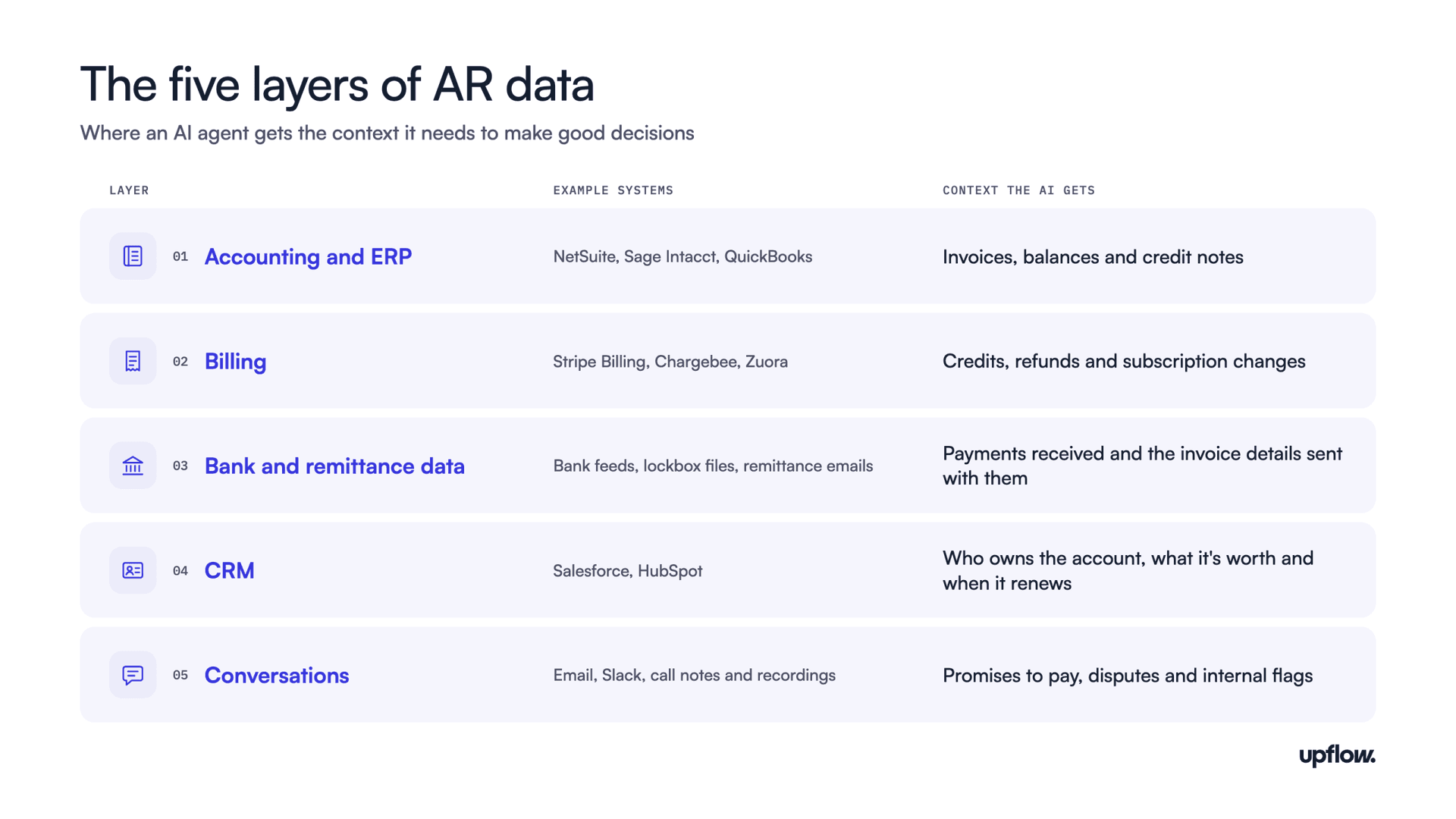
As the example shows, the same agent makes better calls when more of your systems are connected. So when you evaluate an AI tool, look at how easily it connects to the systems you already use, how much it can do through each connection, and how up to date the data stays once it’s flowing. To make that easier to judge, it helps to break your systems into five layers and look at each one in turn.
How deep each connection goes
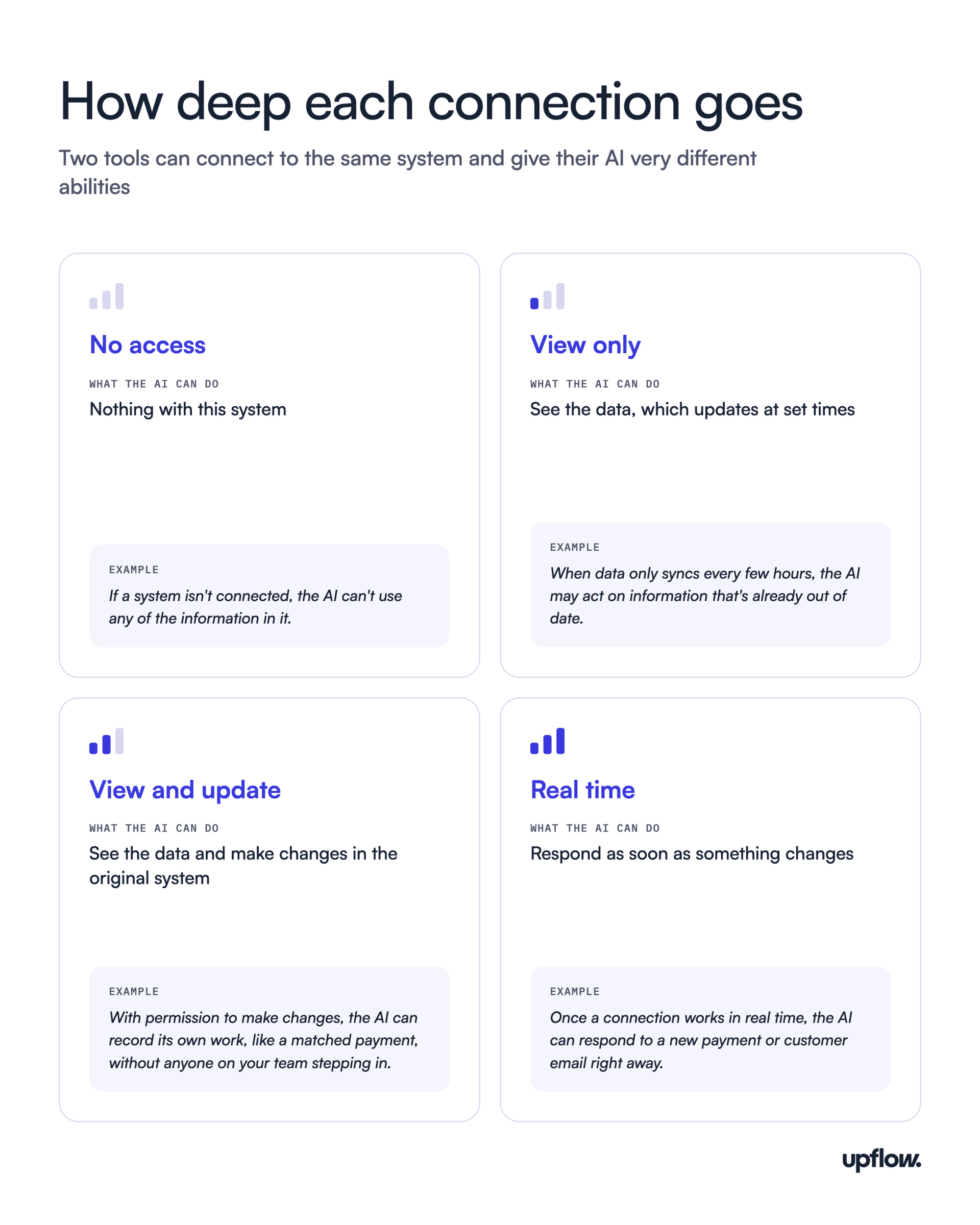
Connecting to a system can mean very different things. Two tools might both list a NetSuite integration, while one pulls in invoices once a day and the other updates NetSuite the moment it matches a payment. To compare tools fairly, rate each connection on four levels.
For any connection, also ask how the tool handles data that doesn’t match between systems, and whether it keeps a record of every change the AI makes.
Access from outside AI assistants
Data access can also run the other way. More finance teams now use general AI assistants like Claude, ChatGPT or Microsoft Copilot, and some AR tools let those assistants query AR data through an API or an MCP server. MCP, short for Model Context Protocol, is an open standard for connecting AI assistants to business software. If your team works this way, ask whether a tool offers it and what an outside assistant can see and do through it.
Demo questions about data access
- “Which of our systems can your AI connect to on day one, and which need extra setup?”
- “What can your AI see about a customer before it contacts them?”
- “Show me what your AI does when a customer replies to a reminder email?”
- “Can we see a record of everything your AI reads and changes?”
Question 2: What can the AI actually do?
Once an AI tool can reach your data, the next question is what it does with it. Here the “AI-powered” label covers a lot of ground. One tool’s AI might answer questions about your aging report, while another’s sends follow-up emails on its own, and many tools mix the two depending on the task. Judging a tool’s AI means looking at how far it goes, and in which parts of your AR work.
How far the AI goes
AI in AR tools usually works at one of four levels.
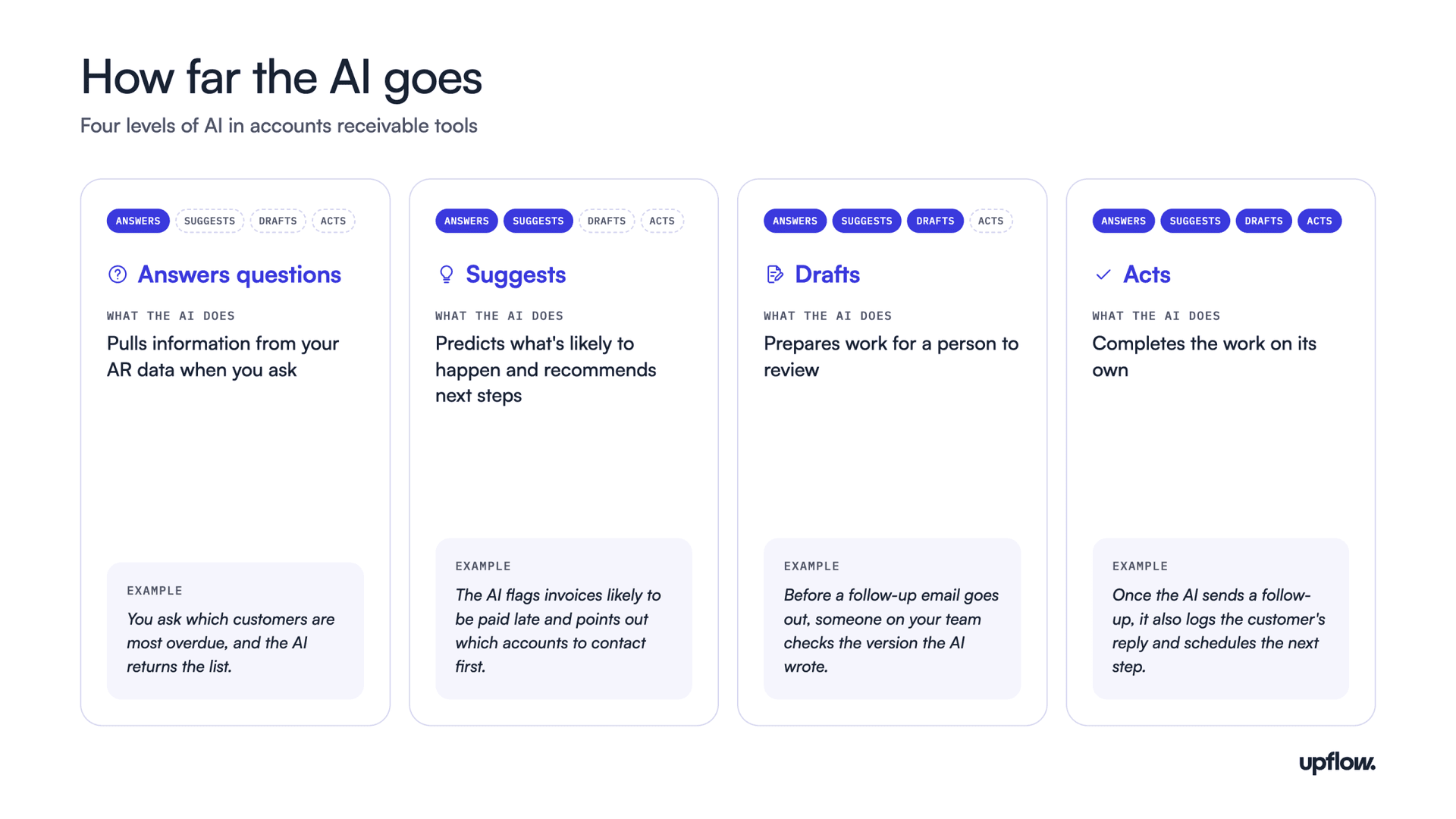
To see the difference, the video below follows one customer payment through each level.
This video is hosted by YouTube. Accept the “Videos” cookies to play it.
Each level takes more work off your team. It also puts more of the customer relationship in the AI’s hands, which is why the third question in this guide looks at trust.
Where AI can help in your AR process
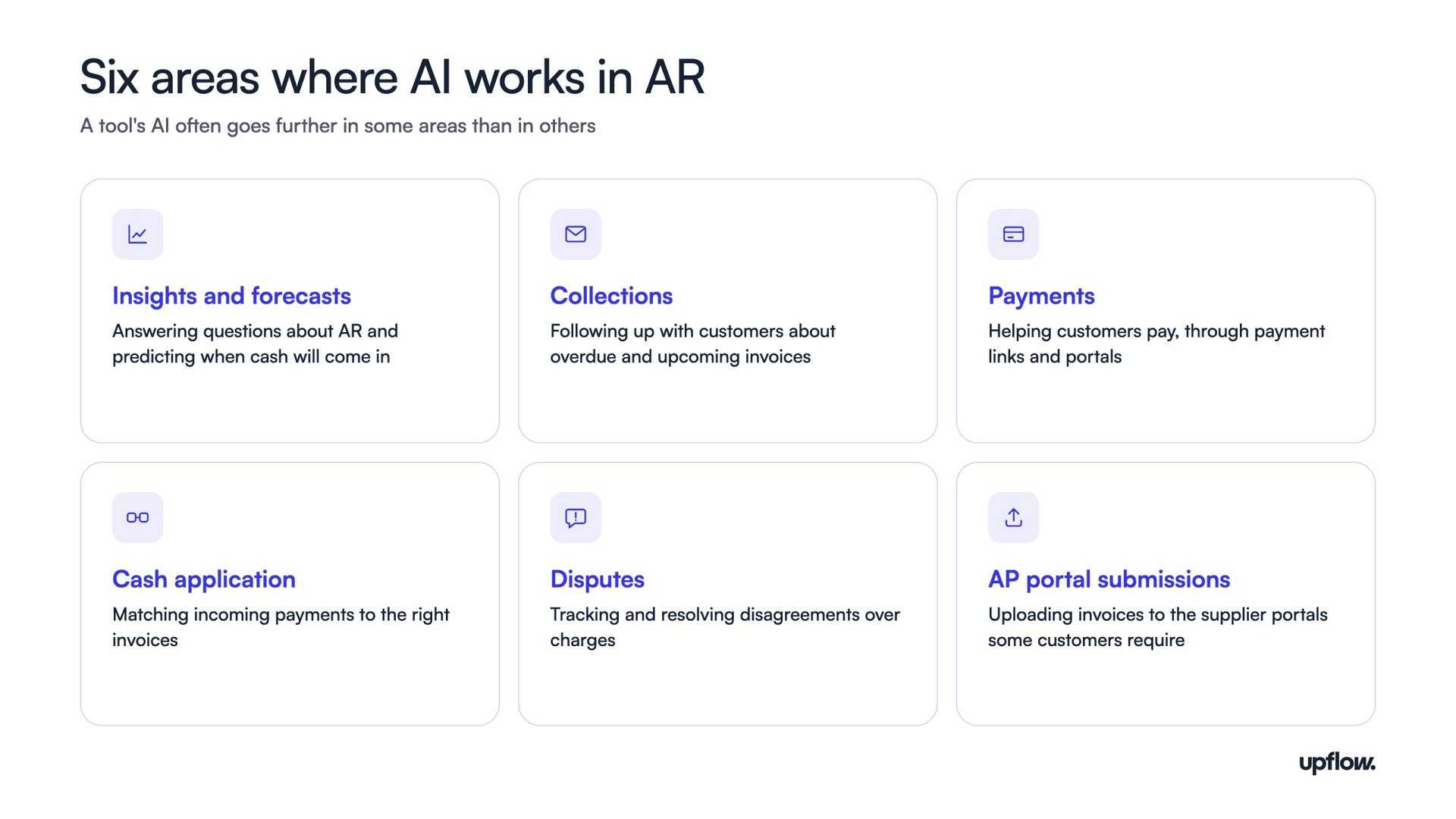
Think about how an AR team works through its receivables. The first step is figuring out where the problems are, such as which customers are paying later than usual and when cash is likely to come in. That’s the work of insights and forecasts, where AI can answer questions about your data on request and flag issues before anyone thinks to ask. AI can also predict when each customer is likely to pay by looking at their historical payment patterns. It then updates those predictions as new signals come in, such as a promise to pay, so your cash forecast stays current.
With a clear picture, the team moves into collections, following up with customers about what they owe and resolving any disputes over charges. AI can help decide which customers to contact first by weighing how much each one owes against how likely they are to pay late. It also checks the context before acting, holding off on a customer who has already promised to pay or is waiting on a fix to a disputed charge. Next comes payments, where the goal is to make paying easy through payment links or a customer portal. The last step is cash application, matching each incoming payment to the right invoices so your books stay accurate.
Alongside these core steps sits more specialized work. If your company sells to larger customers, you’re likely familiar with AP portals, where a customer requires you to upload each invoice into their own system before they’ll pay. Every portal works a little differently, and keeping up with them is mostly manual, repetitive work, which makes it a good fit for AI.
Mapping any tool’s AI
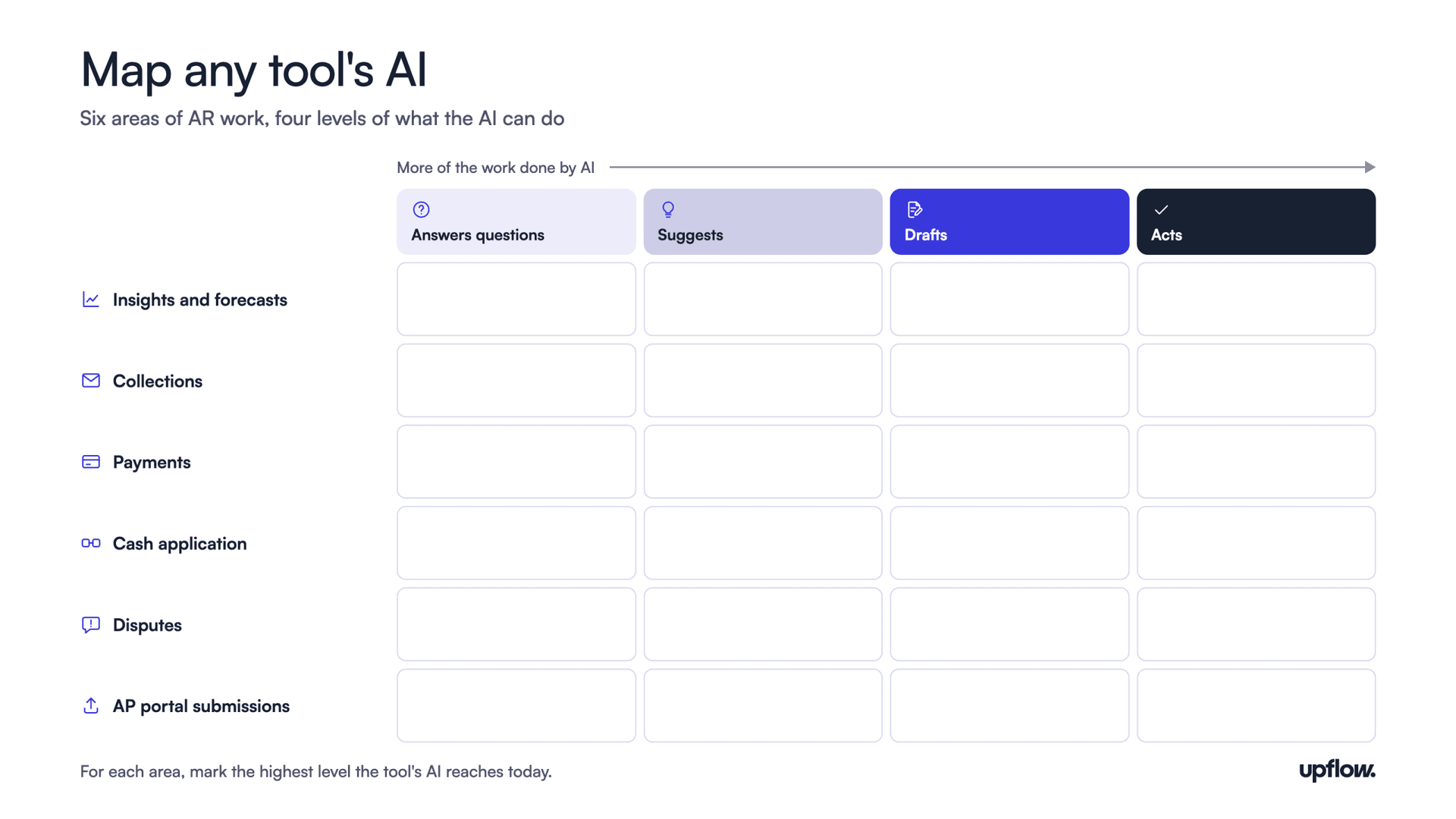
Bringing the four levels and the six areas together gives you a simple way to map any tool’s AI. Picture a grid with the areas of work down the side and the levels across the top, then mark how far the tool’s AI goes in each area today. The comparison later in this guide uses the same grid for every tool, so you can see where each one stands side by side.
Demo questions about what the AI does
- “In which parts of AR does your AI act on its own today, and where does it only make suggestions?”
- “Which of these features are live today, and which are on your roadmap?”
- “Show me something your AI did last week without anyone asking it to.”
- “How does your AI decide which accounts to contact first?”
Question 3: Can you trust it with your customers?
Once an AI tool starts writing to customers on its own, the question shifts from what it can do to whether you can trust it. Collecting cash sits close to revenue, and a single badly timed message can damage a relationship that took years to build. AR teams have used automation for years, from scheduled reminders to rule-based workflows, but none of it solved the harder problem of collecting on time while keeping customers on good terms.
That’s why finance teams usually care more about trust than speed when they bring AI into AR. Most start small, perhaps with lower-value accounts, and give the AI more responsibility as it proves reliable.
Running AR as a relationship
To be trusted with customers, an AI needs to treat them as more than a list of open invoices, which is something AR has long struggled to do. A collector managing hundreds of accounts can’t keep track of every promise to pay or open dispute, so teams relied on templates and fixed email sequences. AI doesn’t have that limit. With the right data, it can carry each account’s history into every message it sends, which makes it possible to manage each customer as an ongoing relationship. Upflow calls this approach Financial Relationship Management (FRM).
That approach matters more when customers are under pressure. Atradius’s 2026 survey found that late payment affects seven in ten companies across North America, and that customer cash shortages are the leading cause. When a customer is short on cash, collecting turns into a negotiation over which suppliers get paid first, and a message that ignores their situation can make things worse.
The controls to look for
Trust depends on what you allow an AI tool to do, and on how easily your team stays in charge. When comparing tools, look for these four controls.
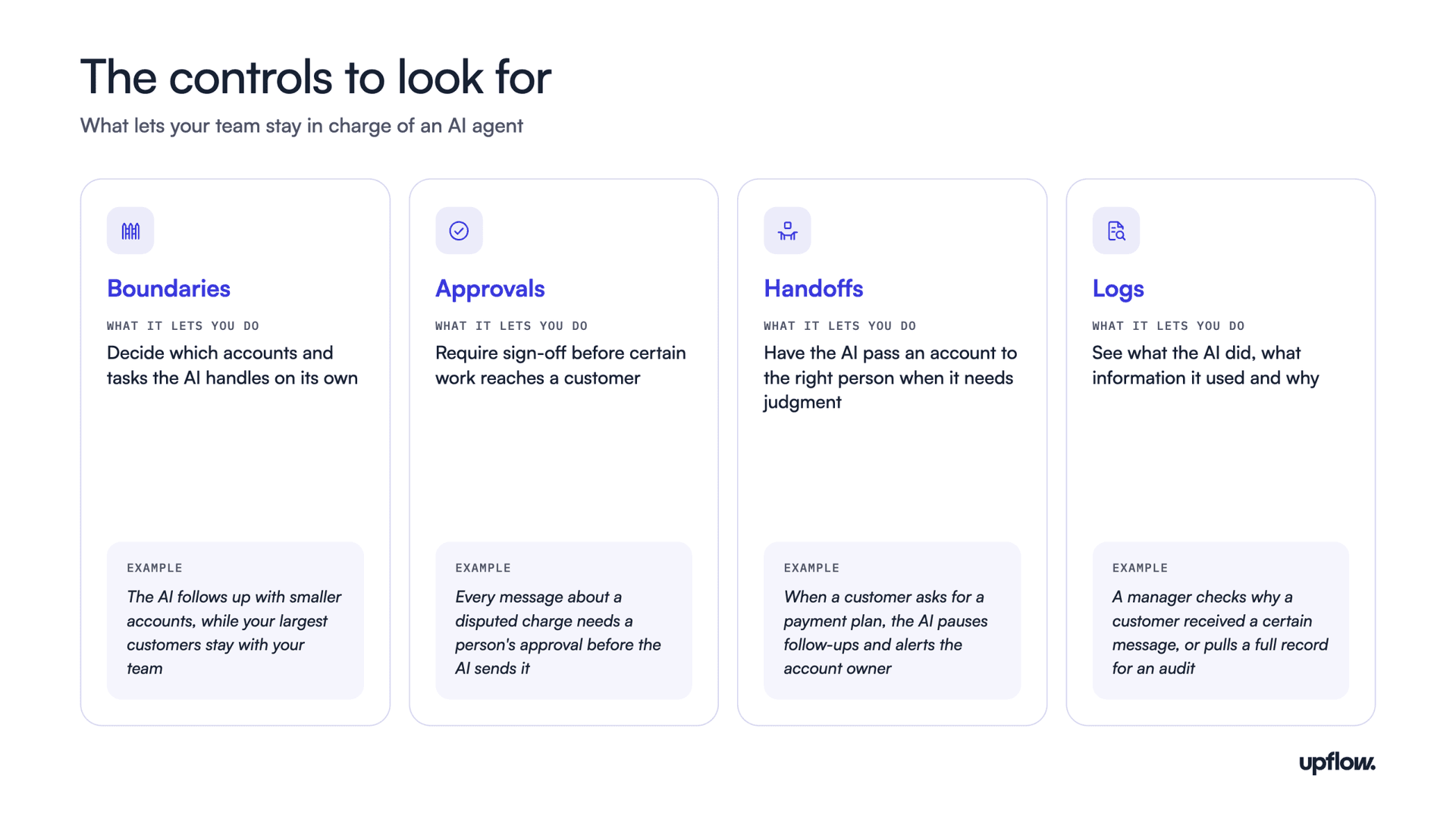
These controls are what make starting small possible. A team can begin with narrow boundaries and frequent approvals, review the logs, and widen the AI’s role over time. Logs also matter during an audit, when you need to show exactly how decisions about customer accounts were made.
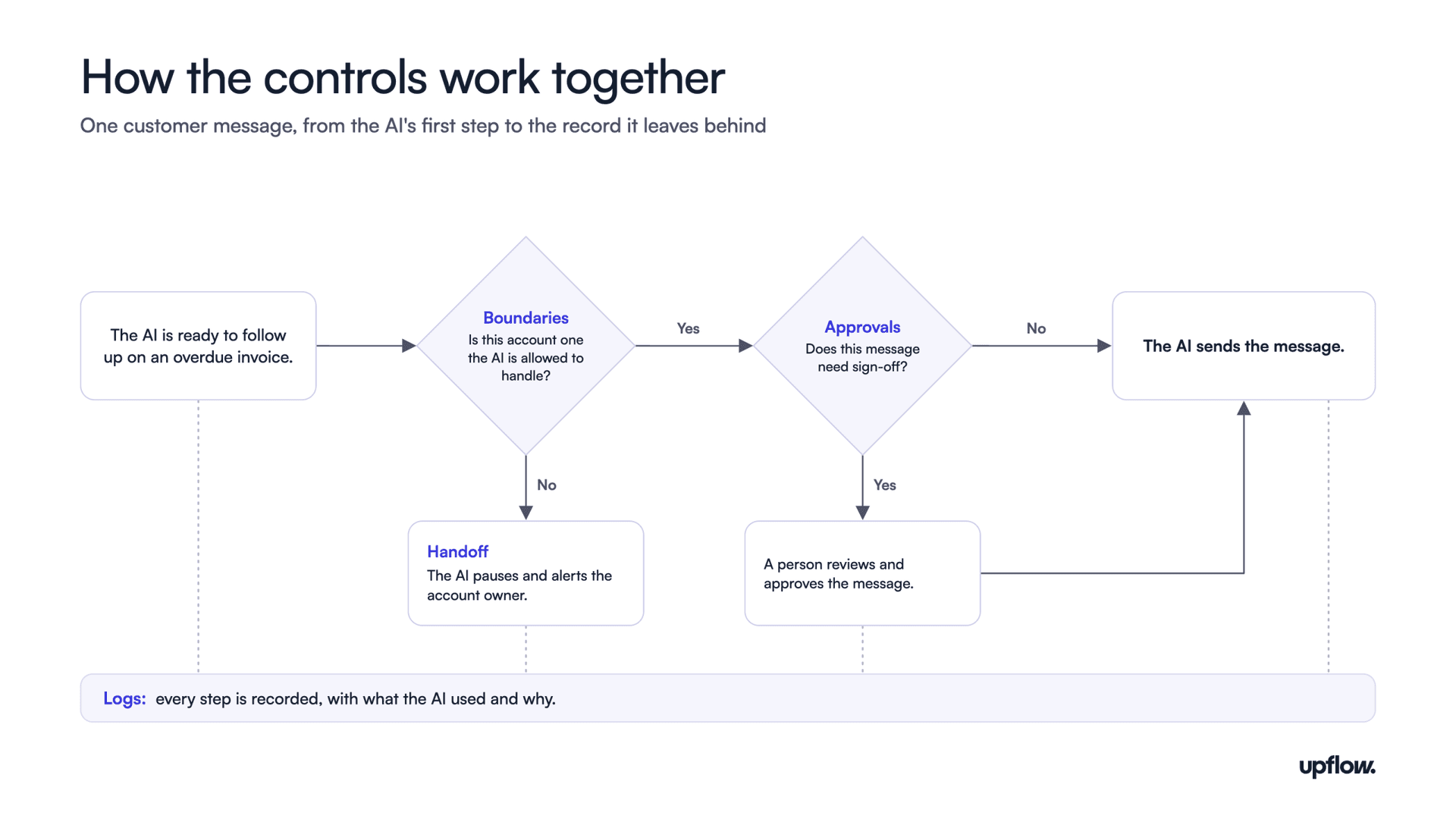
Demo questions about trust
- “What can your AI send to a customer without a person approving it first?”
- “Can we start the AI on a small group of accounts and expand from there?”
- “How does your AI know when to stop and hand an account to a person?”
- “Can we export a full log of the AI’s actions for an audit?”
Can agentic AI run order-to-cash end to end?
Before getting into the methodology and the tools, one question is likely on your mind: can AI take over order-to-cash entirely, so your team can hand off the whole cycle and step back? Order-to-cash covers everything from taking a customer’s order to recording their payment, and several vendors now say their AI agents can run all of it on their own.
The answer is not fully, at least not yet. AI agents can already handle large parts of the cycle on their own, especially routine follow-ups and payment matching. But none of the tools compared in this guide works autonomously across every area of AR, as the AI coverage grid later on shows.
The bigger obstacle is trust rather than technology. Automation has promised to take over large parts of order-to-cash for years, yet many finance teams still hold back, because they’ve seen tools built for speed get things wrong. When the work involves customers’ money, a single serious mistake, like chasing a key account in the middle of a dispute, can take a long time to repair. Without a clear permissions model, and without logs that show what the AI did and why, finance teams won’t hand it the work, however capable it is.
That’s why the goal is supervised autonomy rather than full autonomy. Upflow uses the term for agents that do the work while the team keeps the judgment. Autonomy isn’t a single switch that’s either on or off. It’s set task by task, so a team might let agents send routine reminders on their own while still reviewing every message about a disputed charge. As the agents prove reliable, the team hands over more, and every action stays logged, so the person accountable can always see what happened and why.
In practice, “end to end” then means AI handles the volume while people focus on the conversations that need them, such as negotiating a payment plan with a customer under pressure or settling a dispute with a key account. Those moments shape the customer relationship far more than any reminder does, and they’re where a finance team adds the most value.
So when you compare tools, the better question is how much of the cycle a tool’s AI can take on, and how easily your team stays in control of the rest. The rest of this guide answers that for nine tools, starting with how they were rated.
How we compared the tools
Upflow wrote this guide, and Upflow is one of the nine tools in it. Every tool, including Upflow, is rated against the same three questions.
This guide focuses on AR tools for mid-sized and growing companies. It also includes Stuut and Paraglide, two newer companies that describe themselves as AI-native. Large enterprise suites such as HighRadius and Billtrust serve a different market, so they’re covered briefly at the end of the comparison rather than rated alongside the others.
The ratings draw on two kinds of evidence. The first is each vendor’s public material: websites, help centers, changelogs, announcements and reviews on G2. The second is what we hear directly from finance teams, including teams that evaluated or used these tools before talking to us. When those conversations show a feature working differently in practice than its description suggests, the rating reflects how it works in practice. We don’t name the companies we spoke with.
Ratings count features that customers can use today, including those in beta or early release. Features that are announced but not yet available aren’t counted. No company paid to be included, and none reviewed this guide before it was published. All information was checked in October 2026.
Each tool is rated on the three questions from this guide using five labels, and each label comes with a score range. The table below shows what each label means.
| Rating | Score range | Can the AI see your data? | What can the AI do? | Can you trust it with customers? |
|---|---|---|---|---|
| Excellent | 4.0 to 4.9 | Connects to every data layer, writes back in real time, and shares data with outside AI assistants | Works autonomously in three or more areas of AR, including collections | All four controls documented: boundaries, approvals, handoffs and logs |
| Strong | 3.0 to 3.9 | Connects to most layers, including customer context from the CRM | Works autonomously in two areas | Three of the four controls documented |
| Good | 2.0 to 2.9 | Connects to accounting systems and some other layers | Works autonomously in one area, or drafts in three or more | Two controls documented |
| Limited | 1.0 to 1.9 | Connects to accounting systems only | Only answers questions, makes suggestions or drafts | One control documented |
| Unclear | No score | Not enough information to judge |
Where a tool falls within its score range depends on finer detail from the same framework:
- Data access: how many of the five data layers a tool connects to, and how deep and reliable each connection is, from view only up to real time. Access for outside AI assistants adds to the score as well.
- What the AI does: the average level its AI reaches across the six areas of AR work.
- Trust: how well each of the four controls is documented, with help documentation and release notes counting more than marketing pages.
AI features in AR are changing quickly, so some details may be out of date by the time you read this. If you work at one of these companies and spot something inaccurate, email us at [email protected] and we’ll review it and update the guide.
How the nine tools compare
The tables below apply the three questions from this guide to each tool. Ratings use four labels: Strong, Good, Limited, and Unclear when public information wasn’t enough to judge. Full details for each tool follow in the profiles.
The chart below brings the three questions together and sorts the nine tools into four groups, based on how much work their AI does and how much context and control your team keeps. The scorecard that follows shows each tool’s ratings and scores, using the rubric from the previous section, and full details for each tool follow in the profiles.
Each tool is placed by its scores from the scorecard. The horizontal axis shows what the AI does, and the vertical axis averages data access and trust. Tools that do real work on their own while rating Strong or better on both data access and trust are supervised agents. Those that do real work with gaps in either are autopilot agents. Tools with strong controls whose AI mostly prepares work are cautious copilots, and the rest are rule-based assistants.
Scorecard
| Tool | Can the AI see your data? | What can the AI do? | Can you trust it with customers? |
|---|---|---|---|
| Upflow | Excellent (4.1): Connects to accounting, billing, CRM, email, banks and Slack; public REST API and professional services support proprietary systems; MCP provides live AR data to external AI assistants, with real-time ERP write-back for supported integrations | Excellent (4.2): autonomous collections, cash application and AP portal agents, with human approval available for any of them; AI also identifies risks and recommends actions | Excellent (4.2): Configurable autonomy for individual agent skills, human approvals and escalation for sensitive situations, and recorded activity for review and audits. |
| Chaser | Good (2.5): connects to accounting systems, Stripe and email, with an API for bringing in invoices from other systems; CRM connections only log emails | Limited (1.3): drafts replies to customer emails and builds chase schedules for a person to send or approve | Good (2.3): a person approves every AI action, and every customer email is logged |
| Gaviti | Good (2.3): Connects to named ERPs and accounting systems, including NetSuite, QuickBooks and Sage Intacct, with Salesforce connectivity, bank integrations and file-based imports; depth of CRM context and real-time write-back unclear | Good (2.3): matches payments to invoices, relying on customers’ remittance details or payments through its own portal; otherwise drafts emails and workflows for a person to send | Limited (1.1): AI capabilities can be enabled or disabled; detailed approval workflows, escalation rules and AI-specific audit controls are not clearly documented |
| Kolleno | Good (2.8): connects to major ERPs, billing and payment tools, Salesforce and an MCP server, though teams report custom work for HubSpot, API limits and gaps outside its standard integrations | Good (2.4): AI handles cash application, while collections actions wait for the team to approve them; its AP portal submissions are still listed as in development in its own product updates. | Strong (3.7): its product updates describe audit logs in an AI Control Centre and settings for which events go to a person; approval steps and per-module limits appear on its marketing pages but aren’t described in its product updates |
| Paraglide | Good (2.4): connects to ERPs such as NetSuite, Sage and SAP, and to the finance inbox; no CRM connection or outside AI access found | Good (2.2): runs email collections conversations and answers billing questions on its own; disputes and payment plans are handed to the team, and its supplier portal and cash application agents are newer additions | Strong (3.3): teams decide where a person approves, issues needing judgment are handed off with full history, and every agent action is logged |
| Quadient | Strong (3.6): Connects to major ERPs, Zuora and Salesforce; its email agent processes customer communications; external AI access not documented | Limited (1.3): prepares actions from customer emails about payment promises, invoice questions and disputes; how its AI handles cash application is unclear | Strong (3.3): Teams configure permitted email actions, human review points and audit records for agent activity. |
| Stuut | Good (2.5): connects to major ERPs such as SAP, Oracle, NetSuite and Dynamics, and takes payments mainly through Stripe; CRM and bank connections appear only in third-party coverage, and outside AI access isn’t documented | Strong (3.4): runs collections across email, text and voice, cash application and straightforward disputes on its own; promises to pay become tasks for a person to confirm, and payments are handled through basic Stripe payment links | Good (2.3): complex cases go to a person and actions are logged; it offers some review, but how teams set which messages need approval, or limit the AI for specific accounts, isn’t clearly described |
| Tesorio | Good (2.6): connects to ERPs, Salesforce, email, banks and Slack, with MCP access for outside AI assistants, though teams report flat-file setups for some billing tools and limited Salesforce depth | Strong (3.6): runs cash application and supplier portal submissions on its own; teams report collections automation that misses customer replies and promises to pay | Strong (3.3): configurable auto-send rules, human review for selected replies, and escalation of at-risk accounts; AI logs not described |
| Versapay | Good (2.5): Connects to major ERPs and payment channels; direct CRM integration and external AI access not clearly documented | Good (2.3): Automates payment matching and provides AI-assisted account summaries and collections insights; broader autonomous agent capabilities are not established | Unclear: AI governance and approval capabilities are described, but the availability and scope of controls for live autonomous AI actions remain unclear |
Where each tool’s AI does the work
This grid shows the highest level each tool’s AI reaches in each area of AR work today, using the four levels from earlier in this guide. “No AI found” means the tool offers the feature without AI, and “Not found” means we found no sign of the feature at all.
| Tool | Insights and forecasts | Collections | Payments | Cash application | Disputes | AP portal submissions |
|---|---|---|---|---|---|---|
| Upflow | Acts | Acts | No AI found | Acts | Drafts | Acts |
| Chaser | Suggests | Drafts | No AI found | Not found | Drafts | Not found |
| Gaviti | Suggests | Drafts | No AI found | Acts, needs remittance details | Unclear | Not found |
| Kolleno | Suggests | Drafts | No AI found | Acts | Suggests | Not found |
| Paraglide | Not found | Acts | No AI found | Unclear | Suggests | Unclear |
| Quadient | Suggests | Drafts | No AI found | Unclear | Drafts | Not found |
| Stuut | Suggests | Acts | No AI found | Acts | Unclear | Not found |
| Tesorio | Suggests | Acts, with gaps reported | No AI found | Acts | Suggests | Acts |
| Versapay | Suggests | Suggests | No AI found | Acts | No AI found | Not found |
Key takeaways
Upflow is the only tool rated Excellent on all three questions. The newer entrants have clear gaps: Stuut is built for large enterprises and describes few ways to limit or approve what its AI does, while Paraglide connects to few systems and hands disputes back to the team. Among the established tools, teams report that Tesorio’s collections automation misses customer replies, and Kolleno’s AI mostly waits for team approval, with its AP portal agent not yet live. Gaviti, Quadient and Versapay use AI mainly to match payments or prepare work for a person, and Chaser’s AI only drafts messages for someone to send.
How Upflow approaches AI in AR
Most of the gaps above come down to what happens to the customer relationship when AI takes over the work. Upflow focused on that relationship long before AI agents existed. From the start, it treated collecting cash as relational work, since every reminder, payment and dispute is a conversation with a customer, and finance owns more of those conversations than any other team. Handled well, collections can strengthen those relationships instead of straining them. Upflow calls this Financial Relationship Management, and when it added AI, it built the agents on that same foundation, from the data underneath to the controls around every action.
The foundation: connected data
Good relationships depend on context, and in most companies that context is spread across many tools. Upflow connects to the systems mid-sized and growing US companies already use, including NetSuite, Sage Intacct, QuickBooks Online, Xero, Stripe Billing, Chargebee and Zuora, and brings in context from Salesforce, HubSpot, email and Slack. That gives finance, sales and customer success one shared view of every account, so working together on collections doesn’t depend on scattered emails and spreadsheets. For anything outside that list, a public REST API and a professional services team connect proprietary systems. Everything else in Upflow depends on this layer, which is why it comes first.
The intelligence layer
Upflow Intelligence sits on top of that connected data and powers every AI feature in the platform. It holds the full history of each account, from what the customer has paid to what they’ve promised or disputed, so every agent works from the same complete picture of the customer. It also learns from patterns across Upflow’s entire customer base. Since 2018, Upflow has managed more than 52 million invoices worth over $150 billion, including $38 billion in 2025 alone. Its agents draw on the payment history of more than 74 million paid invoices from over 5 million B2B payer companies, a depth of data that takes years to build.
The agents
Four agents build on Upflow Intelligence, each covering a different part of the AR process. The Insights Agent diagnoses the health of your receivables, answers questions and surfaces the causes behind late payments. The Collections Agent follows up with customers, reads their replies and records promises to pay. The Cash Application Agent matches incoming payments to the right invoices and writes them back to your ERP. The AP Portal Agent handles the purely mechanical work of submitting invoices to the supplier portals that larger customers require, a task that grows quickly as companies move upmarket.
Directing the agents
Teams direct all of this through Ask Upflow, a conversational interface where they can ask questions in plain language and tell agents what to do. Upflow’s data also works outside the platform: through its MCP server, teams can query live AR data and get insights from AI assistants like Claude or ChatGPT.
Controls at every step
Speed means little if it costs a customer’s trust, and finance teams know that trust is hard to rebuild once it’s broken. So controls are built into every step. Each action an agent can take is set to always allow, need approval or be blocked, sensitive situations go to a person, and every agent run is recorded for review and audits.
Upflow Payments
Working alongside the agents is Upflow Payments, which lets teams design the payment experience their customers see. Teams choose which payment methods to offer, can offer different methods by region, and can turn on autopay and saved payment methods. The portal carries the company’s own branding, so customers never need to hear about Upflow, and it can go live the same day. More than $250 million has been processed through Upflow Payments, and about two out of every three payments made through it use autopay. Because payments connect to the ERP and the rest of Upflow, every payment flows straight into cash application and updates what the Collections Agent does next.
Shortlist it if you’re a growing or mid-sized B2B company, such as a SaaS or B2B tech business, that wants AI agents doing real AR work, with control over every action they take.
Figures are from Upflow’s own data, all-time totals as of October 2026.
The other eight tools
Chaser
The claim: Chaser describes itself as credit control software that automates payment reminders, with AI that helps draft replies.
What we found: Chaser’s AI stops at drafts. It writes replies and builds chase schedules, but a person has to approve everything before it goes out, and it doesn’t handle cash application or AP portals. Its CRM connections only log emails, and some of its accounting connections sync in one direction on a schedule.
Shortlist it only if you’re a small business that needs automated reminders and doesn’t plan to hand AR work to AI.
Look elsewhere if you want AI to do any AR work on its own.
Gaviti
The claim: Gaviti describes itself as AI-driven, autonomous A/R.
What we found: Gaviti’s AI matches payments to invoices, but its matching leans on customers providing remittance details or paying through Gaviti’s own portal. Beyond that, its AI mostly drafts emails and workflows for a person to send, and it doesn’t document agents that follow up with customers on their own. It doesn’t name the systems it integrates with, and how much CRM context it brings in is unclear. It also doesn’t document approvals, handoffs or logs of what its AI does.
Shortlist it only if your main need is cash application automation and your customers already send clean remittance details.
Look elsewhere if you want AI to run collections, or need to see and control what the AI does.
Kolleno
The claim: Kolleno describes AI agents that execute the full order-to-cash sequence, with the team handling exceptions only.
What we found: Kolleno’s collections actions wait for the team to approve them, and its own October 2026 product update lists AP portal submissions as still in development, despite the agent having its own product page. Its AI works on its own only in cash application. Teams report custom work for HubSpot, API limits, and trouble connecting tools outside its standard integrations.
Shortlist it only if you want rules-based collections workflows, with AI as an add-on rather than doing the work.
Look elsewhere if you need AP portal submissions today, rely on tools outside its standard integrations, or want AI handling collections.
Paraglide
The claim: Paraglide describes itself as AI agents for accounts receivable.
What we found: Paraglide was founded in July 2025, and its product is narrow. Its agents handle email collections and billing questions, while disputes and payment plans go back to the team. We found no CRM, billing or bank connections, no payments experience for customers, and no access for outside AI assistants. Its supplier portal and cash application agents are new, with little public detail on how they work.
Shortlist it only if you’re a European team that needs help with email collections and little else.
Look elsewhere if you need CRM context, customer payments, or AI across more of your AR process.
Quadient
The claim: Quadient describes its AR product as part of one platform for AR and AP, with AI that turns customer emails into action.
What we found: Quadient’s AI prepares work rather than doing it. Its email feature, launched as an opt-in in October 2026, reads customer emails and sets up actions for a person to review, and how its AI handles cash application is unclear. It doesn’t connect to outside AI assistants.
Shortlist it only if having AR and AP in one platform matters more to you than AI.
Look elsewhere if you want AI that does AR work on its own.
Stuut
The claim: Stuut describes itself as AI agents that handle collections, cash application and disputes without the AR team stepping in.
What we found: Much of the work still lands back on the team. Promises to pay wait for a person to confirm, complex disputes go to a person, and Stuut’s own pages disagree on whether dispute handling is live. Payments run through basic Stripe links, and its own site documents only ERP and Stripe connections. Stuut offers some review, but its public materials say little about how teams decide which messages need approval or limit what the AI does for specific accounts.
Shortlist it if you’re a large, invoice-heavy business, such as a manufacturer or distributor, that wants AI to run collections with minimal oversight.
Look elsewhere if you want detailed control over what the AI sends and to whom, need CRM context, or want a full payments experience for your customers.
Tesorio
The claim: Tesorio describes itself as a Financial Operations AI Agent Studio.
What we found: Tesorio’s agents can work with less context than its integration list suggests, since teams report that some billing and CRM data comes in through file uploads or limited syncs rather than full connections. In collections, teams report that its automation can miss customer replies and doesn’t keep track of promises to pay, and some describe its AI predictions as unreliable. Its agents do handle cash application and supplier portal submissions, though teams describe a steep learning curve to set them up and manage them.
Shortlist it only if you have a large AR team with the time to learn a complex tool and work around its gaps.
Look elsewhere if collections and the customer relationship are your priority and you want AI that follows customer conversations closely and works with full context.
Versapay
The claim: Versapay describes itself as collaborative AR, connecting suppliers and their customers in one portal, now with an added AI layer.
What we found: Most of Versapay’s AI is still on its roadmap. Today it matches most payments automatically and provides account summaries and insights, while the AI that would take action on its own, announced in October 2026, isn’t available yet. CRM connections and access for outside AI assistants aren’t documented.
Shortlist it only if you’re happy running collections on rules and reminders, with AI limited to summaries and payment matching.
Look elsewhere if you want AI that follows up with customers on its own today, or need your CRM and the teams that own each customer relationship involved in collections.
Large enterprise suites: HighRadius and Billtrust
HighRadius and Billtrust are built for large enterprises with complex, global AR operations, and typically involve longer implementations and dedicated teams to run them. They fall outside this guide’s ratings.
How to choose
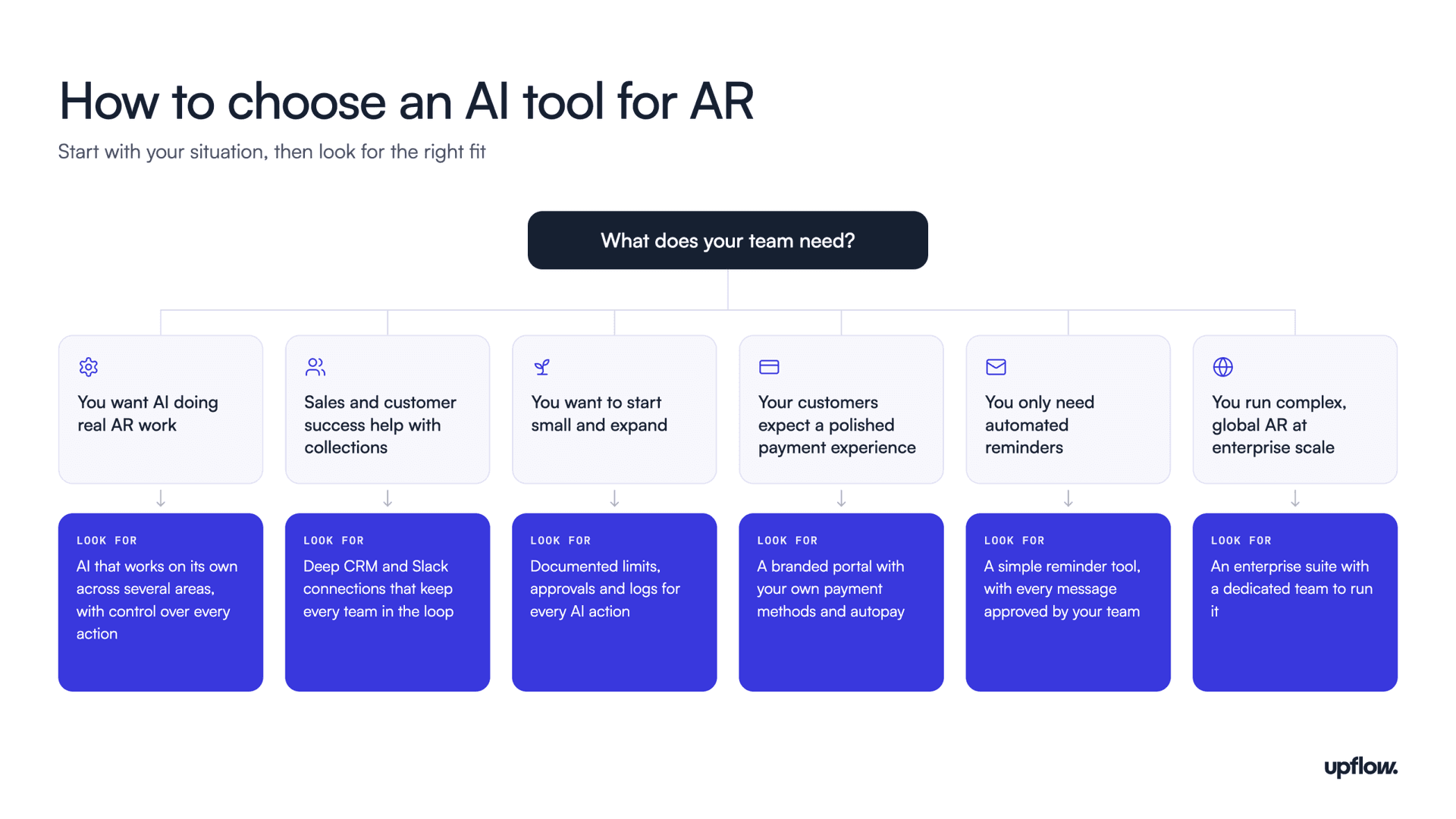
The right tool depends less on how much AI it advertises and more on how your team works. Start with the three questions from this guide, then match your answers to the situations below.
If you want AI doing real AR work
Look for a tool whose AI works on its own in more than one area, connects to more than your ERP, and lets you control each action it takes. Upflow is the only tool in this guide rated Excellent on all three questions. Most other tools’ AI either waits for approval on most actions or covers a single area, such as cash application.
If sales and customer success are involved in collections
Choose a tool that brings CRM context into every decision and keeps those teams in the loop. Upflow connects to CRMs like Salesforce, HubSpot and communication tools like Slack, so the people who own the customer relationship see what’s happening with each account. Elsewhere, CRM connections are often limited: Chaser’s only log emails, and Stuut and Paraglide don’t document one on their own sites.
If you want to start small and expand
Choose a tool that documents how you limit, approve and review what its AI does, so you can begin with a few accounts and widen its role as it proves reliable. The trust column in the scorecard shows how far each tool goes, and the demo questions under “Can you trust it with your customers?” will show you how those controls work in practice.
If your customers expect a polished payment experience
Look at how much control you have over what customers see. Upflow Payments lets you brand the portal, choose payment methods, and offer autopay and saved payment methods, while some tools offer little more than a payment link.
If you only need automated reminders
If your team isn’t ready to hand AR work to AI, a simpler reminder tool may be enough, as long as you’re comfortable approving each message yourself.
If you’re a large enterprise with complex, global AR
Enterprise suites such as HighRadius and Billtrust are built for that scale, with longer implementations and dedicated teams to run them.
The bottom line
As AI spreads through finance, many teams are using it to make collections faster, with more reminders sent sooner and less human attention behind each one. That treats AR as a transactional function at the moment the evidence points the other way. In PwC’s Working Capital Study 24/25, days sales outstanding rose 6.6% over five years, a rise PwC attributes to a combination of lax processes and a largely transactional approach to accounts receivable. Adding AI to that approach only speeds up the same problem.
The companies that pull ahead will treat collecting cash as a discipline, with clear principles for how they treat customers and clear metrics for how well it’s working. PwC’s latest study makes a similar case, describing collections discipline underpinned by an intelligent, holistic approach that links receivables with payables, inventory and cash forecasting. That’s the idea behind Financial Relationship Management: every conversation about money is part of a customer relationship that finance owns.
AI agents can make that discipline far stronger, but only when the foundation is in place. Gartner predicts that over 40% of agentic AI projects will be canceled by the end of 2027, due to escalating costs, unclear business value or inadequate risk controls. And in McKinsey’s 2025 State of AI survey, AI high performers were nearly three times as likely as others to fundamentally redesign their workflows in their deployment of AI. In AR, that foundation means connected data, a clear view of every customer relationship, and controls your team trusts. The teams that build it first will get the most from AI, and from their customer relationships too.
AI in AR is changing quickly, and so will the tools in this guide. We’ll update the ratings as new features become available to customers.

Alex Louisy
Co-founder and CEO of Upflow
Alex is the Co-founder and CEO of Upflow, where he leads the company’s mission to revolutionize how B2B businesses manage their cash flow. Backed by top-tier investors like Hedosophia, YCombinator, Hexa, and Lorimer Ventures, with more than $25m in funding to date, he is a strong advocate for financial transparency and operational excellence, bringing a founder’s perspective to the biggest challenges and opportunities in modern revenue management.
Alex developed Upflow’s widely recognized “5 Maturity Stages of Cash Collection” framework, a model that has helped hundreds of companies build scalable and efficient finance operations. He also co-hosts The Growth-Minded CFO podcast, where he engages with finance and business leaders on innovative approaches to financial leadership. His thought leadership explores the intersection of business strategy, financial discipline, and organizational growth.
As a regular contributor to Upflow’s blog, Alex shares insights on leadership, scaling SaaS businesses, and the future of B2B finance. His writing helps founders, CFOs, and revenue leaders make smarter decisions and build financially resilient companies.

Summary

Shared
Frequently Asked Questions
Can’t find what you’re looking for?
Ask AI
AI in accounts receivable uses software to handle work that AR teams used to do manually, such as answering questions about overdue invoices, predicting late payments, drafting and sending customer follow-ups, and matching payments to invoices. Tools range from chat assistants that answer questions to AI agents that do the work on their own, so it’s worth checking which level a tool actually reaches.
AR automation follows fixed rules, such as sending a reminder five days after an invoice is due, whatever is happening with the account. AI agents read the context around each account, such as a customer’s reply or an open dispute, and adjust what they do next, like holding a reminder when a customer has already promised to pay. The strongest setups let agents handle the routine work while people stay in charge of the decisions that need judgment.
It can be, as long as your team stays in control of what the AI does. Look for four controls: limits on which accounts and tasks the AI handles, approval steps before sensitive messages go out, handoffs to a person when judgment is needed, and logs of every action the AI takes. Many teams start with a small group of accounts and widen the AI’s role as it proves reliable.
AI agents usually rank accounts by how much is overdue and how likely each customer is to pay late, based on their payment history. Good agents then check the context around each account before acting. A customer who has already promised to pay, or who is waiting on a fix to a disputed charge, moves down the list, while a key account at risk may go to a person instead. When comparing tools, ask the vendor to show you how its agent ranked a real list of accounts, and why.
At a minimum, your ERP or accounting system, so the AI sees invoices and payments. Better results come from also connecting the tools where customer context lives, like your CRM and email, since that’s where promises to pay and open disputes usually show up. Check how deep each connection goes, too: whether the tool can update your ERP, and whether it reacts to changes as they happen.
Financial Relationship Management (FRM) is a new way of thinking about cash collection, where every conversation about money is treated as part of an ongoing customer relationship. Making it work takes the right foundation: full context on every account, and coordination between everyone who works with that customer. In the age of AI agents, that foundation decides whether AI strengthens customer relationships or strains them.
AI shifts what AR teams spend their time on. Agents can take on routine work like follow-ups and payment matching, which frees the team for the conversations that need a person, such as negotiating payment plans and resolving disputes. The relationships with customers stay with your team.
Yes. AI can estimate when a customer is likely to pay by looking at how that customer has paid in the past, then update that estimate as new signals come in, such as a promise to pay. Larger sets of payment history give the AI more patterns to learn from. As of October 2026, Upflow’s agents draw on the payment history of more than 74 million paid invoices from over 5 million B2B payer companies. Teams use these predictions to keep their cash forecasts accurate and to decide which accounts to contact first.
MCP, short for Model Context Protocol, is an open standard that lets AI assistants like Claude or ChatGPT connect to business software. An AR tool with an MCP server lets your team ask questions about live receivables data from the AI assistant they already use, without logging into another system. As more finance teams work through AI assistants, it’s becoming a useful way to get AR insights wherever your team works.
Related articles