

Upflow → Blog → Accounting and Software
Can’t we just run AR in Claude or Copilot? An honest answer
Jean-Malo Le Dreff
|
November 14, 2026
Generate AI summary


TL;DR: AI assistants like Claude, ChatGPT or Microsoft Copilot are now very good at the thinking parts of accounts receivable: reading an account, drafting a reminder, building a forecast. Running AR is something else. It is a system of record that has to know, for every invoice, what was sent, what was paid and who promised what, and act on it every day across every channel. Build that around an assistant and you own the plumbing and the upkeep. Put the assistant on top of an AR platform instead, and you keep everything it is good at.
Yes, AI can do a meaningful share of accounts receivable work today. A general assistant connected to your ERP can summarize an account, draft a collection email or analyze your aging in minutes. What it cannot do on its own is run the function: remember the status of every invoice, act on it every day across channels, and leave a record your whole team and your auditor can rely on.
Our view is simple. An assistant is a system of questions. AR needs a system of record. The question is never whether to use Claude, ChatGPT or Copilot in finance (you should), but whether to make one of them the thing your collections depend on.
Why are finance leaders asking this now?
Because the tools got good and got connected. In May 2026, Anthropic released ten finance agent templates, including a general ledger reconciler and a month-end closer. NetSuite now supports the Model Context Protocol (MCP) through its AI Connector Service, so a supported assistant such as Claude or ChatGPT can work with NetSuite data directly.
So the question writes itself: if Claude or ChatGPT can see my open invoices and write a good reminder, why am I paying for AR software?
We hear it more and more from finance teams that haven’t tried Upflow yet, and some of them have already tried the DIY route. One controller pastes an invoice list into Claude to draft reminders, then checks each one by hand before sending. Another team built a local Python script with Claude to run its follow-ups. The worries they raised afterward were consistent: who maintains the code, how do we know the data is right, what happens at audit, and what will the token bill look like next year.
Those worries match the wider picture. In a March 2026 survey of 204 finance leaders, 63% of finance organizations said AI implementation in 2025 had been slower than expected, and Gartner warned CFOs not to mistake activity for impact.
What do AI assistants like Claude, ChatGPT or Copilot already do well for finance?
More than most AR vendors like to admit:
- Analysis on demand. Ask which customers drifted from 30 to 45 days to pay this quarter and get an answer with the reasoning shown.
- Drafting. A reminder that references the right invoice and matches the tone to the account reads better than most templates.
- Forecasting and modeling. General assistants are strong at building cash forecasts and scenarios from payment history. If forecasting is your main AR need, an assistant may cover much of it.
- Inbox help. Microsoft’s Finance Agent in Outlook, still in preview (an early version Microsoft may change), is built for AR staff. It summarizes customer information from the ERP and inbound emails, helps draft replies and saves updates back to the ERP.
The limits, as of November 2026, are worth knowing. Microsoft’s setup guide connects the Finance Agent to Dynamics 365 Finance and states: “Connecting the Finance Agent to other ERP applications and services isn’t supported at this time.” None of Anthropic’s ten finance templates is an AR or collections agent. Both will change. For now, a NetSuite team that wants an AI collections agent from Microsoft or Anthropic has nothing ready to switch on, so it has to build one.
Why does AR need a system of record, not a system of questions?
Because collection is a long series of small commitments that someone has to keep. An assistant answers the question you ask, from the data it can see at that moment. AR needs a system that already knows, for every open invoice, which segment it sits in, which stage it has reached, what went out last and on which channel, and whether the customer paid, disputed or promised a date. Then it has to act on that every day, whether anyone asks or not.
Upflow’s playbook for building a collection function, From Zero to Collected, splits the work plainly: half of collection is repetitive and half takes judgment. Assistants can help with the judgment half, as long as someone brings them the question. The repetitive half is different: when nobody keeps up with it, cash goes uncollected. Cédric Pesle, Accounting Manager at Welcome to the Jungle, describes the pattern in the book: invoice volume grew past what anyone could work by hand, routine follow-ups ate the hours meant for the accounts that needed a person, and by his read the company left collectable cash uncollected. A sharper chat window does not fix that. A system that runs the routine work does.
Out-of-date data is also where errors hide. The book gives the example of an ERP and billing system that sync overnight: the agent works from yesterday’s picture, and a customer who paid on Tuesday gets chased on Wednesday. An assistant reading a Monday export has the same blind spot. Accuracy is a wider worry, too: in a survey of 100 CFOs by Maximor, an AI finance vendor, reported by the Journal of Accountancy in February 2026, 86% said their team had run into inaccurate or hallucinated data when using AI for finance tasks.
The gap shows up job by job:
| AR job | What a general assistant does well | What you would have to build and own around it |
|---|---|---|
| Sequenced reminders by segment | Drafts excellent messages | A scheduler, a record of what was sent so nobody is chased twice, deliverability monitoring |
| Calls, SMS, letters | Writes the script or letter text | Telephony, an SMS gateway, a print and mail provider, logging back to the account |
| Taking payment | Explains how to pay | A payment portal, payment methods, writeback to the ERP |
| Cash application | Suggests likely matches for a person to check | Bank data ingestion, matching rules, an exception queue |
| Sales and CS visibility | Answers whoever has access | ERP roles and AI licenses for every person, a shared account timeline, CRM updates |
| Audit trail | Logs of its own tool calls | A record of every message, promise to pay and dispute against the invoice |
What would you have to build and own yourself?
Everything the assistant does not do, wired together by your team. Your controller can connect a payment processor, a mail API and a dialer. The question is who owns the result.
- Channels. Email alone stops working at the point where collection gets serious. Our book, From Zero to Collected, treats channels as an escalation ladder: email for scale, collection calls when a situation needs a step up, SMS kept for the few moments where a text will stand out, and a registered letter as the formal step that proves notice was given. Each step up the ladder means another provider, another integration and another log to reconcile.
- Payments and cash application. Someone has to take the payment, write it back to NetSuite or your ERP and accounting system and run cash application: matching what arrives to open items and routing the ambiguous cases to a person. Tools like NetSuite are trying to improve here: NetSuite’s 2026 Release 2 adds an AI transaction matching assistant for ambiguous bank matches. That helps the reconciler. It does not give your customer a way to pay.
- Sales and CS. An assistant connected to NetSuite or another ERP only sees what the connected user’s role in that system allows, so in practice only the few finance people with ERP access can use it. Sales and CS are left out. Collection is cross-functional work: the AE knows the customer is mid-procurement, CS knows the champion left. Upflow calls the discipline that joins these up Financial Relationship Management (FRM): the discipline of managing the financial relationship with a customer, from the moment payment terms are agreed until cash is collected and reconciled. It treats getting paid as a genuine customer touchpoint, owned collectively by Finance, Sales, and CS. You can apply it without any vendor, but not without a shared record.
Each of these looks manageable on its own. Together, they add up to a whole product, and someone on your team now has to maintain it.
What does a DIY build look like six months in?
Picture a controller at a $60M B2B tech company with 1,500 open invoices on NetSuite. This is a hypothetical scenario, built from the worries finance teams raised with us.
- Month 1. The controller exports overdue invoices, and Claude drafts reminders that are better than the old templates. The team reviews each one, and it works.
- Month 2. To save time, someone schedules the script and connects it to email so it sends on its own. A customer who wired payment on Tuesday is chased on Wednesday, because the export ran on Monday.
- Month 3. A CSM asks why a strategic account received a firm final notice in the middle of its renewal. Nobody in CS could see what had been sent, or that a reminder was due.
- Month 4. The auditor asks for evidence of what was sent, to whom and who approved it. The answer sits in chat histories and a script log on one laptop.
- Month 6. The controller goes on leave. Nobody else knows how to change the rules, and collections quietly falls back to a spreadsheet.
None of these failures is about model quality. Each one is about out-of-date data, access or ownership, which is why they show up no matter which assistant you pick.
What are the hidden costs and risks of building it yourself?
Two costs show up after the build: the bill and the security exposure.
Does a DIY assistant really cost less at volume?
Usually not, because the cost model runs the wrong way for collections. Assistant pricing scales with usage. AR platform pricing generally does not scale with how much thinking the software does.
On Claude’s Team and seat-based Enterprise plans, usage beyond what is included is billed through usage credits “at standard API rates,” and on usage-based Enterprise plans all usage is billed at API rates from the first token. Microsoft works the same way. Even though using Copilot agents inside apps like Outlook or Teams costs nothing extra with Microsoft 365 Copilot licenses, an agent that runs on its own, for example on a schedule, is still billed per action, at 5 Copilot Credits each.
That suits ad hoc questions, and fits a collections engine badly, because its cost is repetition. A scheduled agent that takes one action per open invoice per week, on 1,500 invoices, logs about 6,500 actions a month, or roughly 32,500 credits, before it has read a single reply. Then add a provider for each extra channel, the payment processor and the hours your team spends maintaining it all.
Platform pricing works differently. Upflow, for example, prices subscriptions in tiers by annual invoiced revenue with unlimited user seats, and charges usage fees on top for channels such as calls and letters. Your finance team can ask a hundred questions a day and the subscription does not move.
Is it safe to connect an AI assistant directly to your ERP?
It can be, with care. But Oracle’s own security guidance for connecting AI assistants to NetSuite warns against the exact setup a DIY collections agent requires. Its risk page for the AI Connector Service lists prompt injection and hallucination, along with tool poisoning from third-party MCP servers, and warns that an agent may run powerful tool functions, such as making payments or granting approvals, without the user’s explicit intent.
NetSuite ships real controls. External AI agents are off by default, MCP tools run with the same permissions as the NetSuite user, they never run as Administrator, and all tool usage is logged. Two of Oracle’s recommended mitigations deserve a CFO’s attention, because a DIY collections agent tends to break both:
- Prefer clients that require explicit user confirmation before high-impact actions, which Oracle defines to include paying and exporting large data sets.
- “Avoid combining NetSuite MCP tools with tools that provide broad access to local file systems, browsers, email, messaging platforms, databases, or internal networks.”
The second point matters most for collections. By design, a DIY collections agent connects to NetSuite and to email, and acts on its own. It also reads customer replies, and an email is exactly where someone can hide instructions meant to trick an AI, a risk known as prompt injection. That is the combination the ERP vendor tells you to avoid. OWASP calls the underlying risk “excessive agency,” which comes from giving an AI system more functionality, permissions or autonomy than the task needs.
On confidentiality, check your plan terms. Anthropic states that it does not use data from its commercial products to train its models. The bigger exposure is usually internal: customer balances and dispute history flowing through prompts and scripts that nobody in security has reviewed.
Won’t the next model fix all this?
Some of it, yes. Models will keep getting better and cheaper per task. That is the strongest argument for building, and it deserves a straight answer.
Look back at the six-month story: a better model would not have known the customer paid on Tuesday if the data said otherwise. It would not have shown the CSM what was sent. It would not have produced an audit trail, and it would not have taken over when the controller went on leave. Even a much smarter agent still reads untrusted customer emails while holding access to your ERP, which is the risk Oracle’s guidance is about.
From Zero to Collected makes the deeper point: what decides how much you can hand to agents is less what they are capable of and more how much of your function you have defined well enough to hand over. Better models raise the ceiling on the assistant layer. That is a reason to keep the assistant in your stack, on top of a system that keeps the record.
What is the better setup?
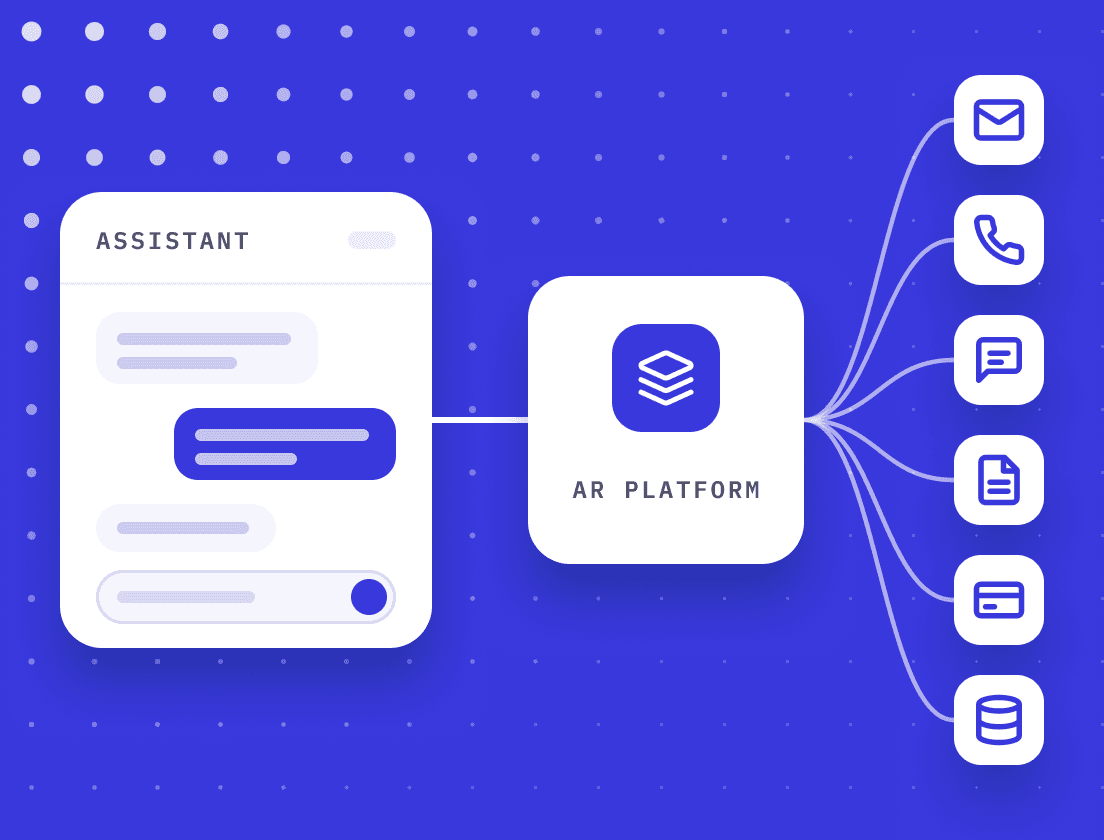
Keep NetSuite or your ERP and accounting system as the financial record, let an AR platform run collection on top of it, and put your AI assistant above both. The AR platform keeps the record, runs the channels and payments under the supervision you set, and keeps sales and CS informed in the tools they already use. The AI assistant becomes the fastest way to ask questions about all of it.
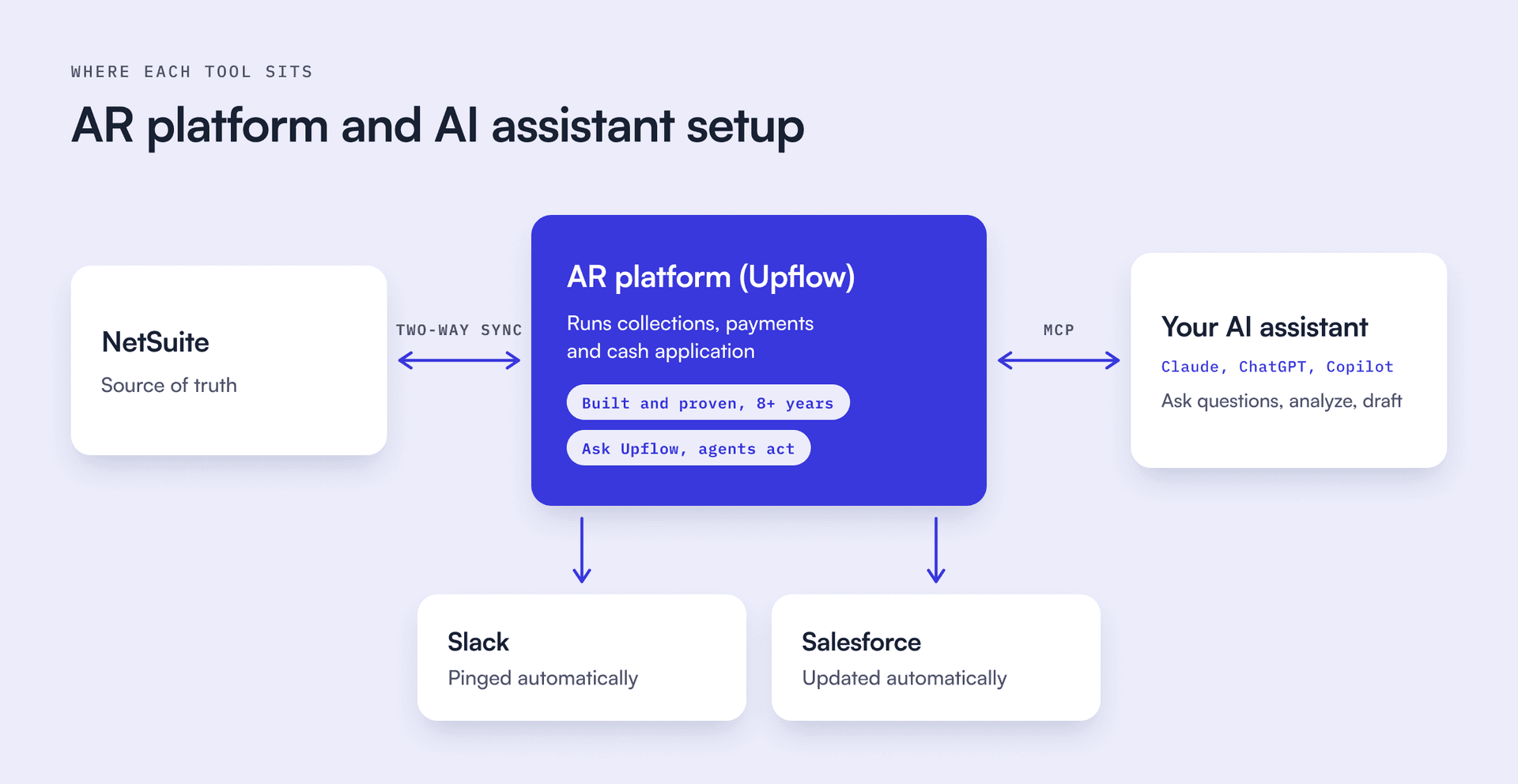
This is how we built Upflow to work. The Upflow MCP server lets a finance team query its AR data from Claude, ChatGPT or Copilot, with permission-based access aligned to its existing data structure. The connection is read-only: the assistant can query AR data but cannot create, change or delete anything in Upflow, so the actions stay in the platform, under the rules your team sets. A controller can ask which accounts are blocking cash this week and why, and get an answer grounded in invoices and customer conversations, while the collection work keeps running, collection data flows to the CRM and the team gets notified in Slack.
How should you decide between building and buying?
Answer five questions honestly.
- Volume. Could one person review every outgoing message this month? If yes, an assistant with human review may be enough for now.
- Channels. Do any accounts need a call, an SMS or a letter before they pay? If yes, an email-only setup has no escalation path.
- Cash. Do you want customers paying through a portal, with transactions written back to the ERP? An assistant will not take a payment.
- People. Do sales and CS need to see and act on collection status? If yes, count the ERP roles and AI licenses that would take, and decide who keeps the shared history.
- Ownership. If the person who built your setup left tomorrow, could someone else change the rules and show your auditor what was sent? If not, you may be building a dependency rather than a process.
If you answered yes to the first question and no to the rest, keep experimenting with your assistant. Plenty of teams start there. If two or more answers point the other way, buy the platform and keep the assistant. You will get more from both.
See how Upflow and your AI assistant work together. Bring your own assistant. In a short demo, we will show Upflow running collections and payments while your team queries the same AR data from Claude, ChatGPT or Copilot. Book a demo.


Jean-Malo Le Dreff
Director of Product Management at Upflow
About the Author
Jean-Malo (JM) is the Director of Product Management at Upflow, where he leads the design and development of the platform’s core features. With a strong product mindset and a deep understanding of user needs, JM ensures Upflow’s tools deliver both functionality and delight to modern finance teams.
At Upflow, he works cross-functionally to translate customer feedback into intuitive, impactful features, especially around integrations, workflows, and platform scalability. His expertise lies in making complex financial processes simpler through thoughtful product design and seamless system connectivity.
JM contributes to Upflow’s blog with practical, product-driven content that helps users get the most value from the platform. He writes in-depth guides on product comparisons, software integrations, and the strategic advantages of using Upflow within a broader finance tech stack.

Summary

Shared
Frequently Asked Questions
Can’t find what you’re looking for?
Ask AI
Yes, for drafting and analysis, and many finance teams already do. Paste in an invoice list or connect your ERP, and the assistant will write good reminders and explain an account. Keep a person reviewing every message. Plan separately for what it does not cover on its own: scheduling and deduplication, calls and letters, payment collection, and a shared record for sales and CS.
It covers the questions, not the process. Those licenses give finance a fast way to analyze accounts and draft messages. They don’t run reminders by segment, escalate to calls or letters, take payments, or keep a record that sales, CS and your auditor can rely on. An AR platform like Upflow does that work and connects to the assistant you already pay for through MCP. The licenses keep their value, and nobody on your team has to build and maintain collections software on the side.
It depends on your ERP and your volume. Microsoft’s Finance Agent in Outlook, in preview, helps AR staff summarize customer information and emails and draft replies. As of November 2026, Microsoft’s setup guide supports connecting it to Dynamics 365 Finance and says other ERPs are not supported at this time. NetSuite teams would need a different route.
It can be, if you follow Oracle’s guidance. NetSuite’s AI Connector Service keeps external AI agents off by default, runs tools with the user’s own permissions and logs usage. Oracle also recommends confirming high-impact actions and avoiding combining NetSuite tools with broad email or messaging access, which is exactly what a DIY collections agent needs. Involve your security team before you build.
Upflow is one. Its MCP server connects your AR data to Claude, ChatGPT or Copilot, with access that follows your team’s existing permissions. A controller can ask which accounts are blocking cash this week and get an answer grounded in invoices and customer conversations. When comparing tools, check what each MCP server exposes and who owns the actions it can take.
Any assistant can answer questions about AR. What matters is the record behind it. Connected straight to the ERP, it sees invoices and balances, but not what was sent, who promised to pay or what is in dispute. Connected to an AR platform like Upflow, it can answer from the full collection history, while the platform keeps running reminders, payments and cash application.
Related articles