

Upflow → Blog → Accounting and Software
NetSuite AR Automation: Native Features vs Add-ons
Jean-Malo Le Dreff
|
October 15, 2026
Generate AI summary


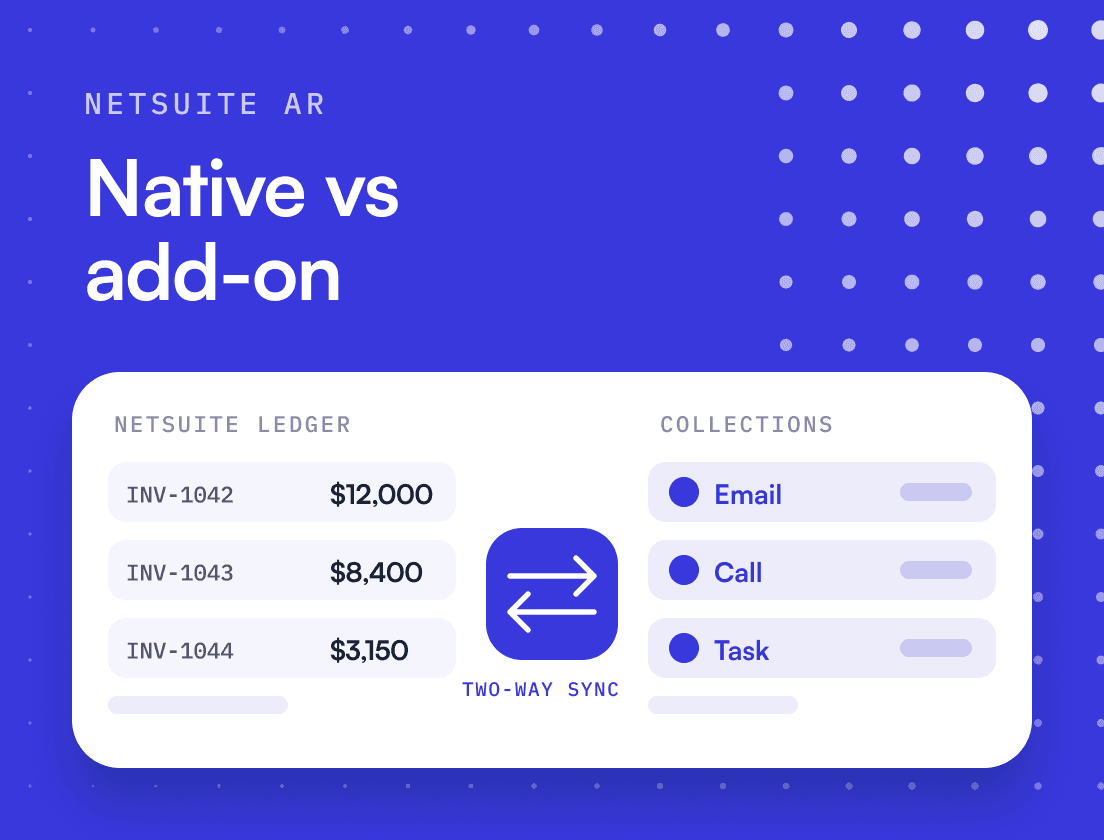
TL;DR: NetSuite AR automation covers the mechanics well: aging reports, scheduled dunning letters through the Dunning Letters SuiteApp, payment links through NetSuite Pay and bank matching that suggests payments for open invoices. What it does not give you is a collections workflow built around people and context. Most NetSuite teams decide to add a tool when the bottleneck moves from sending reminders to deciding who to call, about what, and with whose help.
NetSuite AR automation means using NetSuite’s native features and SuiteApps to run invoice-to-cash without manual exports: generating invoices, sending dunning letters on a schedule, taking payments online and matching bank receipts to open invoices. NetSuite does most of that well, and it keeps getting better at the cash side.
The limit most NetSuite teams hit is the letter itself as the unit of collections work. Dunning in NetSuite is a rules engine that decides when a template goes out. Collections at a growing B2B tech company is a series of judgment calls about specific customers, and those calls depend on context that usually sits with sales and customer success, or in someone’s inbox. This guide maps what NetSuite does natively, where it starts to strain, and how to choose between configuring more, adding a SuiteApp or adding a dedicated AR platform.
What does AR automation mean for a NetSuite team?
For a NetSuite team, AR automation is everything between a posted invoice and a closed one that no longer needs a person to start it. That covers reminders and escalation, how customers pay, how payments get matched to invoices, and the reporting that tells you where cash is stuck.
The scope matters because the cost of getting it wrong is concrete. Atradius’s 2026 survey of US businesses found that late payments affect an average of 22% of B2B receivables, and about seven in ten US companies still face late payments. Take a hypothetical tech company with $48M in annual revenue. Each day of DSO holds about $131,500 of cash. At 58 days DSO that is roughly $7.6M sitting in receivables. Bring DSO to 50 and around $1.05M comes back into the bank.
So the question to ask of any setup, native or not, is simple: which of those days does it actually remove?
What does NetSuite automate natively in accounts receivable?
NetSuite handles the record and the routine. Out of the box you get invoice generation, customer and payment records, the A/R Aging reports and manual collection letters. Add the Dunning Letters SuiteApp and NetSuite Pay on top of the banking features, and a good share of the reminder and cash work can run on a schedule.
| AR step | Native NetSuite feature | Availability notes |
|---|---|---|
| Aging and visibility | A/R Aging Summary and Detail reports, Cash 360 dashboard | Aging buckets configurable; Cash 360 is a managed SuiteApp available by default on Classic and Accounting Centers |
| Reminders | Collection letters from the invoice Communication subtab, individually or in bulk | Manual |
| Dunning | Dunning Letters SuiteApp with procedures and levels | Purchased through your NetSuite account manager; requires the Multiple Currencies feature |
| Online payment | NetSuite Pay with Payment Link, plus payment from Customer Center or SuiteCommerce MyAccount | US and Canada; merchant approval required |
| Cash application | Automated Cash Application and Match Bank Data suggestions | Uses imported bank lines; 2026.2 suggestions are one-to-one for the full amount only |
A few details worth knowing before you plan around them:
- Aging. The A/R Aging Summary groups unpaid invoices by customer into 1 to 30, 31 to 60, 61 to 90 and over 90 days overdue, and you can change the interval and duration from the report footer. Cash 360 adds A/R and A/P aging charts and a near-term cash forecast built from NetSuite data.
- Collection letters. Without the dunning SuiteApp, you send collection letters from a template on the invoice’s Communication subtab, individually or in bulk, and the message is saved on the invoice.
- Payments. NetSuite Pay accepts card and ACH, and its Payment Link lets you send e-invoices with a link or QR code to a payment page that can allow partial payments. Customers can also pay from Customer Center or from SuiteCommerce MyAccount. It is a separate SuiteApp, and its dashboard shows content for the United States or Canada. NetSuite’s 2026.1 release added card processing in Canadian dollars for Canadian organizations.
That is a solid base for a team at a few hundred customers. The question is what happens to it as the customer count and the number of people involved grow.
How does NetSuite dunning work, and where does it stop?
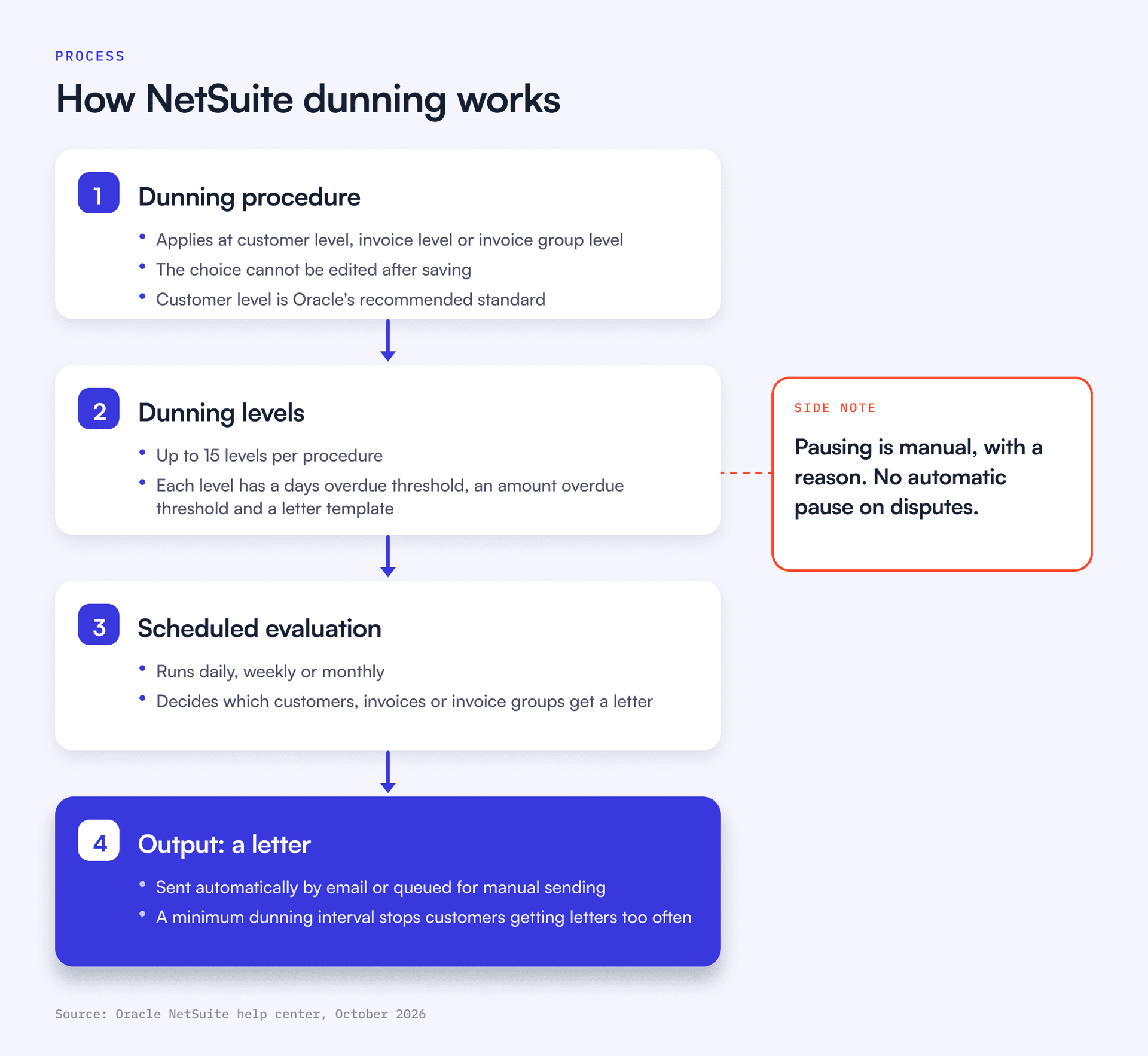
NetSuite dunning runs through the Dunning Letters SuiteApp. You build dunning procedures made of levels, each level has thresholds for days overdue and amount overdue plus a letter template, and a scheduled evaluation workflow decides which customers, invoices or invoice groups get a letter.
Setting it up follows the sequence in the Dunning Setup Assistant:
- Assign the Dunning Director and Dunning Manager roles.
- Define dunning levels by days past due and minimum amount.
- Attach an email template to each level, in as many languages as you need.
- Schedule the evaluation to run daily, weekly or monthly.
- Bulk assign the procedure to customers, then review the setup summary.
Each dunning procedure applies at customer level (one letter listing all overdue invoices, which Oracle recommends as the standard), invoice level or invoice group level, and that choice cannot be edited after saving. A procedure can send automatically by email or queue letters for manual sending, and a minimum dunning interval stops a customer receiving letters too often. You can run several procedures with assignment criteria and priority, so rule-based segmentation is possible: a stricter cadence for invoices above a value, or a different template for a sales rep’s accounts.
Oracle’s documentation lists these dunning limitations:
- A procedure can have at most 15 levels.
- The email sending queue and the PDF printing queue each handle up to 100 letters at a time, and PDF letters can only be generated manually.
- The SuiteApp cannot detect bounced emails.
- Only accounts with the Multiple Currencies feature enabled can use it.
Two behaviors matter more than the limits. Pausing dunning is manual: someone checks Pause Dunning on the customer, invoice or invoice group and picks a reason, and clearing the box triggers a new evaluation right away. Nothing in the documentation pauses dunning when a customer raises a dispute. And the output is always a letter. There is no notion of a phone call, a task for the account executive or a reply that needs reading.
NetSuite dunning decides when a template goes out. It does not decide who should get a call instead.
Is there a NetSuite collections module?
No. In Oracle’s current documentation there is no standalone collections module. The Collections chapter of the NetSuite help center covers collection letters, overdue balances on the customer dashboard and dunning, which “is provided as a SuiteApp”.
What people searching for a “NetSuite collections module” usually want is a collector’s worklist: which accounts to work today, what was said last time, who promised to pay and when. Dunning Managers and A/R Clerks can be limited to the customers assigned to them, and the Dunning Dashboard tracks letter status. Beyond that, teams build saved searches and dashboards. Plenty run that way for years. It works until the context behind each account lives in more places than a saved search can reach.
What about cash application in NetSuite?
NetSuite’s Automated Cash Application creates customer payments from imported bank lines and applies them to open invoices, using invoice numbers in the bank line where they exist and suggesting matches where they do not. It has improved in the last two releases. In 2026.1, bank transaction matching started using generative AI to pull richer data from bank lines for auto-matching, available to eligible accounts. In 2026.2, the Match Bank Data page added suggestions to create and apply payments for open invoices, limited to one-to-one matches for the full outstanding amount, with partial payments and multi-invoice payments not supported.
That last limit is where B2B teams feel it, because enterprise customers pay several invoices in one wire with thin remittance. Matching those wires is the hard part of automated cash application in NetSuite.
When does native NetSuite AR start to strain?
Native NetSuite AR strains when collections stops being a volume problem and becomes a coordination problem. The signals tend to show up in this order.
| Signal | What it usually means |
|---|---|
| A spreadsheet next to the aging report that someone updates weekly | The context for each account lives outside NetSuite |
| Disputes discovered when a customer replies to a dunning letter | Finance has no shared view with sales and CS |
| Every overdue customer gets the same cadence regardless of value | Segmentation stops at rules on amount and days |
| Collectors spend mornings building saved searches | The worklist is manual |
| Payments that arrive between syncs trigger reminders anyway | Data is not real-time across tools |
The first signal is the one to watch. From Zero to Collected describes a Finance Director who joined a fast-growing tech company and found deals closed in Salesforce CPQ, invoices generated in Salesforce Billing, sent through Conga, paid through Stripe, and a NetSuite general ledger with no invoice-level records. Her team kept a shared Google Sheet updated weekly to hold it together. The sticking point was a decision nobody had made: which system held the truth about an invoice.
In the Financial Relationship Management (FRM) framework, the discipline of managing the financial relationship with a customer from the moment payment terms are agreed until cash is collected and reconciled, this is the move from stage 2 to stage 3 of the maturity curve. Stage 2 is a reminder sequence and central AR data. Stage 3 gives each segment its own cadence and escalation path, with a formal dispute process. That jump tends to produce the fastest results, and it is where NetSuite’s letter-first model gets tight.
SuiteApps or a dedicated AR platform: which fits?
Both sit on NetSuite, and both can be the right answer. The difference is where the collections work happens.
| Option | Where the work happens | Good at | Watch for |
|---|---|---|---|
| Native NetSuite plus Dunning Letters SuiteApp | Inside NetSuite | Rules-based letters, one system, no extra sync | Letter-only output, manual pause, 100-letter queues |
| Third-party collections SuiteApp | Inside NetSuite screens | Keeps users in NetSuite, uses NetSuite records | Depth of workflow varies; check Built for NetSuite status |
| Dedicated AR platform with two-way sync | In a separate workspace synced with NetSuite | Multi-channel workflows, shared timelines, portals, analytics | Sync model and frequency, ownership of the integration |
Native plus the Dunning Letters SuiteApp fits a team with a few hundred customers, mostly self-serve payers and one person running AR. It keeps everything in one system, which is worth a lot.
A collections SuiteApp keeps work inside NetSuite screens. SuiteApp.com lists several AR add-ons, such as AR Post. Check how deep the workflow goes and whether the app holds “Built for NetSuite” status.
A dedicated AR platform moves collections work into a workspace built for it and syncs back to NetSuite. ERP Research’s July 2026 comparison lists 14 such options for NetSuite, including Billtrust, HighRadius, Upflow and others. Upflow’s NetSuite integration syncs customers, invoices, credit memos and contacts into Upflow in real time, including NetSuite custom fields and multiple subsidiaries, and writes portal payments back so they reconcile against NetSuite invoices. It connects to your CRM as well. With the Salesforce integration, each customer’s Salesforce account owner becomes their assigned user in Upflow, so collections work lands with the person who owns the relationship, and HubSpot connects too.
The deciding factor is your bottleneck. If the pain is sending reminders, configure NetSuite properly first. If the pain is that collectors cannot see what sales promised, or chase customers who already disputed, a better letter engine will not help.
How should you evaluate AR automation tools for NetSuite?
Start with the sync, because every other feature reads from it. Then judge the workflow against how your team actually collects.
- Sync model. Ask whether data flows both ways, which objects sync (invoices, credit memos, payments, custom fields) and how often. From Zero to Collected makes the point bluntly: if systems sync overnight, an invoice paid on Tuesday still reads as outstanding on Wednesday, and the customer who paid gets chased anyway.
- Multi-subsidiary and multi-currency. Map one entity end to end in the demo, with your real structure.
- Collections workflow. Look for segmentation by customer value and behavior, channels beyond email, dispute handling that stops reminders, and tasks you can hand to sales or CS. Upflow’s AR automation, for example, prioritizes which accounts to contact and drafts outreach across channels.
- Payments. Check that a portal payment lands in NetSuite as a payment applied to the right invoice, with no manual step.
- Reporting. You want DSO, CEI and aging by segment without exporting to a spreadsheet.
- Implementation and cost. ERP Research suggests asking for two reference customers at your size and comparing three-year total cost, since vendors price per user, per transaction or per module.
Run every vendor through the same messy scenario: a customer with three subsidiaries who paid two of five invoices in one wire and disputes a third. You will learn more from that hour than from a feature grid.
What should the first 90 days look like?
The first 90 days should earn trust in the data before they automate anything that touches a customer.
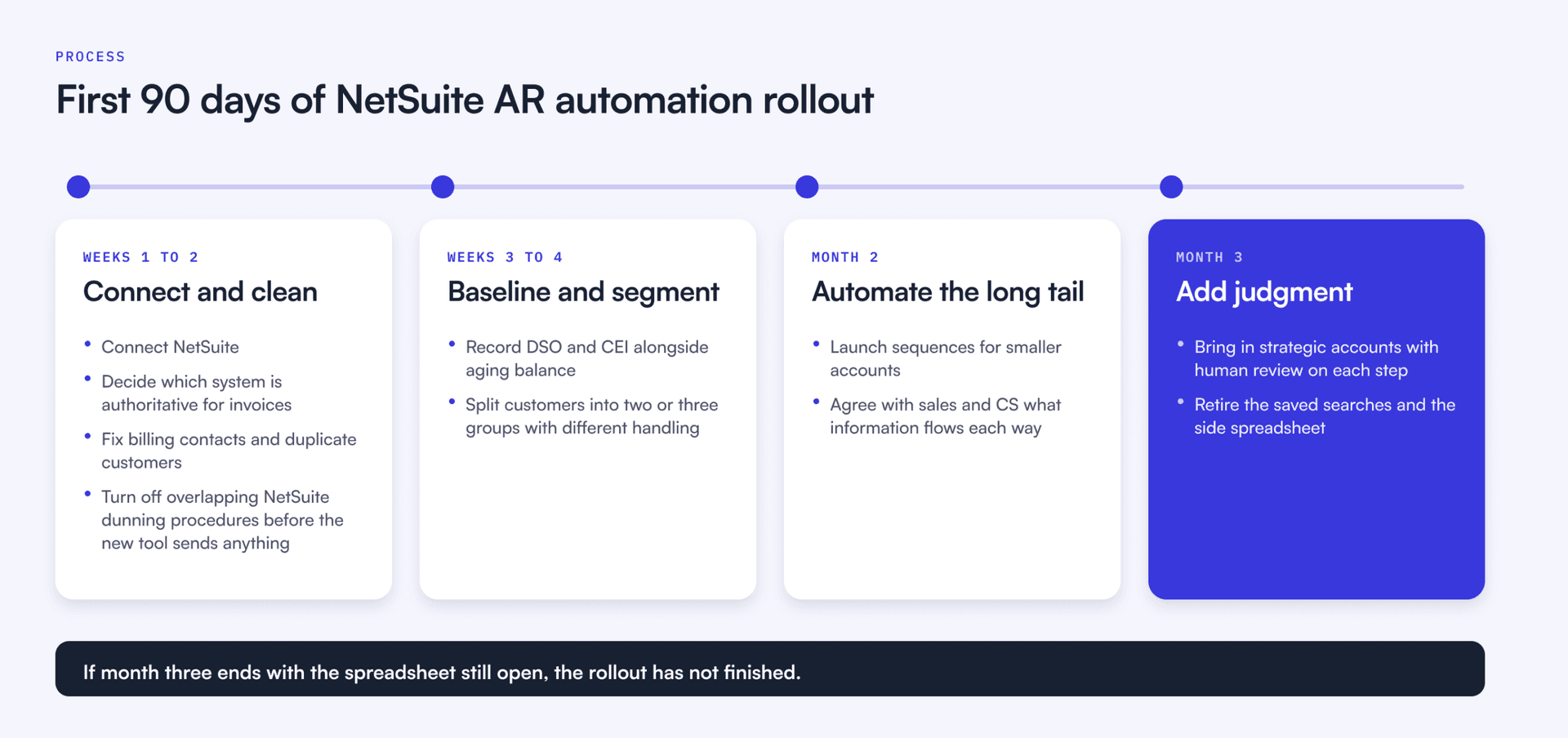
- Weeks 1 to 2: connect and clean. Connect NetSuite, decide which system is authoritative for invoices and fix billing contacts and duplicate customers. Turn off overlapping NetSuite dunning procedures before the new tool sends anything, so customers never get two reminders for one invoice.
- Weeks 3 to 4: baseline and segment. Record DSO and CEI alongside aging balance, then split customers into two or three groups with different handling.
- Month 2: automate the long tail. Launch sequences for smaller accounts and agree with sales and CS what information flows each way.
- Month 3: add judgment. Bring in strategic accounts with human review on each step, then retire the saved searches and the side spreadsheet.
If month three ends with the spreadsheet still open, the rollout has not finished.
Ready to see it on your own NetSuite data?
NetSuite keeps the books. The collections work around it is where cash gets won or lost. If you are still designing the process, download From Zero to Collected, Upflow’s book on building a collections function for B2B tech companies.
To see how a dedicated platform runs that work on top of your NetSuite data with two-way sync, book a NetSuite-focused demo with our team.


Jean-Malo Le Dreff
Director of Product Management at Upflow
About the Author
Jean-Malo (JM) is the Director of Product Management at Upflow, where he leads the design and development of the platform’s core features. With a strong product mindset and a deep understanding of user needs, JM ensures Upflow’s tools deliver both functionality and delight to modern finance teams.
At Upflow, he works cross-functionally to translate customer feedback into intuitive, impactful features, especially around integrations, workflows, and platform scalability. His expertise lies in making complex financial processes simpler through thoughtful product design and seamless system connectivity.
JM contributes to Upflow’s blog with practical, product-driven content that helps users get the most value from the platform. He writes in-depth guides on product comparisons, software integrations, and the strategic advantages of using Upflow within a broader finance tech stack.

Summary

Shared
Frequently Asked Questions
Can’t find what you’re looking for?
Ask AI
Yes, partly. Natively, NetSuite generates invoices and tracks aging, and you can send collection letters from it. Scheduled dunning comes from the Dunning Letters SuiteApp, online payments from NetSuite Pay, and bank matching from the banking features, which suggest payments for open invoices. What it lacks is a collections workflow beyond letters: segmentation by behavior, multi-channel outreach and dispute handling that pauses reminders on its own.
Buy the Dunning Letters SuiteApp through your NetSuite account manager, then install it and open the Dunning Setup Assistant. You assign Dunning Director and Dunning Manager roles, define levels by days past due and minimum amount, attach an email template to each level, schedule the evaluation daily, weekly or monthly, then bulk assign the procedure to customers. Customer level dunning is Oracle’s recommended standard.
There is no standalone collections module in Oracle’s current NetSuite documentation. The Collections area of the help center covers collection letters, overdue balances on the customer dashboard and the Dunning Letters SuiteApp. Most teams build their collector worklist from saved searches and dashboards, or add a SuiteApp or a dedicated AR platform when they need collector tasks and account notes in one place.
Go to Reports, then Customer/Receivables, then A/R Aging. The summary groups unpaid invoices by customer into 1 to 30, 31 to 60, 61 to 90 and over 90 days overdue, and you can change the interval and duration in the report footer. Use A/R Aging Detail to see individual invoices, or the Cash 360 dashboard for an aging chart alongside a cash forecast.
It depends on your bottleneck. If reminders are the pain, a well-configured Dunning Letters SuiteApp may be enough. If you need multi-channel workflows, shared context with sales and CS, and a payment portal that syncs back, Upflow is built for that. It syncs with NetSuite in real time, in both directions, and runs collections as Financial Relationship Management (FRM): managing the financial relationship with each customer from the moment payment terms are agreed until cash is collected and reconciled. Finance, sales and customer success work from one shared timeline per customer, with invoice status, conversations and open disputes in view, so nobody starts a customer conversation without the full picture.
Choose a SuiteApp if you want collectors to stay inside NetSuite screens and your workflow is mostly rules-based. Choose a dedicated platform with two-way sync if collections involves several teams, many channels or complex disputes. In both cases, check which objects sync and how often, and ask who maintains the integration when NetSuite ships a new release.
Related articles