

Upflow → Blog → B2B payments
Lockbox Services: A Guide for B2B Tech Finance Teams
Alexandre Antoine
|
November 5, 2026
Generate AI summary


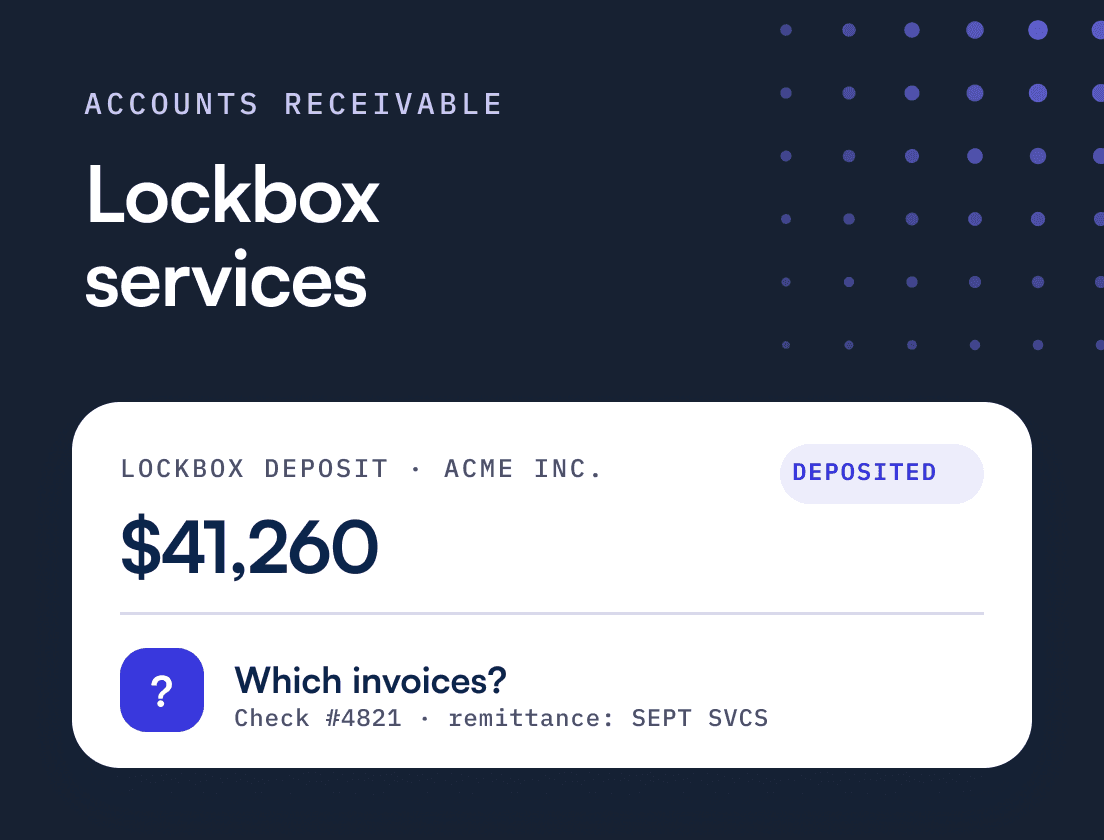
TL;DR: A bank lockbox service collects your customers’ mailed checks at a P.O. box, deposits them the same day and sends you images and a data file. For a B2B tech company it speeds up the deposit and takes check handling out of the office, but it doesn’t tell you which invoices were paid. Buy a lockbox for the checks you can’t get rid of, and treat the bank’s file as the start of cash application.
Lockbox Services: What B2B Tech Finance Teams Should Know
A lockbox service is a bank service in which your customers mail their checks to a P.O. box the bank controls, and the bank opens the envelopes, deposits the checks into your account and sends you images and data for each payment. It exists to shorten the time between a check leaving your customer’s AP department and the cash sitting in your account.
A bank’s own material tends to focus on the deposit, which is the easy half. Picture a check for $41,260 with a stub that says “SEPT SVCS.” The bank deposits and images it by mid-morning. Nobody yet knows which three invoices it was meant to clear. A lockbox moves checks faster. It does not apply cash.
This guide covers how a lockbox works, what the bank sends back and what it costs. It ends with when a lockbox is worth paying for, and how to shrink the number of customers who need one.
What is a bank lockbox service?
A bank lockbox is a P.O. box that your bank owns and empties for you. You print the lockbox address on your invoices as the remit-to address, customers mail checks there, and the bank processes them without anyone at your company touching paper.
The process runs in five steps:
- Your customer mails a check and a remittance stub (or a printed remittance advice) to the lockbox address.
- The bank collects mail from the box several times a day. Cadence Bank describes collecting “at frequent intervals throughout the day.”
- Bank staff or scanning equipment open each envelope, image the contents and capture the payment data.
- The checks are deposited into your operating account, usually as images under Check 21, the federal law in effect since 2004 that lets banks exchange electronic check images instead of moving paper.
- The bank sends you a deposit report, the images and a data file for posting.
Banks also call this “remittance processing” or “lockbox processing.” Same service.
Which type of lockbox do B2B tech companies use?
Banks sell two kinds of lockbox: retail and wholesale. B2B tech companies almost always need a wholesale lockbox, because their customers send large payments without a standard coupon.
| Retail lockbox | Wholesale lockbox | |
|---|---|---|
| Built for | High volumes of small, standardized payments | Business-to-business payments |
| Volume and size | Very high volume, small amounts | Lower volume, higher dollar amounts |
| Remittance | A scannable coupon with a fixed layout | Free-form stubs, printed advices, cover letters or nothing |
| Data capture | Mostly automated (OCR on the coupon) | More manual work, keyed by bank staff at extra cost |
| What matters most | Cost per item | Quality of the remittance data |
Cadence Bank sizes retail lockbox at “5,000-200,000 payments per month or even larger,” while wholesale payments “tend to be higher dollar amounts with less frequency.” The difference that matters to a controller is the remittance. A retail coupon is built to be read by a machine. A check from an enterprise customer’s AP department comes with whatever their ERP prints, and that is where wholesale processing gets expensive.
What does the bank send back after a lockbox deposit?
Your bank sends back a deposit total, images of every item, a data file with the payment details it captured, and a list of exceptions it could not process. None of these tells you which invoices a payment settles.
| Output | What it contains | What AR does with it |
|---|---|---|
| Deposit report | Lockbox deposit total on BAI2 prior-day or intraday reporting, for example type code 115 "Lockbox Deposit" in Webster Bank's code list | Reconcile the deposit to the bank statement |
| Images | Check front and back, remittance documents, often the envelope | Answer customer questions and research disputes |
| Data or posting file | Payer, check number, amount, any invoice numbers the bank captured or keyed | Cash application |
| Exceptions | Correspondence, items with no remittance, foreign items | Manual review |
The deposit total shows up on your bank’s prior-day or intraday reporting, usually in BAI2 format. Webster Bank’s code list, for example, uses type code 115 for “Lockbox Deposit”. Bank reconciliation works from this, and it tells you how much arrived, not who it was for.
The images (check fronts and backs, remittance documents, often envelopes) sit in a portal. Cadence stores check images for up to seven years. Your AR team will live in that portal whenever a customer asks whether you got their payment.
The data file is the one that matters for cash application. It carries the payer, check number, amount and whatever remittance detail the bank captured, either as a standard posting file or as customizable output files shaped for your AR system. Invoice numbers only appear if the bank keyed them, and keying is a premium service billed per keystroke.
The bank has turned paper into data, which is real progress. It has not decided which invoices the money settles.
What does a lockbox cost, and when is it worth it?
A wholesale lockbox is priced as a monthly fee plus per-item charges, with extras for imaging and keyed data. For most B2B tech companies the float alone won’t pay for it. The case rests on getting check handling out of the office and getting usable data faster.
Banks publish these fees on their treasury management schedules. One regional bank’s schedule effective February 1, 2025 lists wholesale lockbox processing at $0.37 to $0.57 per item, remittance imaging at $0.15 per item, a P.O. box at $154 to $165 a month and keying at $0.05 per keystroke. Truist’s 2026 price changes put wholesale data capture keystrokes at $0.019 each. Your quote will differ, but the structure is consistent.
A worked example
The numbers below are illustrative, using fees from the schedule above. Assume a $110 monthly account fee, a $154 P.O. box, $0.57 per item to process plus $0.15 to image, and bank keying on 30% of items at 40 keystrokes each. Assume the lockbox gets each check deposited two days sooner than your office would, and that cash earns 4% a year.
| Company A | Company B | |
|---|---|---|
| Checks per month | 250 | 40 |
| Average check | $14,000 | $14,000 |
| Monthly lockbox cost | $594 | $316.80 |
| Annual lockbox cost | $7,128 | $3,801.60 |
| Cost per check | $2.38 | $7.92 |
| Annual check receipts | $42,000,000 | $6,720,000 |
| Value of two days' float at 4% | $9,205 | $1,473 |
Monthly cost = $110 + $154 + checks × ($0.57 + $0.15) + checks × 30% × 40 × $0.05. Float value = annual check receipts × 2 ÷ 365 × 4%.
Company A covers its fees with float and then saves the hours someone spent opening mail and running deposits. Company B pays about $2,300 a year more than the float is worth. That can still be the right call if checks pile up in an empty office, but it is a convenience purchase. Company B’s energy is better spent moving those 40 checks to ACH. Faster deposits also pull cash forward in your forecast, and our 13-week cash flow forecast guide shows how the timing of receipts drives it.
Two more factors belong in the decision. Mail is less predictable than it was: under the U.S. Postal Service’s 2025 service standard changes, 11% of First-Class Mail got a slower standard, still within one to five days. And checks remain the payment type fraudsters hit most. In the 2026 AFP Payments Fraud and Control Survey, 58% of organizations reported check fraud in 2025, ahead of ACH and wires. A lockbox takes your office out of the chain of custody. It does not protect the envelope on its way to the box.
What are the limits of a lockbox?
A lockbox can only capture what the customer puts in the envelope, and B2B customers often put very little. The limits show up as thin remittance data and a second delay between the deposit and the invoice being marked paid.
In practice you will see:
- Stubs that reference the wrong numbers. The customer’s AP system prints its own voucher number or a PO, not your invoice number. The bank captures it faithfully, and it means nothing to your billing system.
- One check, many invoices. A single check covers eight invoices minus a credit the customer took, with the breakdown in an email to someone in sales.
- Short payments with no explanation. The bank deposits what arrived. Why it is $660 short is your problem.
- Keying you pay for and still check. A typo in a keyed invoice number sends the payment to the wrong place.
- Posting lag. Cash is in the bank at noon. If the file waits for someone to work through it, the invoices stay open for days and your reminders keep going to customers who have paid.
That last one is the expensive one. From Zero to Collected, Upflow’s book on building a cash collection function, describes a fast-growing tech company that found more than twelve percent of its incoming payments sitting in suspense each month. Three customers were chased for invoices they had already paid, one a week before its renewal conversation. The book’s conclusion fits lockbox exactly: for checks, remittance information will be inconsistent whatever instructions you give customers, so the matching logic has to sit on your side.
How does lockbox data feed cash application?
Lockbox data is an input to cash application. The bank file gives you a list of deposited payments with whatever references were captured, and cash application turns each one into specific invoices settled in your ERP.
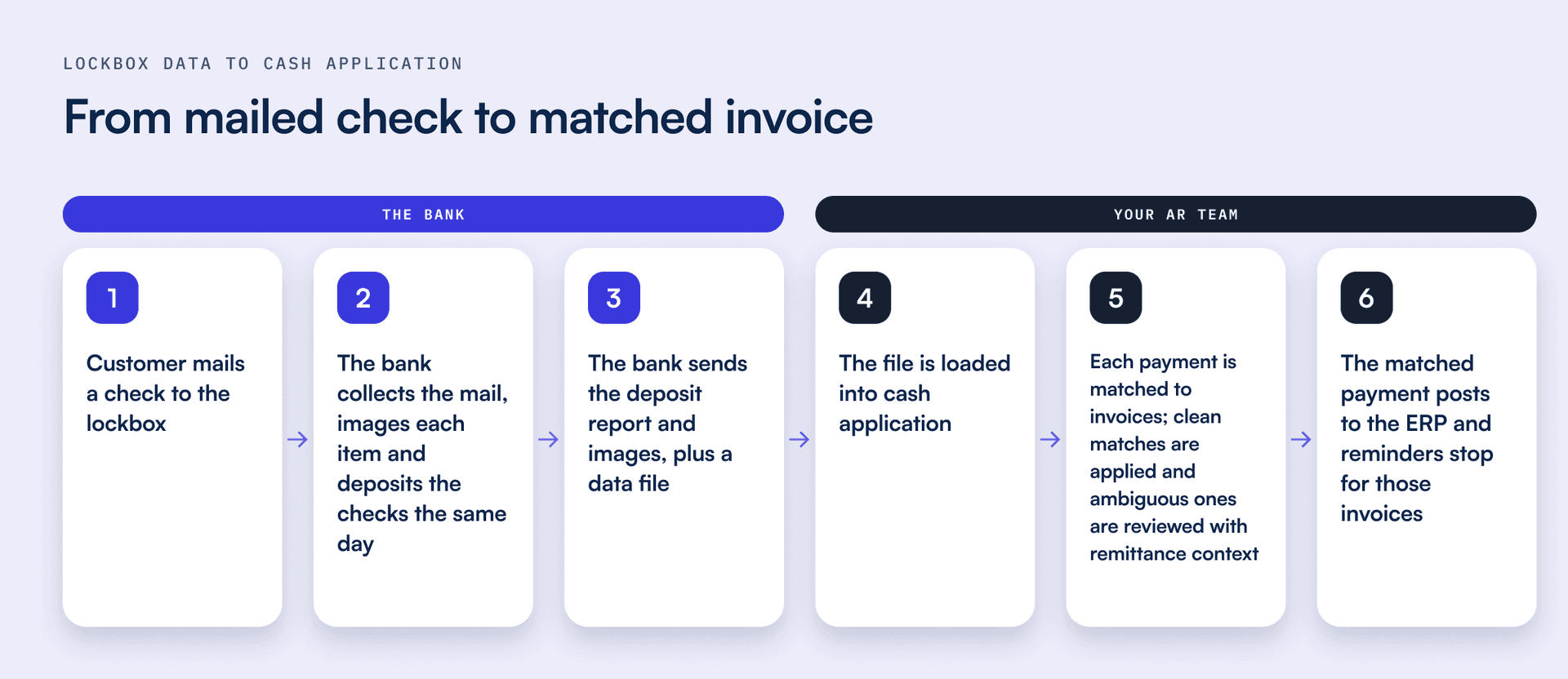
For each payment in the file, someone has to identify the customer, find the invoices, explain any difference and post it. Where the stub carries clean invoice numbers, this takes seconds. Where it doesn’t, the work looks the same as for a wire with a thin reference, and our cash application guide and payment reconciliation guide cover how to handle those exceptions.
Two habits make lockbox data easier to apply. Set a clearing window for anything unmatched: From Zero to Collected suggests five business days before an unapplied payment is escalated, because a suspense account without a deadline is where cash goes to age quietly. And treat repeat exceptions as upstream signals. If one customer’s checks never carry invoice numbers, the fix is a conversation with their AP team.
This is where Upflow Cash App picks up. The bank runs the lockbox, and Upflow takes over once the data lands. Lockbox and bank exports that don’t arrive through a feed can be brought in by CSV upload. Upflow then enriches thin payment references from your customer and invoice records, and its AI matching learns how each customer pays. Split and multi-invoice payments get worked out without a rules library for your team to maintain. Remittance is captured from email and PDF, and matched payments post to your ERP with a full audit trail. Upflow reports a 98% auto-match rate, and the Cash App Agent is accuracy-first: it applies a match on its own only when a payment maps cleanly to an invoice, and brings anything ambiguous to your team as a suggestion to confirm.
Should you use a lockbox, digital payments or both?
Use both, and plan for the lockbox to shrink. Keep it for customers whose AP process can only cut checks, and move everyone else to ACH or card, where payments cost less to receive and arrive with better data.
The trend is on your side. Checks fell from 75% of incoming B2B payments in 2004 to 25% in 2025, according to the AFP Digital Payments Survey as reported by Nacha. The reasons checks persist are the cost of converting legacy systems, the difficulty of onboarding smaller counterparties and familiarity. None of those means your customer can’t pay you by ACH. Often nobody has asked.
The economics favor asking. AFP’s 2022 benchmarking put the median cost of receiving a paper check at $1.01 to $2.00, against $0.26 to $0.50 for an ACH payment, before any lockbox fees.
A practical sequence:
- Rank check payers by volume. A handful of enterprise customers usually send most of your checks.
- Make the alternative easy. Put ACH instructions and a pay-online link on every invoice, above the lockbox address.
- Ask at renewal and onboarding. That is when the customer’s AP team is already updating vendor records.
- Offer autopay to recurring accounts. Each cycle then settles without a reminder or a payment to match.
- Keep the lockbox address for those who can’t move. Forcing them only delays payment.
From Zero to Collected makes the same call for the whole payment mix: wire and check stay available for the customers who need them, and those customers should be a minority. Upflow Payments gives customers a branded portal to pay online by card or ACH, with saved payment methods and autopay. When a customer picks the invoices they are paying in a portal, the match is made before the money moves.
This is a Financial Relationship Management (FRM) question as much as a treasury one. FRM is the discipline of managing the financial relationship with a customer, from the moment payment terms are agreed until cash is collected and reconciled. How a customer pays you is part of their experience of your company.
How do you set up a lockbox well?
Pick a bank whose data file your AR process can use, put the lockbox address on every invoice, and run a parallel test before you switch. Most lockbox problems come from setup choices nobody revisits.
- Judge the bank on its data file as well as its price. Ask for a sample file and image export. If the file needs manual reformatting before cash application can use it, that costs more than the per-item fee.
- Limit what the bank keys. Pay for keyed invoice numbers only for customers whose stubs are unreadable.
- Update every invoice template. Put the lockbox address in the remit-to field with a line asking customers to include invoice numbers, and check every template your billing system and ERP produce.
- Tell customers’ AP teams directly. A changed remit-to address is a classic fraud pattern, so expect them to verify it. Give them a phone number to confirm, and expect some checks to reach the old address for months.
- Run in parallel. Keep office mail monitored for a full billing cycle, and agree the daily deposit cutoff and file timing so cash application can run the same morning.
Done well, a lockbox makes checks boring. The deposit happens without anyone thinking about it, and your team spends its time on the payments that need judgment.
Want to see how lockbox and bank data turn into matched invoices? Book a call with our team to see how Upflow Cash App matches payments to invoices.


Alexandre Antoine
Finance Director at Upflow
Alexandre is the Finance Director at Upflow, where he leads the company’s internal finance and accounting operations. With a background in both strategic finance and financial reporting, Alexandre brings a practical, detail-oriented approach to the complexities of B2B finance.
At Upflow, Alexandre ensures that internal processes from cash management to KPI reporting are optimized for transparency, accuracy, and growth-readiness. He helps build scalable finance systems that support Upflow’s mission to empower other finance teams through better collections and cash flow insights.
Alexandre regularly contributes to Upflow’s blog with in-depth articles on accounting metrics, financial ratios, reporting best practices, and operational benchmarks. His writing provides actionable advice for controllers, FP&A teams, and finance leaders navigating complex financial processes.

Summary

Shared
Frequently Asked Questions
Can’t find what you’re looking for?
Ask AI
A lockbox service is a bank service that receives customer checks at a dedicated P.O. box, deposits them the same day and sends the company images and payment data. It removes check handling from the office and shortens the time between a customer mailing a check and the cash being available. B2B companies use wholesale lockboxes, built for larger payments with free-form remittance.
A lockbox collects mailed payments, deposits the checks and reports what arrived. The bank sends a deposit total for bank reconciliation, images of checks and remittance documents, and a data file with the amount and any invoice references it captured. It does not decide which invoices a payment settles. That cash application step stays with your AR team or its software.
Lockbox pricing combines a monthly account fee and a P.O. box fee with per-item charges, plus extras for imaging and keyed data. One regional bank’s 2025 schedule lists wholesale processing at $0.37 to $0.57 per item, imaging at $0.15 and keying at $0.05 per keystroke. At low volumes the fixed fees dominate, so the cost per check can pass $7. Get a quote on your own volume.
Most commercial banks offer lockbox services through their treasury management teams, from national banks to regional ones. Some run their own processing centers and others outsource to specialist processors. When comparing providers, look past the per-item fee at the data file and how exceptions are reported, because those decide how much work lands on your AR team afterward.
A retail lockbox handles high volumes of small payments that arrive with a standardized, machine-readable coupon, so processing is mostly automated and cheap per item. A wholesale lockbox handles business-to-business payments, which are larger and come with free-form remittance that often needs manual capture. B2B tech companies almost always need a wholesale lockbox.
Related articles