

Upflow → Blog → B2B payments
Payment Reconciliation: How B2B Teams Match Cash to Invoices
Alexandre Antoine
|
October 28, 2026
Generate AI summary


TL;DR: In B2B, payment reconciliation means matching every ACH, wire, check and card receipt to the specific open invoices it pays, then posting the result to the ERP. The hard cases are usually the large ones: a wire covering several invoices with no usable reference, or an amount that comes in short. A daily process with a five-day clearing window for exceptions, plus a monthly look at why payments failed to match, does more for your close than any month-end cleanup.
Payment reconciliation is the process of matching each incoming customer payment to the open invoices it settles, recording any difference, and posting the result to your ERP so your AR ledger agrees with both the bank and the customer on what is still owed. For a B2B tech company, that means invoice-level work on ACH, wire, check and card receipts, done daily.
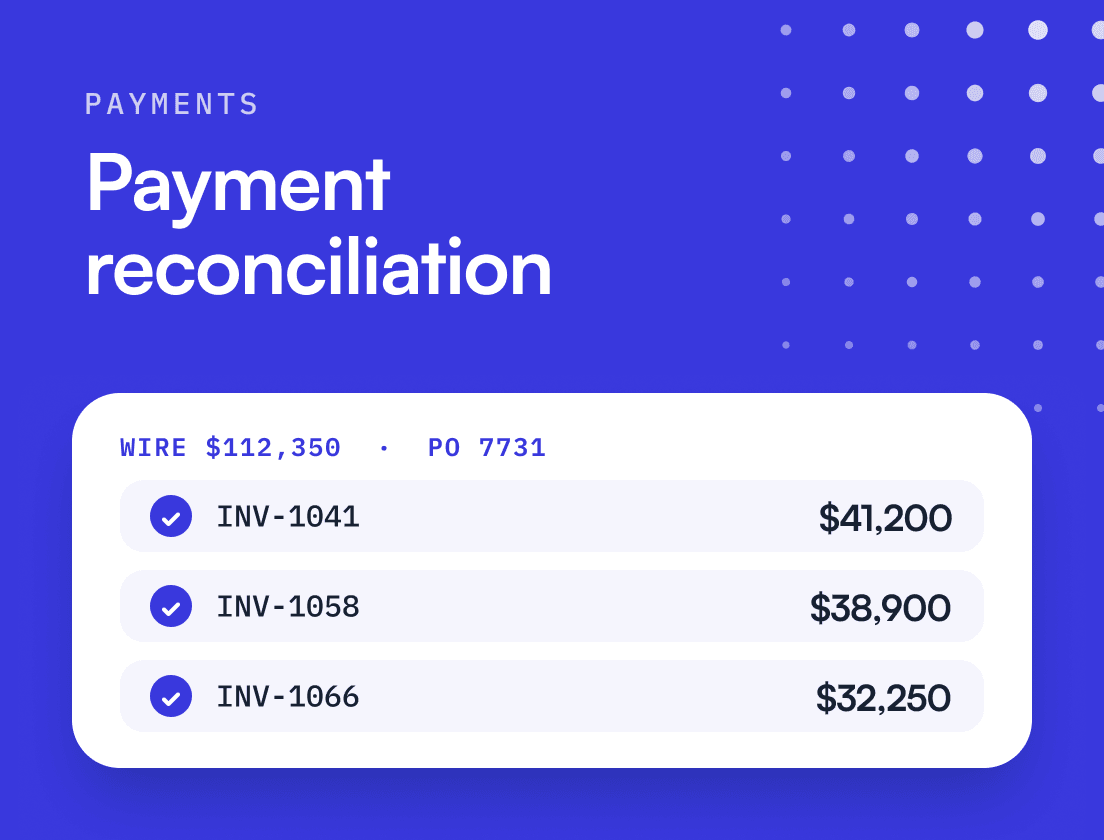
Searches for this term often lead to guides for merchants, who match card settlements and processor payouts to orders. B2B teams have a different problem: a $112,350 wire with “PO 7731” in the reference field and three invoices it might be paying. The argument of this guide is that B2B payment reconciliation breaks on missing and split remittance, and that the fix is a process that treats every unmatched payment as information about something that went wrong upstream.
What is payment reconciliation in B2B, and how is it different from bank reconciliation?
B2B payment reconciliation connects a receipt to the invoices behind it. Bank reconciliation connects your bank statement to the cash account in your general ledger. Processor settlement reconciliation connects a payment provider’s payout to the gross charges and fees inside it. The three get mixed up because they share a word, and teams that mix them up end up with a balanced cash account and a wrong aging report.
| Payment reconciliation (B2B) | Bank reconciliation | Processor settlement reconciliation | |
|---|---|---|---|
| Matches | Each receipt to the open invoices it pays | Bank statement lines to GL cash entries | Provider payout to the charges, refunds and fees in it |
| Question it answers | Which invoices are now paid, and by how much | Does the cash account match the bank | Did the provider pay us everything it collected |
| Usual cadence | Daily | Monthly, at close | Per payout |
| Typical owner | AR team | Controller or GL accountant | Payments or revenue operations |
| Breaks on | Missing remittance, split and short payments | Timing differences, unrecorded fees | Fee and refund mismatches |
In most finance teams, B2B payment reconciliation is the matching half of cash application. If you want the bank statement view, our guide to bank reconciliation covers it. This article stays with the invoice.
Why does payment reconciliation break for B2B tech companies?
It breaks because B2B payments travel separately from the information that explains them. A card payment through a checkout carries an order ID. An ACH credit from a customer’s AP system carries whatever their AP clerk typed.
The rails themselves set the limits. Under the Nacha Operating Rules, a CCD entry can carry a single addenda record with an 80-position payment-related information field, while the CTX format allows up to 9,999 addenda records that can hold full EDI remittance. Most mid-market customers send the first kind, if they send anything. Wires improved on July 14, 2025, when the Fedwire Funds Service moved to ISO 20022, a format that supports structured extended remittance information. Supporting it and the sender filling it in are two different things.
Checks have not gone away either. The 2025 AFP Digital Payments Survey found that 25% of B2B payments organizations receive still arrive by check, down from 75% in 2004. A check with a stub is easy to apply. A check whose stub went to a different address is not.
On top of the rails sit four payment patterns that turn matching into judgment:
- One payment, several invoices. The customer batches a month of invoices into one wire and sends the breakdown by email, or not at all.
- Short payments. The customer deducts a discount or a service credit, or an intermediary bank takes its fee, and the amount no longer matches any open item.
- Overpayments and duplicates. Money you owe back sits on the account and confuses both sides.
- The wrong payer name. A parent company or a payment platform pays on behalf of the entity you invoiced, so the name on the bank line matches no customer record.
In From Zero to Collected, Upflow’s book on building a collection function, the point is made plainly: the accounts most likely to send complex remittance are the enterprise accounts carrying the largest balances. The hard payments are the big ones.
What does a good payment reconciliation process look like?
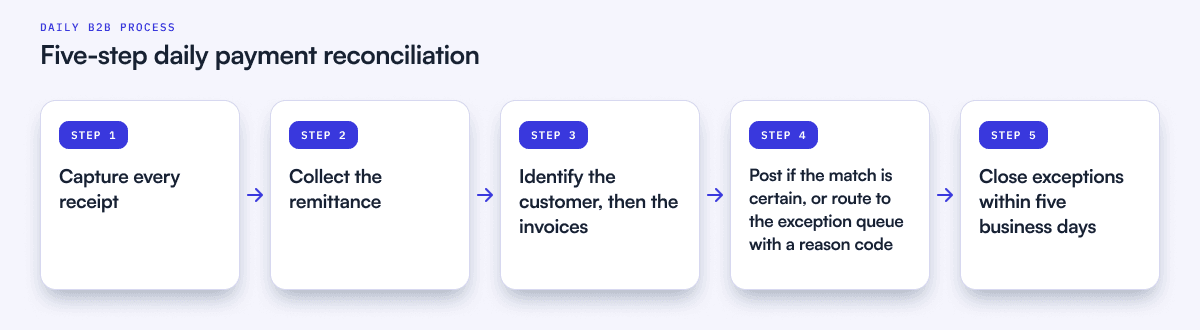
A good process runs daily, sends every payment down one of two paths (posted or exception), and gives every exception an owner and a deadline. Five steps cover it.
- Capture every receipt in one place. Pull bank lines from every operating account each morning, plus lockbox files and portal payments. A payment you have not seen cannot be matched.
- Collect the remittance. Remittance advice arrives by email, as PDFs, in AP portal downloads and in the bank reference. Route it to a shared inbox the AR team owns, not to whoever the customer happens to know. Our payment remittance guide covers formats in more depth.
- Identify the customer, then the invoices. Customer first: the payer name and bank account usually settle it, and payment history covers most of the rest. Invoices second: invoice numbers in the remittance, then exact amounts, then combinations of open invoices that add up to the payment.
- Post or route. If the match is certain, apply it and post to the ERP the same day. If it is not, the payment goes to an exception queue with a reason code, never to a “figure it out later” pile.
- Close exceptions inside a window. From Zero to Collected suggests five business days as a reasonable starting point, after which anything still unmatched is escalated. A suspense account with a clearing discipline is a managed process. One without it is where cash goes to age quietly.
The order in step 3 matters more than it looks. Teams that start with the amount match the wrong customer whenever two customers owe the same figure, and recurring billing produces a lot of identical figures.
How should you handle short payments and other exceptions?
Give each exception type a default action and an owner with a time limit, and write them down before the payment arrives. The decision about how to apply cash is often a decision about the customer relationship, so it should not be improvised at 6 p.m. on day two of the close.
Here is one Monday of receipts at a hypothetical $60M revenue tech company. Six payments came in, $227,915 in total.
| Receipt | Amount | What arrived with it | Outcome |
|---|---|---|---|
| ACH (CCD+) | $48,000 | Reference "INV-10482", exact amount | Matched and posted |
| Portal payment | $15,000 | Customer selected the invoice when paying | Arrived already matched |
| Wire | $112,350 | Reference "PO 7731" only | Three open invoices ($41,200, $38,900, $32,250) add up exactly: matched once someone looked for the combination |
| Wire | $24,965 | Customer name only, invoice is $25,000 | $35 short: bank fee, written off under the fee tolerance |
| Check | $18,000 | Stub against a $20,000 invoice | $2,000 short: customer says a service credit was agreed. Routed to the account owner |
| ACH | $9,600 | Payer is the customer's parent company, no reference | Unidentified: held in unapplied cash, customer contacted the same day |
Two of the six payments, $63,000 or 28% of the day’s cash, matched with no thought at all. Add the three-invoice wire, which a simple one-to-one amount rule will never find, and you are at 77% of the dollars. The remaining three payments are only 23% of the value, and they are where all the judgment sits.
Some defaults that hold up in practice:
- Short pays under a set tolerance (bank fees, rounding): write off to a fee account with a reason code. Agree the threshold with your controller once, rather than case by case.
- Short pays above the tolerance: apply what was paid and leave the balance open. Tell the account owner the same day. A customer who has never paid short before probably has a reason worth a conversation. A customer who always pays short has learned that nothing happens when they do.
- Overpayments: record them as a customer credit and tell the customer. Money you owe someone should not sit unacknowledged.
- Unidentified payments: hold in unapplied cash and contact the payer within a day. Add any new payer name or bank account to the customer record so the next one matches.
One piece of finance logic to keep straight: if the $2,000 short pay ends in a credit note, the invoice closes but no cash arrives. Your receivable is cleared, your cash is still $18,000. Keep those two numbers apart in every report. If the short pay turns into a dispute, it should leave the matching queue and follow your dispute process instead.
What can your ERP do natively, and where does matching stop?
Modern ERPs handle the clean cases well and are getting better at the next tier. Where they stop is the judgment cases, which is where the time goes.
NetSuite lets you enter a customer payment and check Auto Apply, or pick invoices by hand, and turns any overpayment into a customer deposit. Its Automated Cash Application feature goes further: it generates a batch of customer payments from imported bank lines, assigns a customer where it finds a match, uses invoice numbers on the bank line when present, and suggests invoices when they are not. NetSuite adds payment suggestions inside Match Bank Data, proposing exact matches between bank transactions and open customer invoices and creating the payment once you accept. Oracle’s release notes state that those suggestions are one-to-one and for the full outstanding amount, so the $112,350 wire above still needs a person. For the wider workflow around matching, see our cash application guide and our guide to automated cash application in NetSuite.
Sage Intacct uses matching rules to pair bank transactions with transactions already recorded in Intacct, and creation rules to generate new ones; its help center lists credit card transactions and journal entries as what creation rules can create today. The 2025 Release 3 added more data fields to bank matching rules and made it easier to spread one credit across several invoices. Applying a receipt to the right invoices is still AR work.
The pattern is consistent. Native tools are strong when the payment says what it is. They need a human when it does not.
When is automated payment reconciliation worth it?
Automation is worth paying for when the exception queue, not the total volume, is what eats your team’s week. A company with 2,000 invoices a month that all arrive through a portal has little to automate. A company with 400 invoices and a dozen enterprise customers paying by batched wire has a lot.
Signals that you have crossed the line:
- Unapplied cash is a standing balance at every month-end rather than a few stragglers.
- Someone on the team spends more than a day a week reading remittance emails.
- Collectors have chased a customer who had already paid. From Zero to Collected describes a fast-growing tech company where more than 12% of incoming payments landed in suspense each month; by the time anyone reviewed it, three customers had been chased for invoices already paid, one a week before renewal. The renewal started with an apology.
- Close slips because cash application has to be finished before AR can be reconciled.
When you assess payment reconciliation software, test it on your worst week, not a demo file. Ask how it handles a payment covering several invoices with no remittance, a short pay inside and outside tolerance, a duplicate payment and a payer name it has never seen. Ask what it does when it is unsure. The right answer is that it asks a person. A tool that guesses creates misapplied cash, which is harder to unwind than unapplied cash.
That accuracy-first behavior is how Upflow Cash App is designed. The Cash App Agent matches incoming bank payments to open invoices, enriches incomplete bank references, captures remittance from emails and PDFs, and syncs matched payments back to the ERP with a full audit trail. When a payment maps cleanly to an invoice it applies the match automatically; when anything is ambiguous it surfaces a suggested match for the team to confirm in a click. Upflow reports a 98% auto-match rate on that accuracy-first basis.
Keep humans on the cases where the payment alone does not tell you enough, such as a short pay on a strategic account or an overpayment on an account with a dispute open. Automation handles the volume. Judgment handles the edge.
Which metrics show payment reconciliation is healthy?
Four numbers tell you whether reconciliation is under control, and they are most useful read together.
| Metric | Formula | Good sign | Warning sign |
|---|---|---|---|
| Auto-match rate | Payments applied without manual work ÷ total payments (track by count and by value) | Rising by value as well as by count | High by count, low by value: you automate the small ones |
| Unapplied cash ratio | Unapplied cash ÷ total AR | Close to zero at month-end | A standing balance that grows with revenue |
| Time to apply | Days from bank receipt to posting in the ERP | Same day or next day | Matching batched weekly or at close |
| Exception aging | Days each exception has been open | Nothing past the five-day window | Items older than a billing cycle |
The link to DSO is direct. DSO = AR balance ÷ revenue for the period × days in the period. Take a company with $9.0M in AR and $15M of revenue over 90 days: DSO is 54.0 days. If $450,000 of that AR is invoices customers have already paid, with the cash sitting unmatched, true DSO is 51.3 days. That 2.7-day gap is a matching backlog dressed up as a collections problem, and it sends collectors after customers who did nothing wrong.
A backlog like that shows up in your DSO before anyone spots it. Want to see where your numbers stand today? Download our free AR metrics spreadsheet to calculate DSO, aging and three other core AR metrics.

How does payment reconciliation connect to forecasting and the close?
Clean matching is what makes the rest of finance believable. Your 13-week cash flow forecast relies on knowing which customers have paid and how late they usually pay. Payment history built on misapplied or unapplied cash teaches the forecast the wrong habits. Your month-end close depends on the AR subledger agreeing with the GL, and every unapplied payment is a reconciling item someone has to explain.
The fastest improvement is upstream, in the reasons payments fail to match. Keep a one-line reason for every manual intervention and read the log once a month. A recurring short pay usually points to a discount that never reached billing. An unidentified payer points to an onboarding step that missed a parent entity. Fix two or three of those causes and a meaningful share of next month’s exceptions never happens. Over the same period, move recurring customers onto a portal or autopay, so their payments arrive already matched.
Payment reconciliation will never be the most visible part of AR. Done daily, with clear owners and a short clearing window, it becomes the part nobody needs to think about at close.
If your team spends more time matching payments than reviewing them, see how Upflow Cash App matches payments to invoices. Book a call with our team.


Alexandre Antoine
Finance Director at Upflow
Alexandre is the Finance Director at Upflow, where he leads the company’s internal finance and accounting operations. With a background in both strategic finance and financial reporting, Alexandre brings a practical, detail-oriented approach to the complexities of B2B finance.
At Upflow, Alexandre ensures that internal processes from cash management to KPI reporting are optimized for transparency, accuracy, and growth-readiness. He helps build scalable finance systems that support Upflow’s mission to empower other finance teams through better collections and cash flow insights.
Alexandre regularly contributes to Upflow’s blog with in-depth articles on accounting metrics, financial ratios, reporting best practices, and operational benchmarks. His writing provides actionable advice for controllers, FP&A teams, and finance leaders navigating complex financial processes.

Summary

Shared
Frequently Asked Questions
Can’t find what you’re looking for?
Ask AI
Payment reconciliation is the process of matching incoming customer payments to the invoices they settle and recording any differences, so your AR ledger agrees with the bank and the customer on what is still owed. In B2B, it is done at invoice level for ACH, wire, check and card receipts, often daily. It is the matching half of cash application, and it is different from bank reconciliation, which ties the bank statement to the general ledger.
A practical process has five steps. Capture every receipt, from bank accounts and lockbox files as well as portal payments. Collect remittance wherever it lands, including email and PDF attachments. Identify the customer first, then the invoices. Post certain matches to the ERP the same day and route the rest to an exception queue with a reason code. Close each exception within a set window, such as five business days.
Payment reconciliation matches each customer payment to the specific invoices it pays, so the AR ledger is right. Bank reconciliation matches bank statement lines to cash entries in the general ledger, so the cash balance is right. A company can pass its bank reconciliation with a wrong aging report, because cash can be recorded in the right account while still unapplied to the invoices it settles.
Start with the ERP: NetSuite’s Automated Cash Application and payment suggestions handle payments that carry invoice numbers or match one invoice exactly. For split payments and short pays, or when remittance is missing, use a cash application tool that reads remittance from email and PDFs and suggests multi-invoice matches, applying them automatically only when it is certain. Keep a person on ambiguous and strategic accounts.
There is no reliable industry benchmark, because rates depend heavily on payment mix. A company paid mostly through a portal will match nearly everything; one paid by batched wires will not. Track your own rate by count and by value, and watch the gap between them. A high rate by count with a low rate by value means you are automating the small payments and leaving the large ones to people.
Because the AR ledger still shows the invoices as open. That inflates DSO and the aging report, and it can send collectors after customers who have already paid, which damages relationships quickly. Unapplied cash also becomes a reconciling item at month-end, slowing the close. Set a clearing window and escalate anything that stays unmatched past it.
Related articles