The accounts receivable process is how your business turns completed sales into actual cash. It starts the moment you issue an invoice and ends when the payment is recorded and reconciled. What happens in between: follow-ups, disputes, cash application, reconciliation. That sequence determines how fast, how reliably, and how painlessly you get paid.
For most B2B SaaS finance teams, the process works until it doesn't. As your customer base scales, the gaps become harder to ignore: invoices go out late, follow-ups are inconsistent, cash application is a mess, and no one has a clean view of what's actually outstanding. This guide walks through the AR process end to end, the points where things typically break down, and how to fix them. In this guide, you'll learn:
Want to see how Upflow handles the AR process end to end? Book a call with one of our experts today.
What Is the Accounts Receivable Process?
Accounts receivable (AR) is money owed to your business by customers who've received goods or services but haven't paid yet. The accounts receivable process is the end-to-end system for managing that money, from issuing invoices to collecting payment, recording and reconciling it accurately.
It sits within the broader order-to-cash cycle, which covers everything from when a customer places an order to when cash hits your account. AR is the back half of that cycle: the part that actually turns revenue into working capital.
In B2B SaaS, this matters a lot as revenue is often recognized before cash is collected. Subscription renewals, expansions, and upsells all run through the same customers your AR team is chasing. Done well, the AR process keeps cash flow predictable, reduces bad debt, and protects customer relationships. Done poorly, it creates collections bottlenecks, cash flow gaps, and the kind of friction that quietly erodes retention.
The Accounts Receivable Process: Step by Step
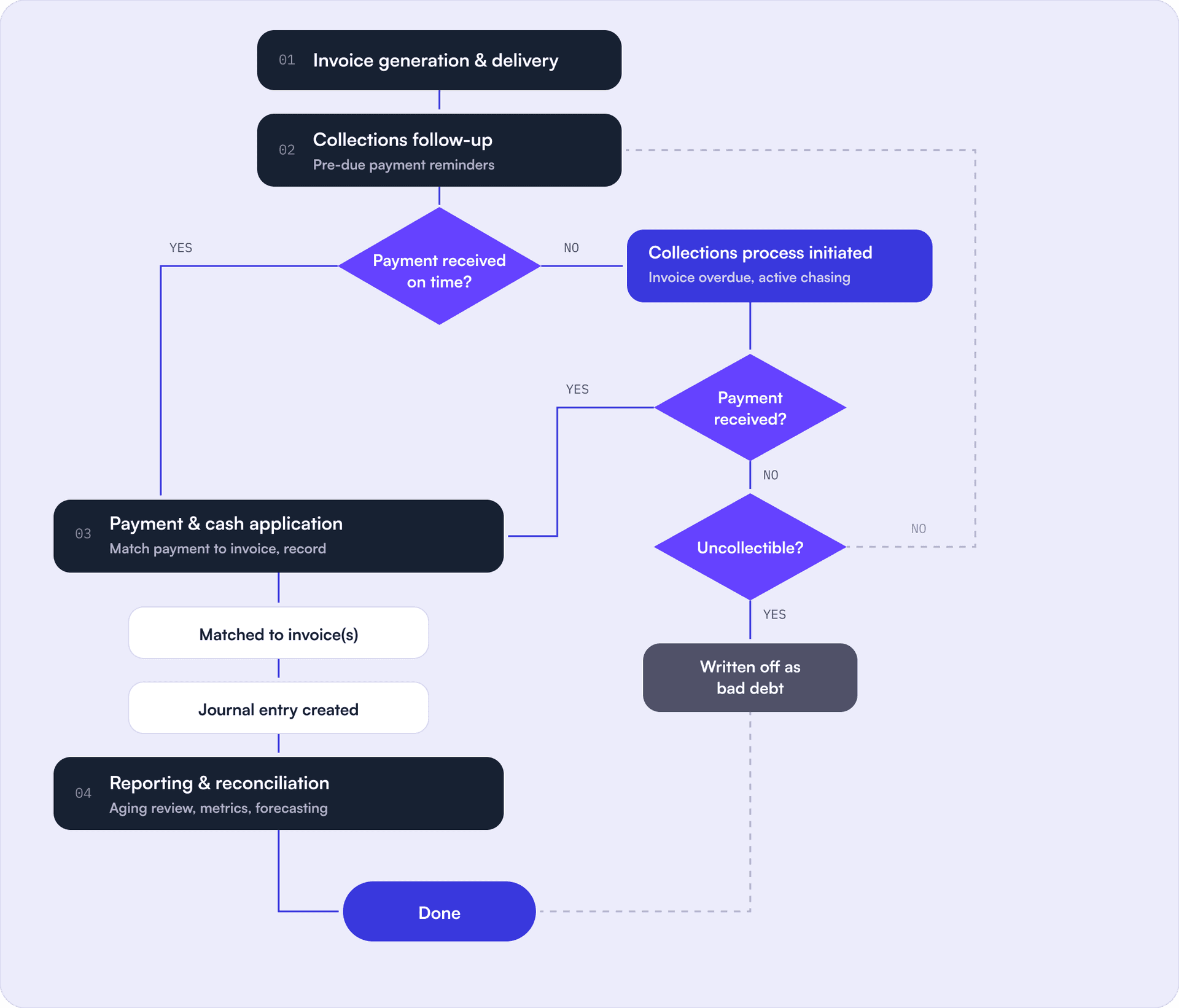
The AR process typically follows a consistent sequence. Here's how it breaks down, including how the key decision points play out in practice:
1. Invoice generation and delivery: Once a sale is finalized, an invoice is issued with the agreed amount, payment terms, and due date. In SaaS, this usually happens automatically at the point of subscription activation or renewal. The invoice should be accurate and delivered promptly. Delays here directly delay payment. A customer can't pay an invoice they haven't received, and disputes almost always start with an invoice they don't recognize or agree with.
2. Collections follow-up: Once the invoice is out, a few polite payment reminders go out before the due date to make sure it's on the customer's radar and there are no issues before payment is due.
3. Payment collection: If payment comes in on time, it moves straight to cash application. If not, the collections process kicks in: structured follow-up and escalating outreach across email, calls, SMS, and in more extreme cases, a formal collection letter.
Most customers will pay. For the ones that don't, you eventually have to assess whether the invoice is recoverable. If it's not, it gets written off as bad debt.
4. Payment and cash application: When payment is received, it needs to be matched to the correct open invoice and recorded in your accounting system. At low volumes, this is straightforward. At scale, it becomes one of the more time-consuming parts of the AR process, especially when customers pay multiple invoices in a single transfer or send payments without remittance details. Poor cash application inflates your apparent AR balance and distorts your cash flow picture.
5. Reporting and reconciliation: At the close of a period, your AR team reconciles outstanding balances, reviews the aging report, and ensures all payments are accurately recorded. This is also when AR metrics are reviewed and shared with leadership to inform cash flow forecasting.
Common AR Process Challenges
Understanding the steps is one thing. The harder question is why the process breaks down in practice. Here are the most common failure points for B2B SaaS finance teams:
Slow or inaccurate invoicing: Late invoices delay the entire payment cycle. Inaccurate ones invite disputes that push payment back further. In SaaS, where billing can involve usage-based components, mid-cycle upgrades, or multi-year contracts, invoice accuracy is a recurring problem. Both are often symptoms of a disconnected billing setup, where invoicing isn't triggered automatically and relies on someone remembering to do it.
Inconsistent follow-up: Without a systematic collections workflow, follow-ups get missed or happen too late. Some customers get chased; others don't. The result is an unpredictable aging profile where late payments accumulate not because customers can't pay, but because no one asked.
No visibility into what's actually outstanding: Many SaaS finance teams don't have real-time visibility into their receivables. They find out how bad the situation is at month-end, not in time to do anything about it. As our CEO Alex Louisy notes in his 5 maturity stages of cash collection: you can't improve what you don't measure, and most B2B companies don't even know they have a problem.
Cash application backlogs: Matching payments to invoices manually is error-prone and time-consuming. At scale, it creates reconciliation issues and inflates your apparent AR balance with payments that have been received but not yet recorded. For SaaS companies running high invoice volumes, this is one of the first processes that breaks.
Siloed AR data: When AR lives in a spreadsheet or an inbox, context doesn't travel. Sales doesn't know a key account is 60 days overdue. Customer success doesn't know a disputed invoice is blocking renewal. Finance can't produce a clean cash flow forecast. In SaaS, where those teams are closely interlinked, that siloing is especially costly.
Treating collections as purely transactional: This is the subtler problem. A finance team that sends reminder emails without any customer context, the same template to every account regardless of relationship or history, will collect eventually, but often at the cost of goodwill. In B2B SaaS, where your customers are also your best candidates for renewal and expansion, the way you collect matters as much as whether you collect.
How to Optimize Your Accounts Receivable Process
Optimizing AR isn't a one-time project. It's a maturity curve. In our cash collection maturity framework, teams progress through five stages: from no real measurement, through systematic workflows and collaborative collection, toward predictive, data-driven AR management. Here's how to move up that curve:
Start with measurement: You can't improve what you don't track. The baseline is knowing, in real time, which invoices are outstanding and for how long. From there, track your aging report regularly and review your DSO against your standard payment terms. If your DSO is more than 30% above your average payment terms, something in the process is broken. For SaaS teams, also keep an eye on average collection period by customer cohort, since renewal timing often masks collection issues. Not sure where to start? Download our free spreadsheet to calculate your key AR metrics in one place.
Fix upstream issues first: The biggest AR wins often come from upstream, not from collections. If your invoice accuracy is poor, fix billing. If customers consistently dispute the same line items, fix the contract or the quoting process. If payment terms are misaligned with how your customers operate, renegotiate them. No collections workflow can fully compensate for a broken billing process.
Standardize your invoicing: Invoices should go out automatically at the point of sale or renewal, not when someone gets around to it. They should include clear payment terms, a due date, accepted payment methods, and a direct way to pay. Onboarding is also a good moment to get customers set up on autopay, it removes the payment step from the equation entirely. Every field that's wrong or missing is a reason for the customer to delay.
Build a systematic collections workflow: Replace ad hoc follow-ups with a structured sequence: a pre-due reminder, a due-date prompt, a first overdue notice, and a defined escalation path. Each touchpoint should be timed and personalized by customer segment. An enterprise account on a $200K contract warrants a different approach than a self-serve customer on monthly billing. The right collection approach keeps communication firm but relationship-aware.
Bring in the broader team: AR works better when it's not siloed in finance. Sales should know when their accounts go delinquent. Customer success should flag customers who are struggling before it becomes a collections issue. When the right people have visibility into payment status, problems get resolved faster and with less friction. This stage is especially relevant for SaaS businesses where finance, sales, and CS are closely tied.
Think relationship, not just transaction: This is the shift Upflow calls Financial Relationship Management (FRM): moving beyond treating AR as a pure cash collection function and recognizing that the payment experience is part of the customer experience. Personalized outreach, a clean self-serve payment portal, and context-aware communication all reduce friction and strengthen the customer relationship at the same time. Just as CRM transformed how sales manages customer relationships, FRM brings that same intelligence to the finance function.
Key AR Metrics to Track
Good AR management runs on data. These are the metrics that matter for B2B SaaS finance teams:
Days Sales Outstanding (DSO): The average number of days between issuing an invoice and receiving payment. It's your primary pulse check on AR efficiency. Calculate your DSO and track against your actual payment terms and the industry median. A rising DSO in SaaS is often the first signal that your collections process hasn't kept pace with customer growth, or that billing issues are quietly delaying cash.
Average Days Delinquent (ADD): Measures how far past their due date invoices are, on average, when payment is finally received. Where DSO tells you how long collection takes on average, ADD tells you how bad the late payments actually are. A high ADD means customers aren't just paying late, they're paying very late, and your collections workflow isn't catching it early enough.
Accounts Receivable Turnover Ratio: How many times you collect your average AR balance in a given period. A higher ratio signals faster, more consistent collection. Track your AR turnover ratio as a trend metric over time. If it's declining quarter over quarter, something in the process is slowing down.
Collections Effectiveness Index (CEI): Measures the percentage of receivables you actually collected relative to what was available to collect in a period. Unlike DSO, CEI also accounts for newly issued invoices along with the opening balances, which makes it a more accurate picture of how well your collections function is actually performing rather than just how fast customers pay.
AR Aging Report: Not a single number, but a view of how your outstanding receivables are distributed across time buckets: current, 1-30 days, 31-60 days, 60+ days. A healthy aging report is heavily weighted toward current. For SaaS, significant balances in the 60+ bucket often indicate at-risk customers where collections and customer success should both be involved.
Billing Cohorts: A way of grouping invoices by the period they were issued and tracking how each cohort collects over time. It lets you spot patterns that aggregate metrics like DSO can miss, like whether a specific quarter's invoices are consistently slower to collect, or whether a pricing change affected payment behavior. Useful for SaaS businesses with recurring billing where cohort-level visibility helps separate structural collection issues from one-off anomalies.
Write-off Rate: The percentage of invoices that ultimately go uncollected and are written off as bad debt. Alex's maturity framework sets a practical benchmark: a write-off rate consistently above 2% is a sign the process needs a top-down review. In SaaS, bad debt that correlates with customer churn usually points to a breakdown between finance and customer success rather than a pure collections failure.
The right metrics tell you where the process is breaking down. The next step is making sure it doesn't break down again. That's where automation comes in.
When to Automate Your AR Process
Manual AR processes have a scaling ceiling. The moment your invoice volume outpaces what your team can handle through spreadsheets and inbox management, accuracy and consistency start to suffer. For B2B SaaS companies in a growth phase, that ceiling tends to arrive faster than expected.
AR automation typically covers:
Invoice syncing from your ERP or accounting software
Automated reminder and dunning workflows triggered by aging and payment behavior
Real-time AR dashboards and metric tracking via an AR dashboard
Customer payment portals with self-serve dispute resolution
Cash application tools that match payments to invoices without manual intervention
The right time to automate isn't when everything has broken down. It's when your team is spending significant time on tasks that should be systematic. If your AR team is manually chasing invoices that could be handled by a workflow, that time is better spent on exceptions, escalations, and the high-touch enterprise accounts that actually need human judgment.
Automation works best when the underlying process is already solid. If your invoicing is inaccurate or your collections workflow is undefined, automating on top of that just makes problems happen faster. Fix the process first, then scale it with the right AR software.
See how Upflow can help you build a faster, more reliable AR process.
FAQs
Q: What does the accounts receivable process include?
A: The AR process covers everything from invoice issuance to cash collection. The core steps are: generating and delivering invoices, following up on outstanding balances, receiving and applying payments, managing disputes, and reconciling accounts at period close. In B2B SaaS, most of this should be systematised and largely automated by the time you're at meaningful scale.
Q: How long should the accounts receivable process take?
A: It depends on your payment terms, but a healthy AR process should result in most invoices being paid within your agreed terms. If your DSO is consistently more than 30% above your standard payment terms, that's a signal something is broken, whether in invoicing accuracy, collections follow-up, or both.
Q: What is the difference between accounts receivable and revenue?
A: Revenue is recognized when a sale is made or a service is delivered. Accounts receivable is the cash that hasn't been collected yet from that recognized revenue. In SaaS, this distinction matters because you can show strong revenue growth on paper while cash flow lags significantly behind if AR isn't managed well.
Q: What causes delays in the accounts receivable process?
A: The most common causes are: invoices going out late or with errors, inconsistent collections follow-up, disputes that sit unresolved, and cash application backlogs that inflate your AR balance. In SaaS specifically, billing complexity, usage-based pricing, mid-cycle upgrades, and multi-year contracts add another layer of invoicing risk that traditional AR processes aren't built to handle.
Q: How do you reduce outstanding accounts receivable?
A: The highest-leverage moves are: fixing upstream issues first (billing accuracy, contract clarity, payment terms), getting invoices out accurately and on time, building a structured collections sequence with defined escalation points, involving sales and customer success when accounts go overdue, and automating the manual parts of the workflow so nothing falls through the cracks. Reducing DSO is usually a byproduct of fixing those fundamentals rather than a goal in itself.
Q: What is accounts receivable automation?
A: AR automation refers to using software to handle the repetitive, rule-based parts of the AR process: syncing invoices from your billing or ERP system, triggering reminders and dunning sequences based on aging, matching incoming payments to open invoices, and generating real-time dashboards. It doesn't replace human judgment for complex accounts, but it frees your team to focus on the exceptions that actually need attention.
Q: What is the difference between accounts receivable and accounts payable?
A: Accounts receivable is money owed to your business by customers. Accounts payable is money your business owes to vendors or suppliers. AR is an asset on your balance sheet; AP is a liability. In a SaaS context, managing AR well directly impacts cash runway and growth capacity in a way that AP management typically doesn't.
Q: How does accounts receivable affect cash flow?
A: Every day an invoice sits unpaid is a day that cash isn't in your account. For SaaS companies, where most costs like payroll, infrastructure, and sales are paid out in real time, the gap between recognized revenue and collected cash can create real working capital pressure. A well-run AR process tightens that gap and makes cash flow more predictable, which in turn makes financial planning and growth investment easier.