

Upflow → Blog → Accounting and Software
Sage Intacct Accounts Receivable: A Practical Guide
Jean-Malo Le Dreff
|
October 13, 2026
Generate AI summary


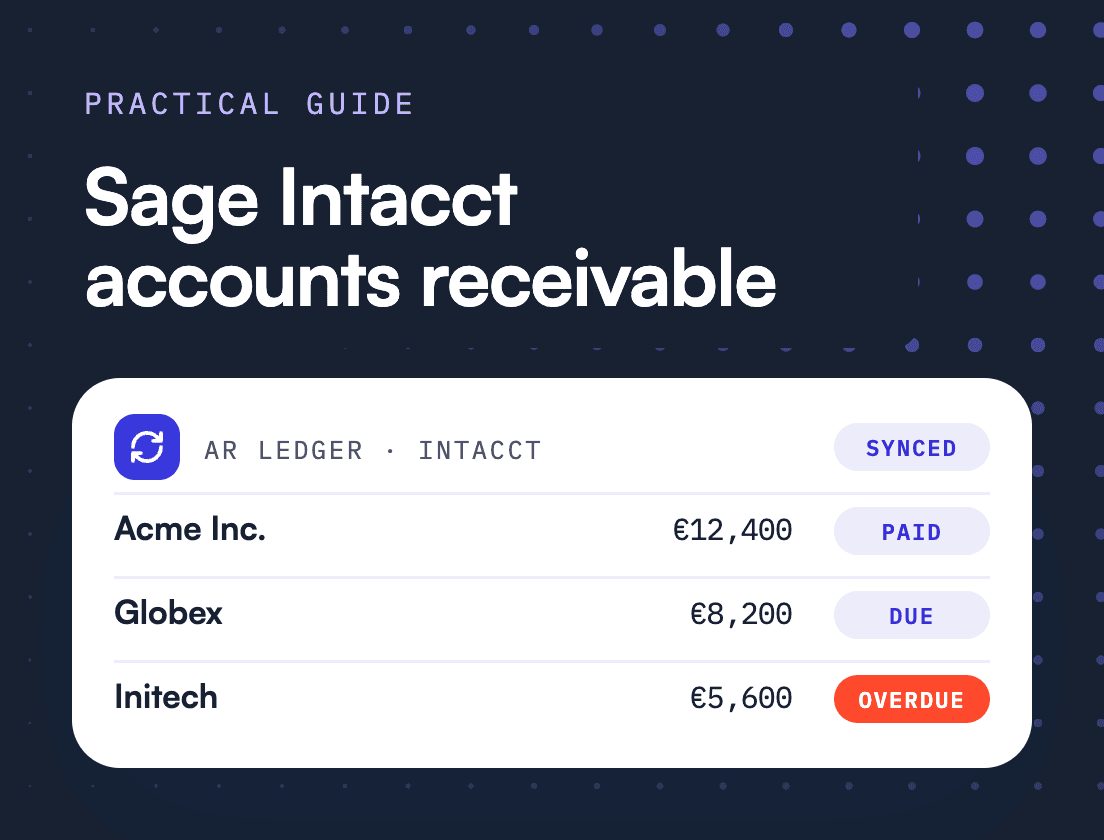
TL;DR: Sage Intacct accounts receivable handles the accounting side of receivables well, from invoices and payment application to aging reports and basic dunning, all posting to the general ledger. Collections needs more than that. Intacct groups overdue customers by days and amount, while the customers you need to treat differently differ by behavior and relationship, which is why most growing teams keep Intacct as the ledger and run collections in a layer on top.
Sage Intacct accounts receivable is the module where you invoice customers, record and apply their payments, run aging reports and send dunning notices, with every transaction posting straight to the general ledger. For the accounting side of receivables it is a strong system of record, and most Intacct teams have no reason to replace it.
The friction starts when the same module is asked to run collections. Intacct’s dunning levels sort customers by how many days overdue they are and how much they owe. That is a sensible way to pick a letter template. It is a poor way to decide who gets a call from their account manager and who should hear nothing at all this week. This guide covers what the native module does, where collections outgrows it, and how to build the rest of the process around Intacct without moving off it.
How does accounts receivable work in Sage Intacct?
In Sage Intacct, accounts receivable runs from the customer record to the invoice to the payment, with each step posting to the general ledger and reporting sitting on top. Sage’s help center organizes the module that way, from setting up customers to receiving payments, plus reports such as the AR Ledger and Customer Aging.
For most B2B tech teams on Intacct, invoices are created in AR directly or generated from Order Entry or Contracts. Customers receive them by email. Payments arrive by bank transfer, check or card and are applied against open invoices, by hand or through lockbox and payment integrations. At month-end, the Customer Aging report shows who owes what.
Because it all sits inside the ledger, the numbers reconcile. That matters more than any collections feature. An AR process built on a clean record beats a clever one built on a messy one.
What does the native Sage Intacct AR module do well?
The native module covers the core record of receivables and a basic collection toolkit. It creates and emails invoices, supports recurring billing, applies payments, produces aging reports on three date bases, emails statements in bulk, and sends dunning notices whose template changes with how overdue a customer is and how much they owe.
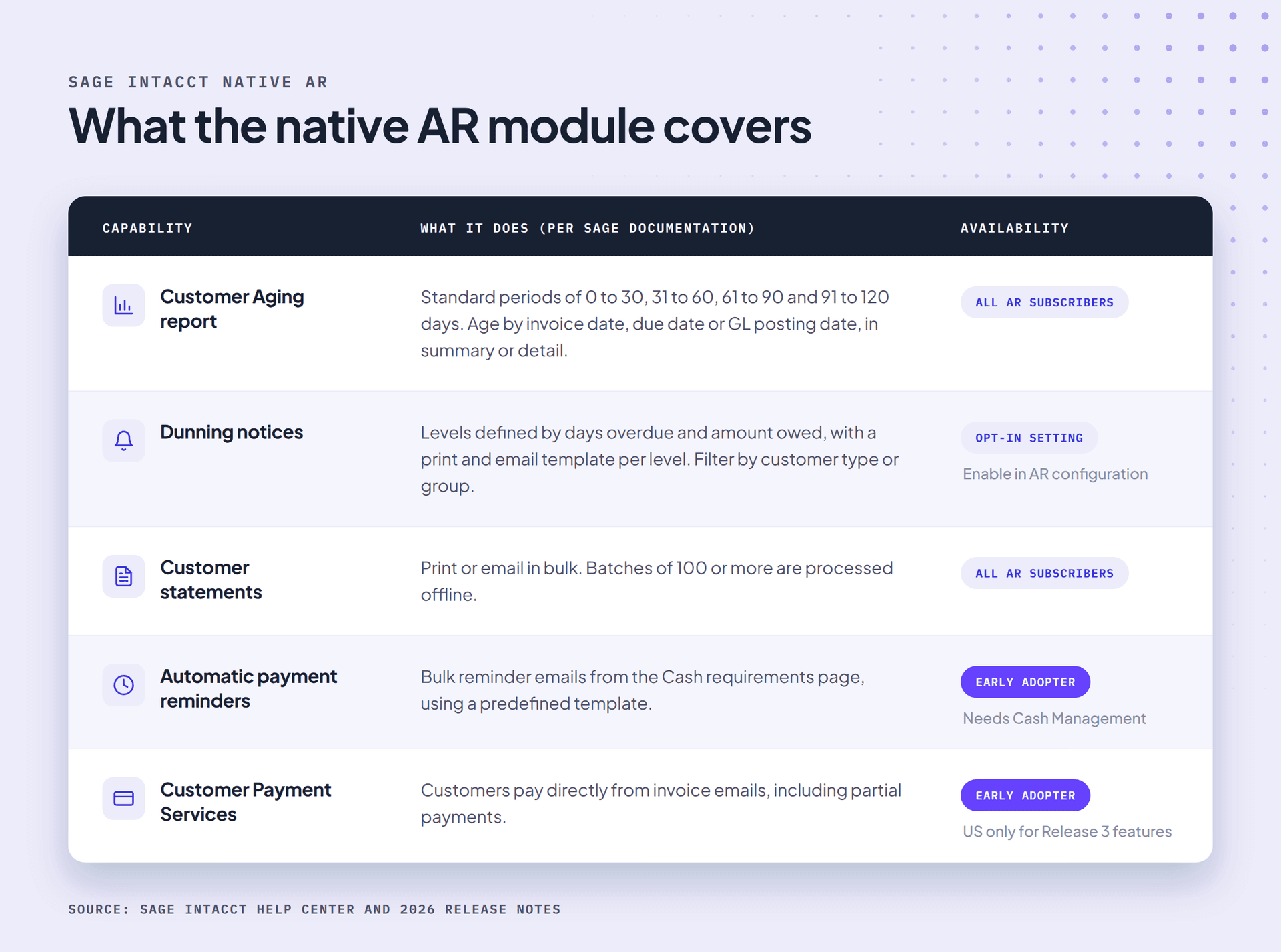
Customer Aging report. The report lists customers who owe you money by aging period, with standard buckets of 0 to 30, 31 to 60, 61 to 90 and 91 to 120 days. You can age by invoice date, due date or GL posting date, run a one-line summary or a per-account detail, and filter by customer group, territory, currency or department. It sits under Accounts Receivable, then All, then Reports, then Customer aging.
Dunning notices. Once dunning is enabled in AR configuration, you define levels by a range of days overdue and a range of amounts, and attach templates to each level. To send, you pick a level, filter by date and customer group, then choose print or email for each customer. Sent notices show on the customer record.
Customer statements. Statements print to PDF or go out by email in a batch, and Intacct processes runs of 100 or more offline.
For a company with a few hundred invoices a month and customers who mostly pay on time, this is enough.
Where do finance teams outgrow Sage Intacct for collections?
Teams outgrow native Intacct collections when the right action depends on who the customer is rather than how late the invoice is. Dunning levels segment by days and amount, and someone starts each send by hand. Automating those sends means scripting them through the Intacct API, a technical project that usually needs an integration partner to build and then maintain. Payment behavior and what sales knows about the account live elsewhere, usually in inboxes and spreadsheets.
Take two customers on the same Monday. Both owe $12,000 and both are 35 days overdue, so both land in the same 31 to 60 day, $10,000 to $25,000 dunning level and get the same notice.
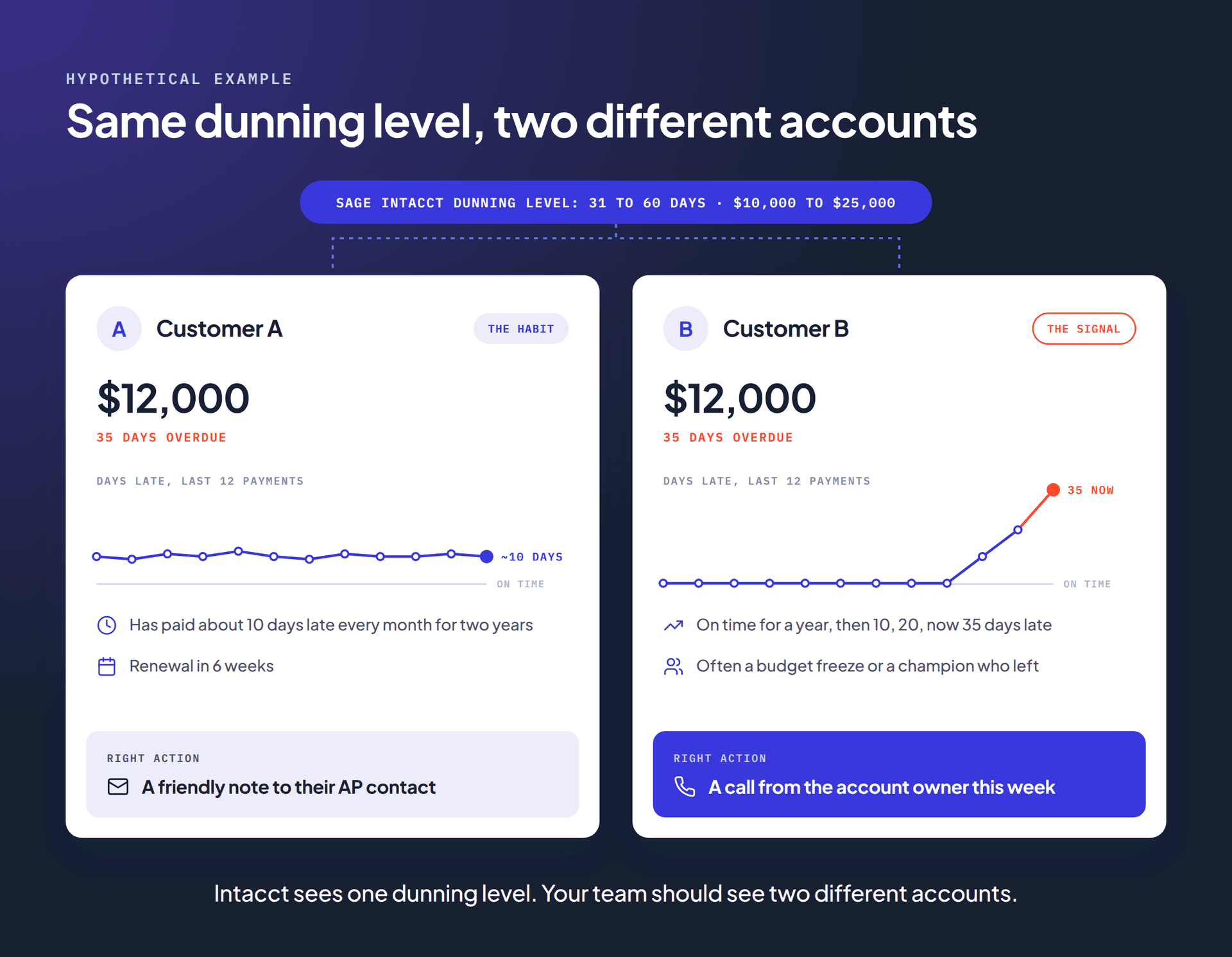
Customer A is a habit: their AP team pays in one monthly batch, and a firm notice six weeks before renewal only costs goodwill. Customer B is a signal. A customer who drifts from on time to 35 days late in a quarter is often telling you about a budget freeze or a champion who left, and CS may already know. The dunning level treats them the same because it cannot see the difference.
From Zero to Collected, Upflow’s book on building a collection function, makes the same point: an account sliding from ten days late to fifteen to twenty is telling you something, and catching that drift across a whole portfolio is not something a person can do reliably by hand.
The other limits show up in the same places for most Intacct teams:
- Conversations live outside the record. Replies and promises to pay sit in one person’s inbox, where sales and CS never see them.
- Paying takes effort. A PDF with bank details at the bottom leaves the customer to go and arrange payment, and invoices go late at that step for reasons unrelated to willingness to pay.
- The useful metrics take work. DSO and aging come out of Intacct easily. Collection Effectiveness Index (CEI) and Best Possible DSO are not among the standard AR reports Sage lists, so most teams calculate them in a spreadsheet, if at all.
The ledger is still doing its job well. These gaps sit in the work around it.
What has Sage added to Intacct AR recently?
Sage has been closing some of these gaps in 2026, mostly through Early Adopter programs. The main additions are automatic payment reminders from the Cash requirements page and new customer payment options, including paying from invoice emails and a payments portal. Each comes with limits on region, subscription or company setup.
- Automatic payment reminders (2026 Release 2, Early Adopter). From Cash Management, then Cash requirements, you select customers with outstanding invoices and send reminder emails in bulk from a predefined template. It needs a Cash Management subscription, works for single-currency companies at entity level, and skips customers reminded in the past 10 days.
- Customer Payment Services (2026 Release 3, Early Adopter). Customers can pay directly from invoice emails and make partial payments. The Release 3 program is open to a select group of US customers whose AR subscription includes Customer Payment Services.
- Customer payments portal (announced August 2026, Early Adopter). Sage’s announcement describes self-service payment with payment links, scheduled payments and saved payment details.
Sage also markets Sage Intacct Collections, which it describes as managing customer communications through structured, automated collections and dunning processes, and Sage AR Automation. Ask your account manager what your subscription includes.
These are real improvements. They still mostly decide who to chase by due date and balance, which is the part that stops fitting as your customer base grows.
How do you build a stronger AR process around Sage Intacct?
Segment customers by behavior and value, set an escalation path that brings in sales and CS, keep every customer conversation in one shared place, make paying the easiest step, and track a small set of metrics together. Intacct stays the ledger throughout. The process around it is what changes.
1. Segment by behavior as well as age
Two or three segments are plenty to start, as From Zero to Collected puts it. A practical first cut for a B2B tech company is your largest accounts, the habitual late payers who always pay, and everyone else. Review them monthly, because a healthy account can start drifting next quarter.
2. Put names on the escalation path
Decide in advance when finance hands an account to its account executive or CSM, and when the head of finance steps in. Write it down. The customer should hear one consistent position from your company.
3. Keep every conversation in one place
Replies and disputes belong next to the invoice, visible to everyone who touches the account. If sales has to ask finance whether a customer is current, the process has failed.
4. Make paying the easiest step
Send invoices from your own domain to the person who actually pays, with a link to pay by card, ACH or direct debit, and offer autopay to recurring accounts. A customer who can pay while the invoice is in front of them usually does.
5. Read DSO, Best Possible DSO and CEI together
Best Possible DSO is what DSO would be if every invoice were paid on its due date. The difference between the two is your collection gap. Upflow’s research across thousands of B2B tech finance teams puts median DSO at 52 days and median Best Possible DSO at 23, a 29-day gap that payment terms do not explain.
CEI measures how much of what was collectable you actually collected in a period:
CEI = (beginning AR + credit sales minus ending total AR) / (beginning AR + credit sales minus ending current AR) × 100
With beginning AR of $1,200,000, credit sales of $800,000, ending total AR of $1,100,000 and ending current AR of $650,000, CEI is 900,000 / 1,350,000 = 66.7%.
One trap catches Intacct teams here. Say $50,000 of that fall in AR came from credit memos against overdue invoices. Credits clear a receivable but collect no cash, so add them back: ending total AR becomes $1,150,000 and CEI drops to 850,000 / 1,350,000 = 63.0%.
How does an AR platform sit on top of Sage Intacct instead of replacing it?
An AR platform connects to Intacct through a two-way integration. It reads customer and invoice data from the ledger, runs collections and payments on top, and writes payments back. Intacct remains the financial record, and the platform becomes the place where the collection work happens.
This is the architecture behind Financial Relationship Management (FRM), the discipline of managing the financial relationship with a customer, from the moment payment terms are agreed until cash is collected and reconciled. It treats getting paid as a genuine customer touchpoint, owned collectively by Finance, Sales, and CS. You can apply it with any tooling, and in system terms it has four layers.
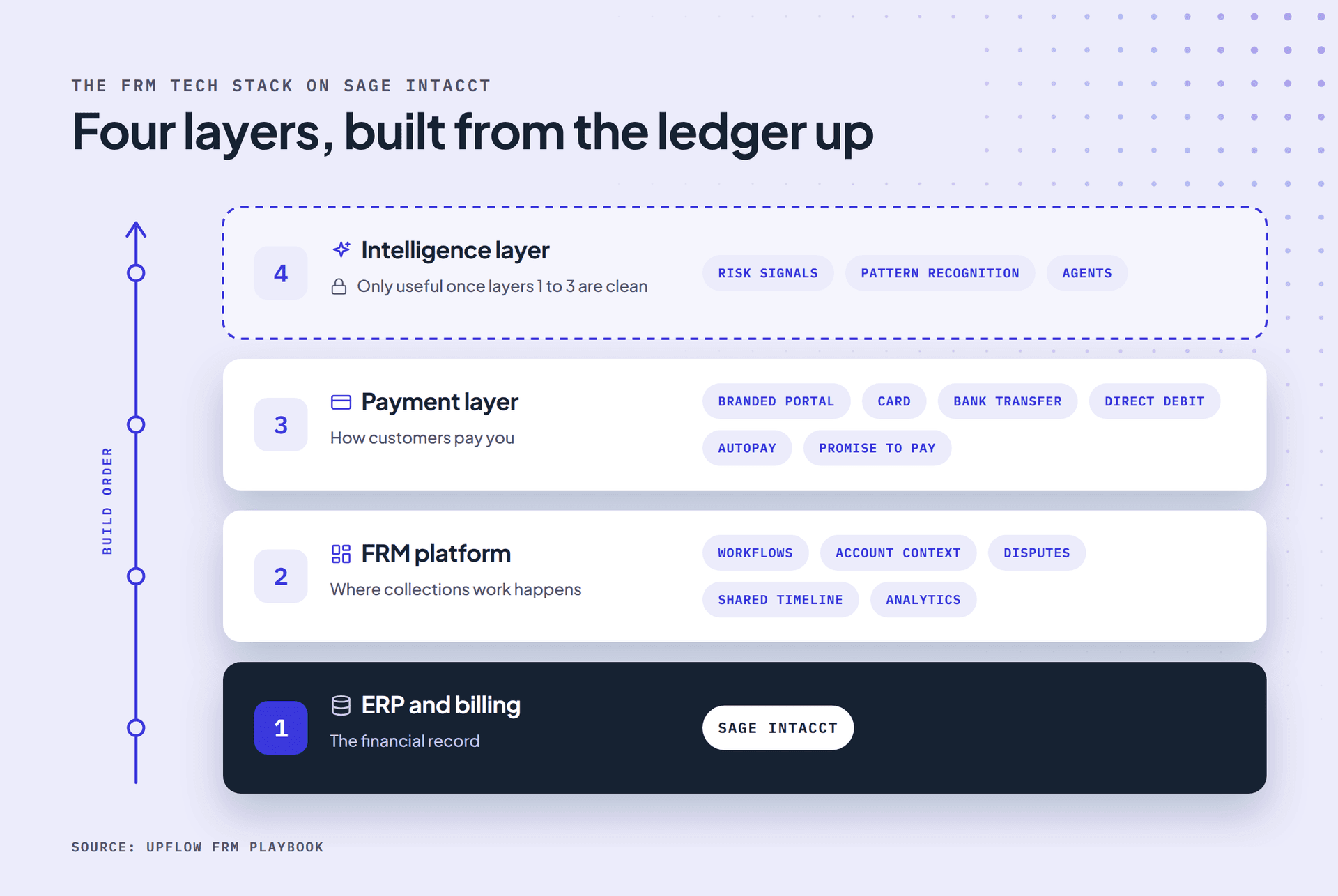
The order matters. If Intacct holds duplicate customers or billing contacts who left last year, an automated sequence will chase the wrong people faster. Clean the record first.
The Sage Intacct Marketplace lists more than 70 apps in its AR and collections category, from payment processors to AR platforms including HighRadius, Upflow and others. They differ most in how deep the sync goes, whether they connect to your CRM as well as to Intacct, and whether they are built for finance alone or for everyone who owns the customer.
How does Upflow work with Sage Intacct?
Upflow connects to Sage Intacct through a native, real-time two-way integration. It imports open invoices and customer records and writes back payments, payment methods, journal entries and classifications, so Intacct stays the record while collections and payments run in Upflow.
Intacct customer hierarchies sync with balances consolidated at the parent level, and every email and note logs alongside the invoices it relates to. Upflow Collections runs multi-step dunning sequences tailored to each customer’s payment history and risk profile, across email, calls, SMS or postal letters, with Smart Rules grouping customers by payment behavior, days overdue, invoice status or risk level. Customers pay through a branded portal by ACH, credit card or direct debit, with autopay available. Finance and the account team share one timeline per customer, and dashboards track DSO and Best Possible DSO alongside CEI.
The ERP is only half of the picture. Account ownership, deal context and renewal dates live in the CRM, so Upflow connects there too. With the Salesforce integration, each customer’s Salesforce account owner becomes their assigned user in Upflow, so collections work lands with the person who owns the relationship and stays current as portfolios change. HubSpot connects as well. That is what lets sales and CS work from the same timeline as finance instead of asking whether a customer is current.
For Customer A and Customer B, that is the difference between one notice and two different conversations.
What should you ask when evaluating AR tools for Sage Intacct?
Ask how deep the Intacct sync goes, how the tool decides who gets which message, who else in the company can work in it, and what the customer sees when they pay. A demo on sample data answers none of these well, so ask to see the tool running on your own Intacct data.
| Question to ask | Why it matters |
|---|---|
| Is the sync two-way, and what does it write back to Intacct | One-way tools leave you reconciling payments twice |
| How fresh is the data when a reminder goes out | A customer who paid yesterday should not be chased today |
| Does it handle Intacct customer hierarchies and multiple entities | Parent-level balances decide how you talk to groups of companies |
| Can it segment by payment behavior as well as days overdue | This is the gap native dunning levels leave |
| Does it connect to your CRM as well as Intacct | Account ownership and deal context live in the CRM, not the ledger |
| Can sales and CS work in it, and what do extra users cost | Per-seat pricing quietly keeps people out of collections |
| What does the customer see when they click pay | A generic processor page loses the trust your brand built |
| Which metrics come built in | CEI and Best Possible DSO should not need a spreadsheet |
See it on your own Intacct data
If your team runs collections from dunning levels and an inbox, the quickest way to see the difference is on your own customers. Book a demo to see Upflow running on your Sage Intacct data. If you would rather design the process first, From Zero to Collected walks through segmentation and escalation step by step.


Jean-Malo Le Dreff
Director of Product Management at Upflow
About the Author
Jean-Malo (JM) is the Director of Product Management at Upflow, where he leads the design and development of the platform’s core features. With a strong product mindset and a deep understanding of user needs, JM ensures Upflow’s tools deliver both functionality and delight to modern finance teams.
At Upflow, he works cross-functionally to translate customer feedback into intuitive, impactful features, especially around integrations, workflows, and platform scalability. His expertise lies in making complex financial processes simpler through thoughtful product design and seamless system connectivity.
JM contributes to Upflow’s blog with practical, product-driven content that helps users get the most value from the platform. He writes in-depth guides on product comparisons, software integrations, and the strategic advantages of using Upflow within a broader finance tech stack.

Summary

Shared
Frequently Asked Questions
Can’t find what you’re looking for?
Ask AI
Sage Intacct has native dunning notices: you define levels by days overdue and amount owed, attach templates, then send by level, choosing print or email per customer. Each send is started by hand; scheduling it means a custom build on the Intacct API, usually with an integration partner. Sage also runs an Early Adopter program for automatic payment reminders and markets Sage Intacct Collections for automated collections and dunning. Check which your subscription includes.
Go to Accounts Receivable, then All, then Reports, then Customer aging. Choose whether to age by invoice date, due date or GL posting date, pick summary or detail, and filter by customer, group or territory as needed. The standard aging periods are 0 to 30, 31 to 60, 61 to 90 and 91 to 120 days.
Yes. You can send dunning notices by email or print and email customer statements in bulk. Early Adopter customers with Cash Management can also send bulk reminder emails from the Cash requirements page, which works for single-currency companies at entity level and skips customers reminded in the past 10 days.
Not always. If customers mostly pay on time and one person handles collections, native dunning and a weekly aging review can be enough. Separate AR automation software earns its place when you need to segment by payment behavior, bring sales and CS into collections, offer customers a proper payment portal, or track CEI without a spreadsheet.
Most AR platforms connect through the Sage Intacct API and are listed on the Sage Intacct Marketplace. The better ones are two-way: they import customer and invoice data and write payments back, so Intacct stays the system of record. Ask each vendor what flows in each direction and how often.
Related articles